More information
See the ASC 150 Storage data sheet for the variations on the grid-tied and off-grid arrangement.
You can select the plant mode for the AGC Mains controller when you have a power management system.
ASC Storage configuration
Basic settings > Application type > Plant type > Plant mode
Parameter Name Setting
6071 Operating mode Power management
AGC Mains configuration
Basic settings > Application type > Plant type > Plant mode
Parameter
Name Setting
6070 Plant mode
Select a plant mode (in the AGC mains controller).
For example, Mains Power Export.
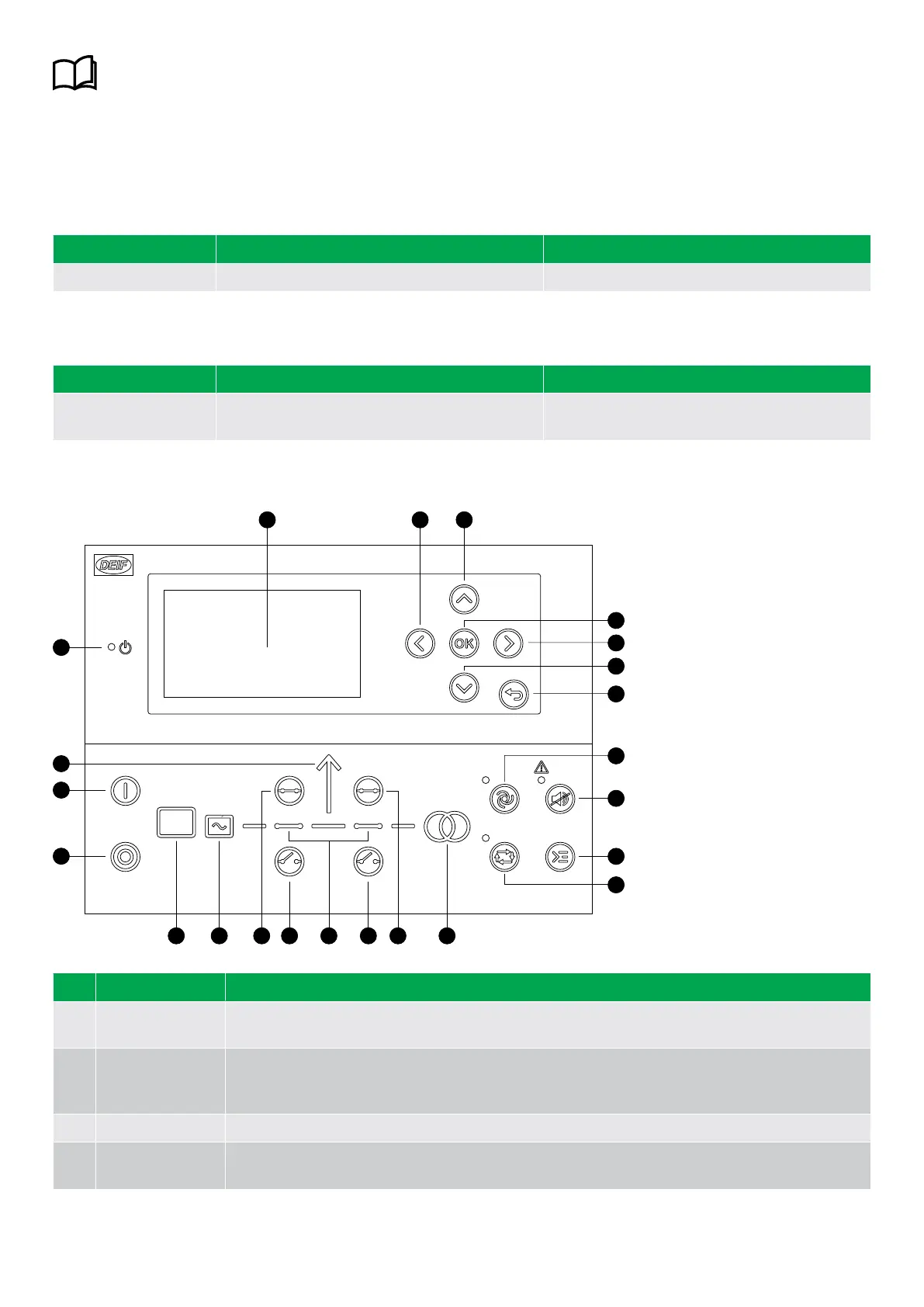
2.3 Display, buttons and LEDs
4
3
3
5
6
7
8
9
15 14 11 1112 12
1
17
16
2 3 3
18
1013
No. Name Function
1 Power
Green: The controller power is ON.
OFF: The controller power is OFF.
2 Display screen*
Resolution: 240 x 128 px.
Viewing area: 88.50 x 51.40 mm.
Six lines, each with 25 characters.
3 Navigation Move the selector up, down, left and right on the screen.
4 OK
Enter the Menu system.
Confirm the selection on the screen.
OPERATOR'S MANUAL 4189341343A EN Page 8 of 36



 To Next Page