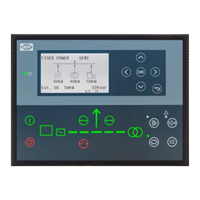
No. Name Function
5 Back Go to the previous page.
6 AUTO mode
The controller automatically starts and stops (and connects and disconnects) the storage system. The
controller automatically controls the power to and from the storage system. No operator actions are
needed.
7 Silence horn Turns off an alarm horn (if configured) and enters the Alarm menu.
8 Shortcut menu Access the Jump menu, Mode selection, Test, Lamp test, and Storage.
9
SEMI-AUTO
mode
The operator or an external signal can also start or stop, and open and close the storage breaker.
Automatic controller actions are not possible.
The controller automatically synchronises before closing a breaker, and automatically de-loads before
opening a breaker.
10
Mains symbol
Green: Mains/busbar voltage and frequency are OK. The controller can synchronise and close the
breaker.
Red: Mains/busbar voltage failure.
11 Close breaker Push to close the breaker.
12 Open breaker Push to open the breaker.
13 Breaker symbols
Green: Breaker is closed.
Green flashing: Synchronising or de-loading.
Red: Breaker failure.
14 Power converter
Green: Power converter voltage and frequency are OK. The controller can synchronise and close the
breaker.
Green flashing: The power converter voltage and frequency are OK, but the V&Hz OK timer is still
running. The controller cannot close the breaker.
Red: The power converter voltage is too low to measure.
15
Battery
management
system
Green: There is storage system available feedback.
Green flashing: The storage system is getting ready.
Red: The storage system is not running, or there is no availability feedback.
16 Stop Stops the power converter if SEMI-AUTO is selected.
17 Start Starts the power converter if SEMI-AUTO is selected.
18 Load symbol
OFF: Power management application
Green: The supply voltage and frequency are OK.
Red: Supply voltage/frequency failure.
NOTE * You can use the display to monitor the storage operation.
OPERATOR'S MANUAL 4189341343A EN Page 9 of 36



 To Next Page