6. Alarm handling and log list
6.1 Alarm handling
If the function Alarm Jump is on, the controller will automatically show the alarm list on the display screen when an alarm occurs.
Service View > Display > Alarm Jump
Parameter Text Range Default
9157 Alarm Jump
OFF
ON
ON
Access the alarm list from the display unit
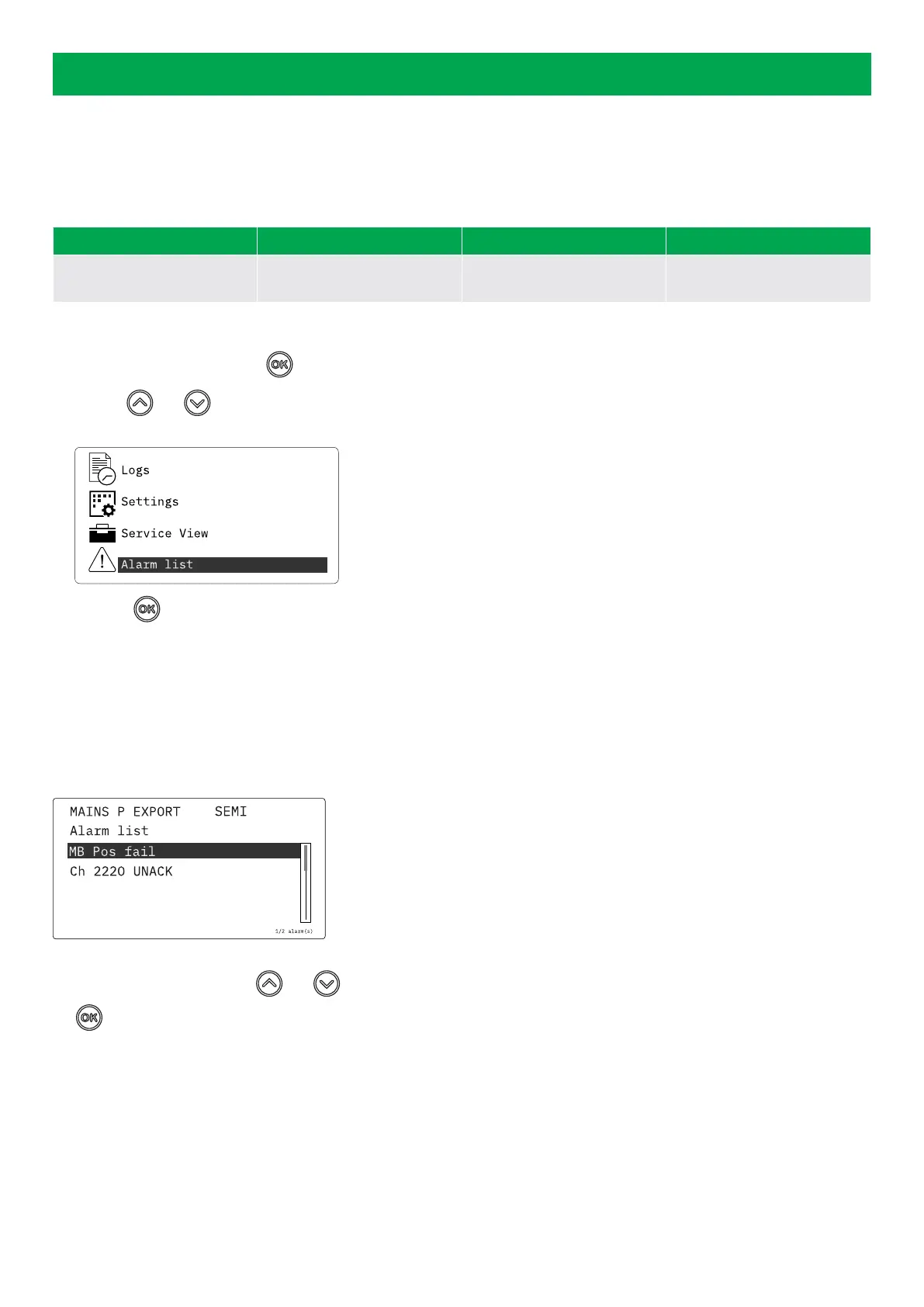
1. From the view menu, push the button.
2. Use the and buttons to go to the Alarm list.
3. Push the button to view the Alarm list.
The alarm list contains both acknowledged and unacknowledged alarms that are active. An alarm is active, if you have not cleared
the alarm condition, which started the alarm. Once an alarm is acknowledged and you have cleared the alarm condition, the alarm is
removed from the alarm list. If there are no alarms, then the alarm list will show No alarms.
The display screen can show only one alarm at a time. The number of alarms is shown on the right at the bottom of the screen.
Example of an unacknowledged alarm
To see the other alarms, use the and buttons to go through the list. To acknowledge an alarm, select the alarm and push
the button.
Access the alarm list with the utility software
Select Alarms on the vertical panel on the left.
OPERATOR'S MANUAL 4189341343A EN Page 35 of 36



 To Next Page