
 Need help?
Do you have a question about the Delfast Top 3.0 and is the answer not in the manual?
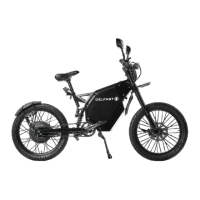
Overview of the e-bike's features and its Guinness World Record recognition.
Instructions and critical warnings regarding the safe and intended use of the e-bike.
Essential rules and safety tips for navigating roads and interacting with other users.
Key advice for operating and maintaining the e-bike to ensure longevity and performance.
Visual identification of all major components of the Delfast Top 3.0 e-bike.
Detailed capabilities and information displayed on the e-bike's screen.
Explanation of the buttons used for navigation and operation of the e-bike.
Essential steps for getting started with your new Delfast e-bike.
Guide to powering the bike and using its function buttons.
Comprehensive breakdown of all indicators and data shown on the e-bike's main display.
Detailed explanation of each button's function in menu navigation and control.
Instructions and critical warnings for charging the e-bike's battery.
Guide to properly adjusting the seat height for optimal riding posture.
Procedure for adjusting mirrors and verifying brake system functionality.
Explanation of different speed limits and available drive modes.
Understanding the operation of throttle and Pedal Assist System (PAS) modes.
Critical warnings and recommendations for safe cornering and acceleration.
How the regenerative braking system recharges the battery during deceleration.
In-depth explanation of button functions for menu navigation and value changes.
Detailed overview of all indicators, icons, and data displayed on the e-bike's screen.
How to control the display's brightness and enable night mode.
Understanding the visual representation of speed on the speedometer.
How to switch between real-time, average, and maximum speed displays.
Viewing real-time, average, and maximum speed numerically.
Viewing trip distance, odometer, and time trip on the display.
How to cycle through trip distance, odometer, and time trip modes.
Understanding the brake icon and its meaning for brake lever status.
How the USB indicator signals the status of the charging port.
Area displaying the e-bike logo or error codes for system malfunctions.
Graphical representation of the motor's power consumption in Watts.
How the fault icon indicates a problem and where to find specific error codes.
Viewing the battery's charge status in Volts or percentage.
How to change the assist level and its effect on maximum speed.
Real-time display of the motor's power usage in Watts.
The display area for showing the current time or system error messages.
How to enter the menu and use buttons for navigation and selection.
Introduction to display, system, battery, and information settings within the menu.
Steps to adjust the display's backlight intensity across five levels.
How to set the year, month, day, hour, minute, and second.
Adjusting unit system, power system, and power indication settings.
Details on the auto-off function and its current operational state.
Setting the diameter in inches or circumference in centimeters for wheel size.
Note that advanced settings are reserved for service center personnel.
Viewing detailed battery status like voltage, capacity, and cycle time.
How to reset all e-bike settings to their default factory configurations.
Setting up a password to access the e-bike's menu for security.
Viewing hardware and software versions and other display system details.
Changing the display's orientation between horizontal and vertical modes.
Procedure for closing the menu and returning to the main display screen.
Critical safety guidelines and warnings for handling the e-bike's battery.
Recommendations for storing the battery in various temperatures and conditions.
Instructions for using the correct charger and monitoring the charging process.
Step-by-step guide for connecting the charger to the e-bike and power supply.
Tips for extending the life and maintaining the performance of the lithium-ion battery.
Recommended temperature, humidity, and storage duration for lithium-ion batteries.
Detailed steps for correctly mounting the front wheel onto the fork.
Procedure for mounting the handlebars and stem clamp securely.
Steps for attaching the rear light mounting bracket to the e-bike's seat triangle.
Guide to mounting and properly adjusting the e-bike's side mirrors.
Instructions for installing the horn and connecting its electrical components.
Steps for mounting the headlight and making electrical connections.
Guide to properly installing the left and right pedals onto the crank arms.
Initial steps to connect the battery, including downloading and setting up the app.
Completing the battery connection and reattaching the side cover.
Routine checks and preventative measures to keep the e-bike in good condition.
Basic maintenance tasks applicable to both e-bikes and regular bicycles.
Identifying parts subject to normal wear and their replacement recommendations.
Data on energy usage for various riding modes and conditions per kilometer.
Table showing expected mileage based on speed and battery capacity.
Guide to registering your e-bike and utilizing the mobile application features.
Steps to link your Delfast e-bike with the mobile application for full functionality.
Overview of the app's dashboard, diagnostic data, and customer support features.
Using the app for route planning and staying aware of your exact distance to destination.
Instructions for setting up the GPS tracker and using SMS commands for tracking.
Answers to common inquiries about weight, speed, maintenance, and general specs.
Information on battery reliability, charge cycles, and factors affecting range.
Details on what the warranty covers, items excluded, and the registration process.
Steps for making a warranty claim and conditions that may void the warranty.
Instructions for inspecting and reporting any damage sustained during product shipment.
Legal statement clarifying the extent of the company's responsibilities and customer rights.
Schedule and fields for recording the first three periodic service inspections and parts replaced.
Schedule and fields for recording periodic service inspections from the 4th to the 6th.
Schedule and fields for recording periodic service inspections from the 7th to the 9th.
 General
| Category | Electric Bike |
|---|---|
| Top Speed | 50 mph (80 km/h) |
| Range | 200 miles |
| Motor Power | 3000W |
| Weight | 154 lbs |
| Charging Time | 6 hours |
| Load Capacity | 330 lbs |
| Brakes | Hydraulic disc brakes |
| Suspension | Front and Rear |

 To Next Page