6
Disassembly and reassembly
Stand
Removing the stand
Prerequisites
1. Follow the procedure in Before working inside your monitor.
Steps
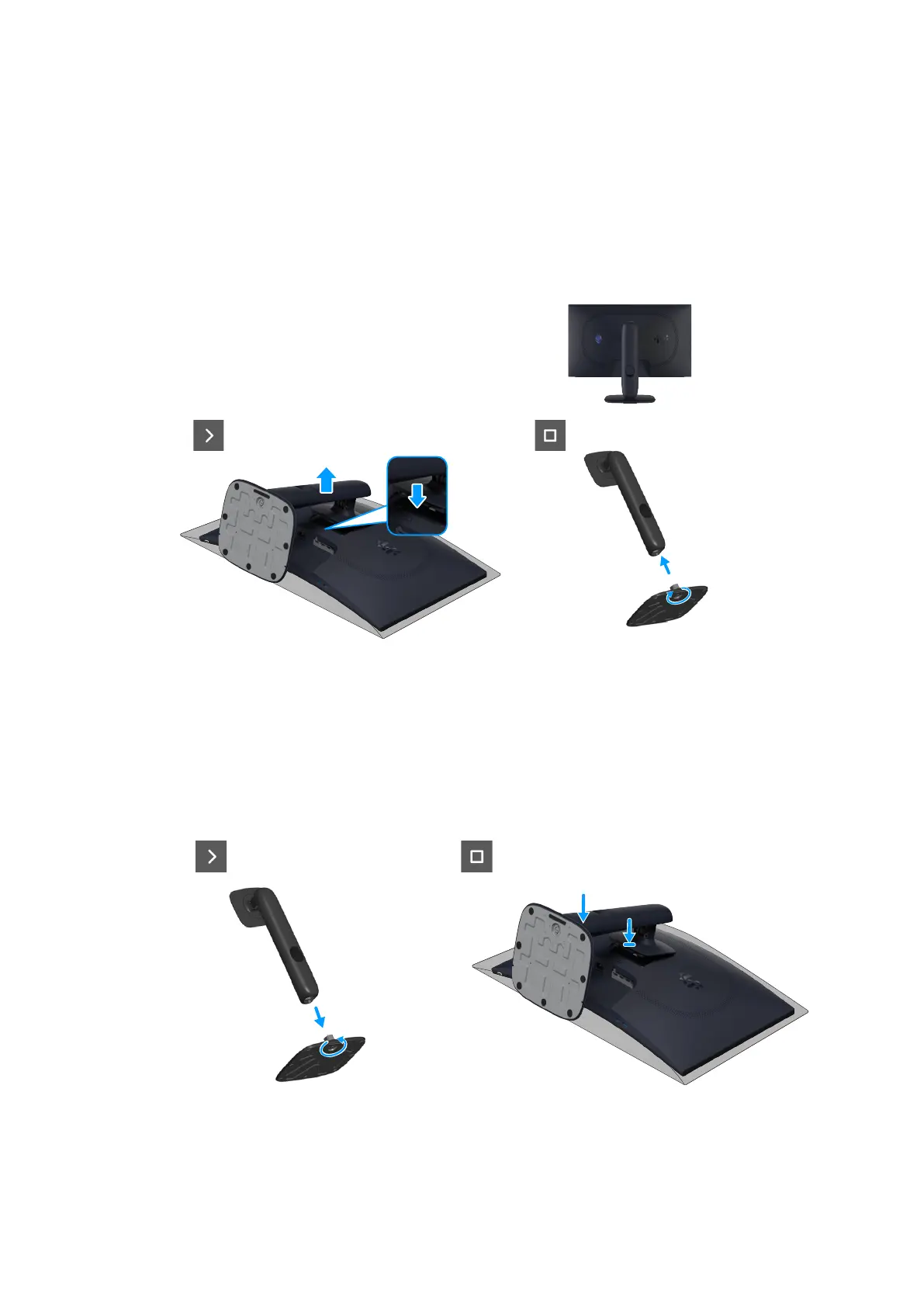
1. Place the monitor on a clean surface on a curved cushion.
2. Press the release button and pull the stand assembly away from the monitor.
3. Open the screw handle at the bottom of the stand base. Turn it anticlockwise to remove the stand riser from the stand base.
Figure 1. Removing the stand
Installing the stand
Steps
1. Align and place the stand riser on the stand base.
2. Open the screw handle at the bottom of the stand base. Turn it clockwise to secure the stand riser to the stand base.
3. Align the stand-riser bracket with the grooves at the back of the monitor.
4. Slide and gently press the stand assembly until it snaps into place.
Figure 2. Installing the stand
Next steps
1. Follow the procedure in After working inside your monitor.













 To Next Page