4. Lift the keyboard-controller board cable off the palm-rest and keyboard assembly.
5. Lift the latches and disconnect the touchpad cable from the keyboard-controller board and the touchpad.
6. Disconnect the touchpad-light cable from the touchpad assembly.
7. Remove the four screws (M1.6x2) that secure the touchpad assembly to the palm-rest and keyboard assembly.
8. At an angle, slide and lift the touchpad assembly from the slot on the palm-rest and keyboard assembly.
Installing the touchpad
Prerequisites
If you are replacing a component, remove the existing component before performing the installation process.
About this task
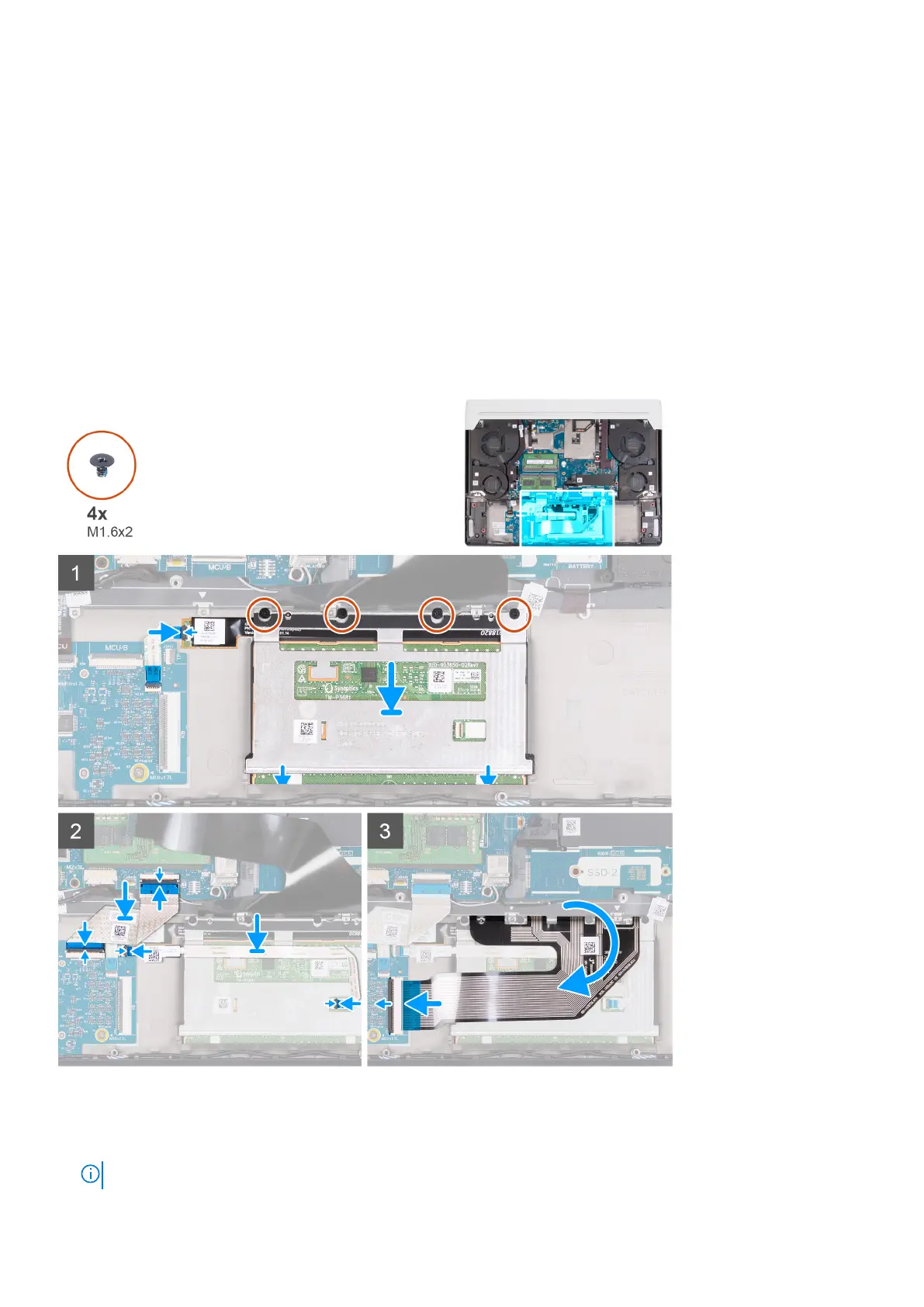
The following image(s) indicate the location of the touchpad and provides a visual representation of the installation procedure.
Steps
1. At an angle slide the touchpad assembly into the slot on the palm-rest and keyboard assembly.
2. Turn the computer over and open the display to ensure that the touchpad is equally aligned on all sides.
NOTE: The image below shows the proper touchpad alignment for your computer.
48 Removing and installing components









 To Next Page