150 Troubleshooting
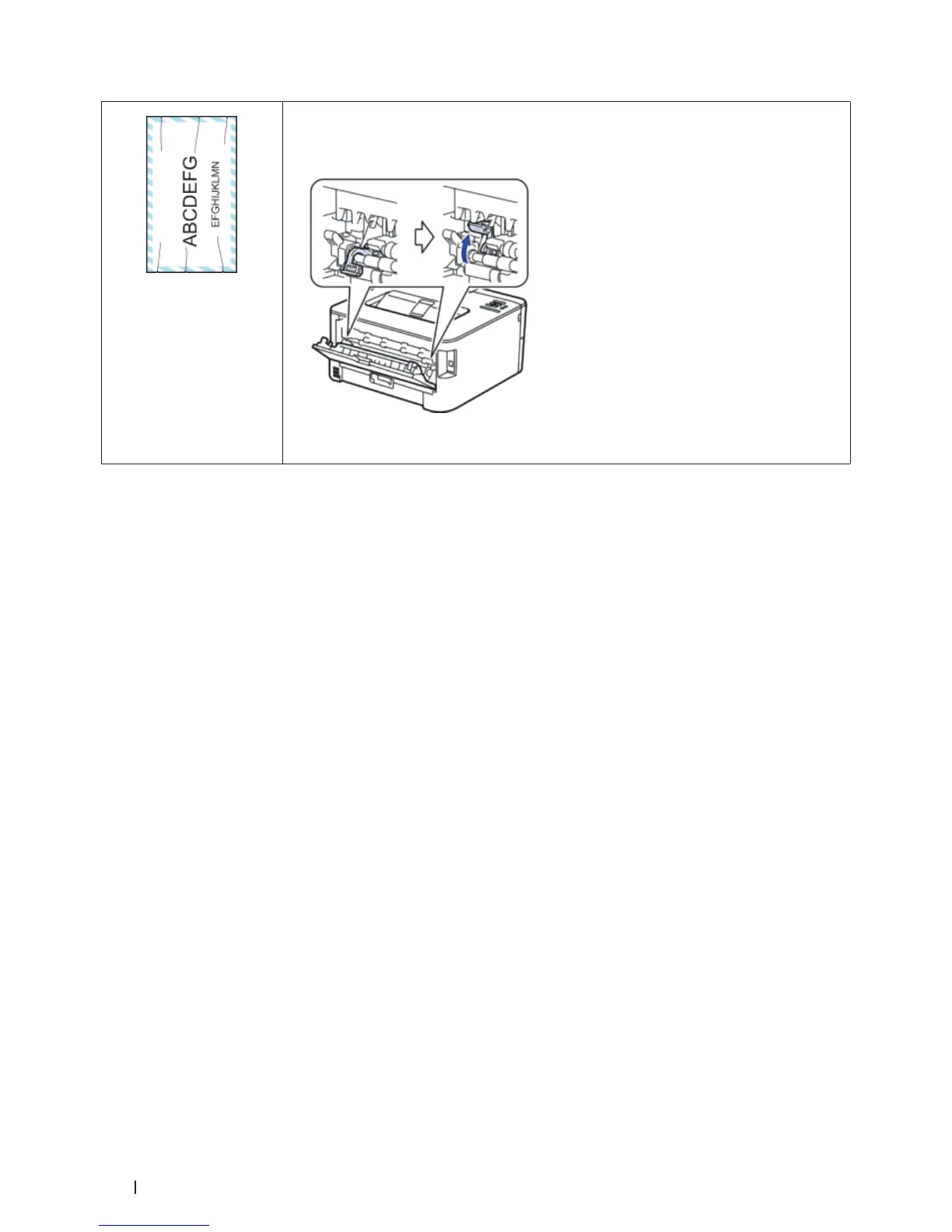
Envelope creases
• Make sure the two levers inside the back cover are pulled down to the envelope position
when you print envelopes. After you have finished printing, reset the levers back to their
original positions. Pull up the levers until they stop.
• Make sure envelopes are printed with the back cover (face-up output tray) opened.
• Make sure envelopes are fed only from the manual feed slot.
Machine Information
• Check the Serial Number
• Check the Firmware Version
• Reset Functions
Check the Serial Number
1. Press p or q to select the Machine Info. option, and then press OK.
2. Press p or q to select the Serial No. option, and then press OK.
The machine displays the serial number on the LCD.
Check the Firmware Version
1. Press p or q to display the Machine Info. option, and then press OK.
2. Press p or q to display the Version option, and then press OK.
3. Press p or q to display the Main Version or Sub1 Version option, and then press OK.
The machine displays the firmware version on the LCD.
Reset Functions
• Network Reset
Use the Network Reset function to restore the print server's network settings, such as password and IP address,
back to its default factory settings.
• Factory Reset
Use the Factory Reset function to reset certain machine settings back to the original factory settings.


 To Next Page