170 Routine Maintenance
Check the Remaining Life of Parts
1. Press p or q to display the Machine Info. option, and then press OK.
2. Press p or q to select the Parts Life option, and then press OK.
3. Press p or q to select the Toner Life or Drum Life option, and then press OK.
Pack and Ship Your Dell Machine
NOTE: If for any reason you must ship your machine, carefully repack the machine in the original packaging to avoid
any damage during transit. The machine should be adequately insured with the carrier.
1. Press and hold
to turn off the machine. Leave the machine turned off for at least 10 minutes to cool
down.
2. Disconnect all the cables, and then unplug the power cord from the AC power outlet.
NOTE: The machine is equipped with a non-detachable AC power cord depending on the model.
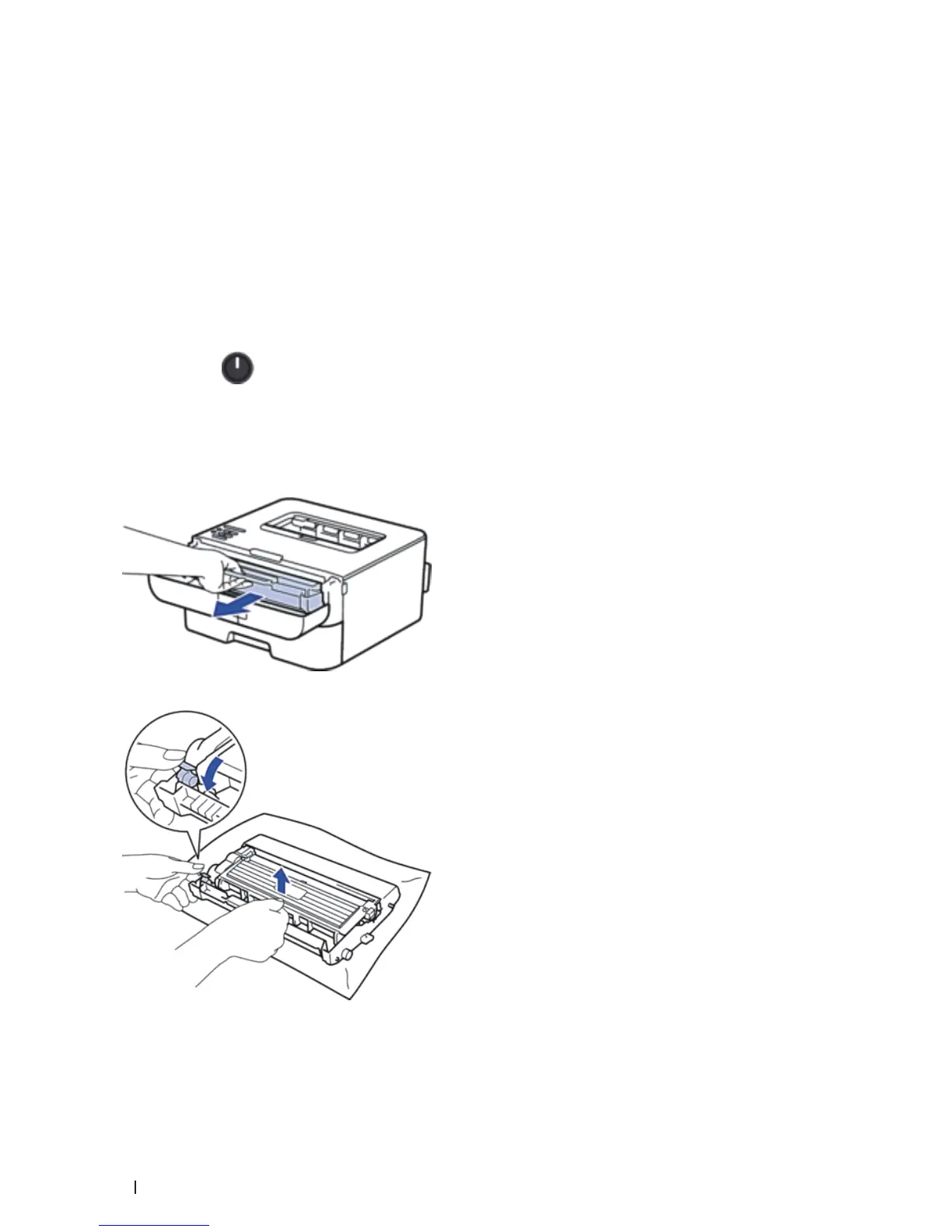
3. Remove the toner cartridge and drum unit assembly.
4. Push down the lock lever and take the toner cartridge out of the drum unit.
5. Put the protective material on the toner cartridge. Put it in a plastic bag.


 To Next Page