Back to Contents Page
Dell™OptiPlex™GX620
User's Guide
Removing the Computer Cover
Removing the Computer Cover
1. Follow the procedures in "Before You Begin."
2. If applicable, remove the cable cover.
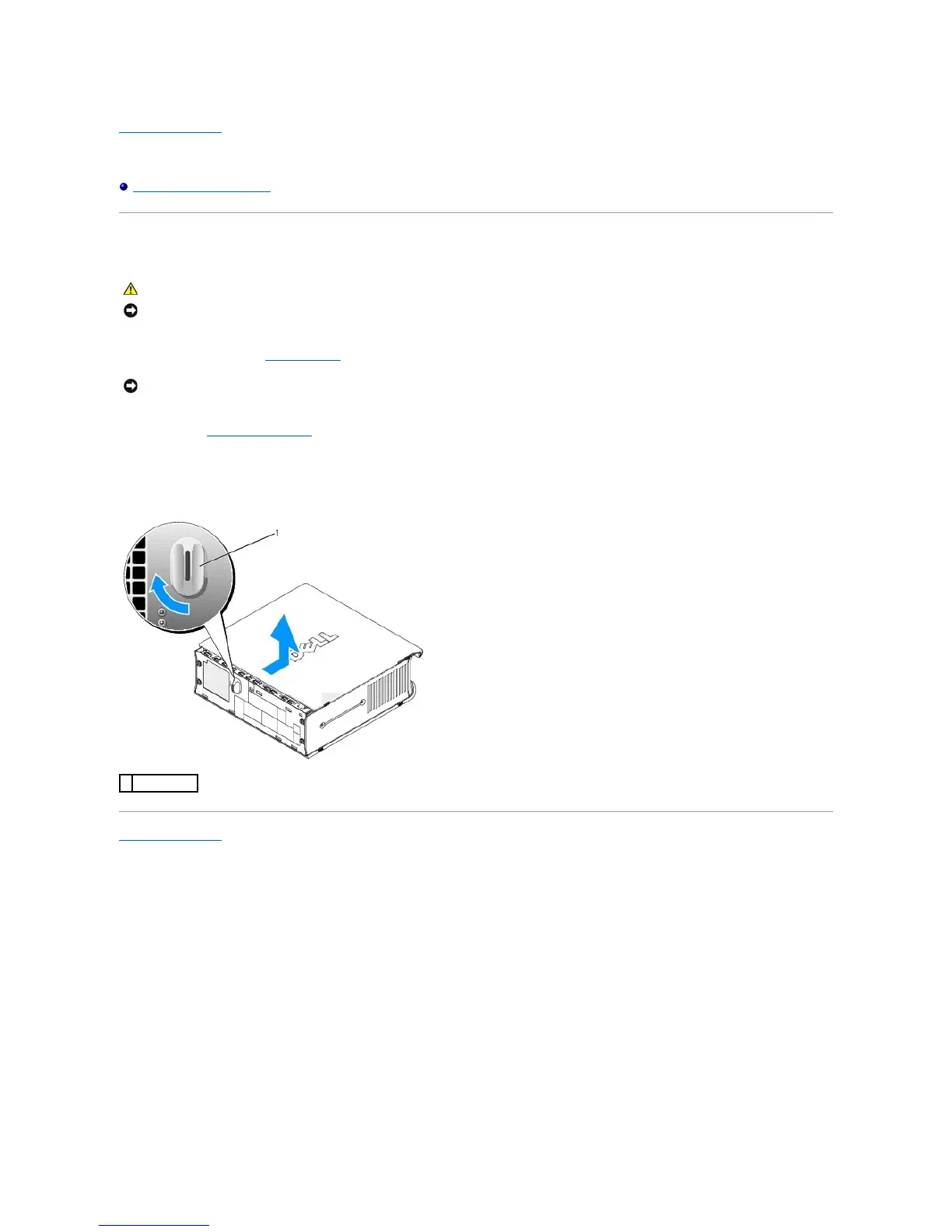
3. Remove the computer cover:
a. Rotate the cover release knob in a clockwise direction, as shown in the illustration.
b. Slidethecomputercoverforwardby1cm(½inch),oruntilitstops,andthenraisethecover.
Back to Contents Page
NOTICE: To prevent static damage to components inside your computer, discharge static electricity from your body before you touch any of your
computer's electronic components. You can do so by touching an unpainted metal surface on the computer chassis.
NOTICE: Before touching anything inside your computer, ground yourself by touching an unpainted metal surface. While you work, periodically touch an
unpainted metal surface to dissipate any static electricity that could harm internal components.















 To Next Page