Coin-cell battery
Removing the coin-cell battery
Prerequisites
1. Follow the procedure in Before working inside your computer.
2. Remove the SD card.
3. Remove the base cover.
4. Disconnect the battery cable.
About this task
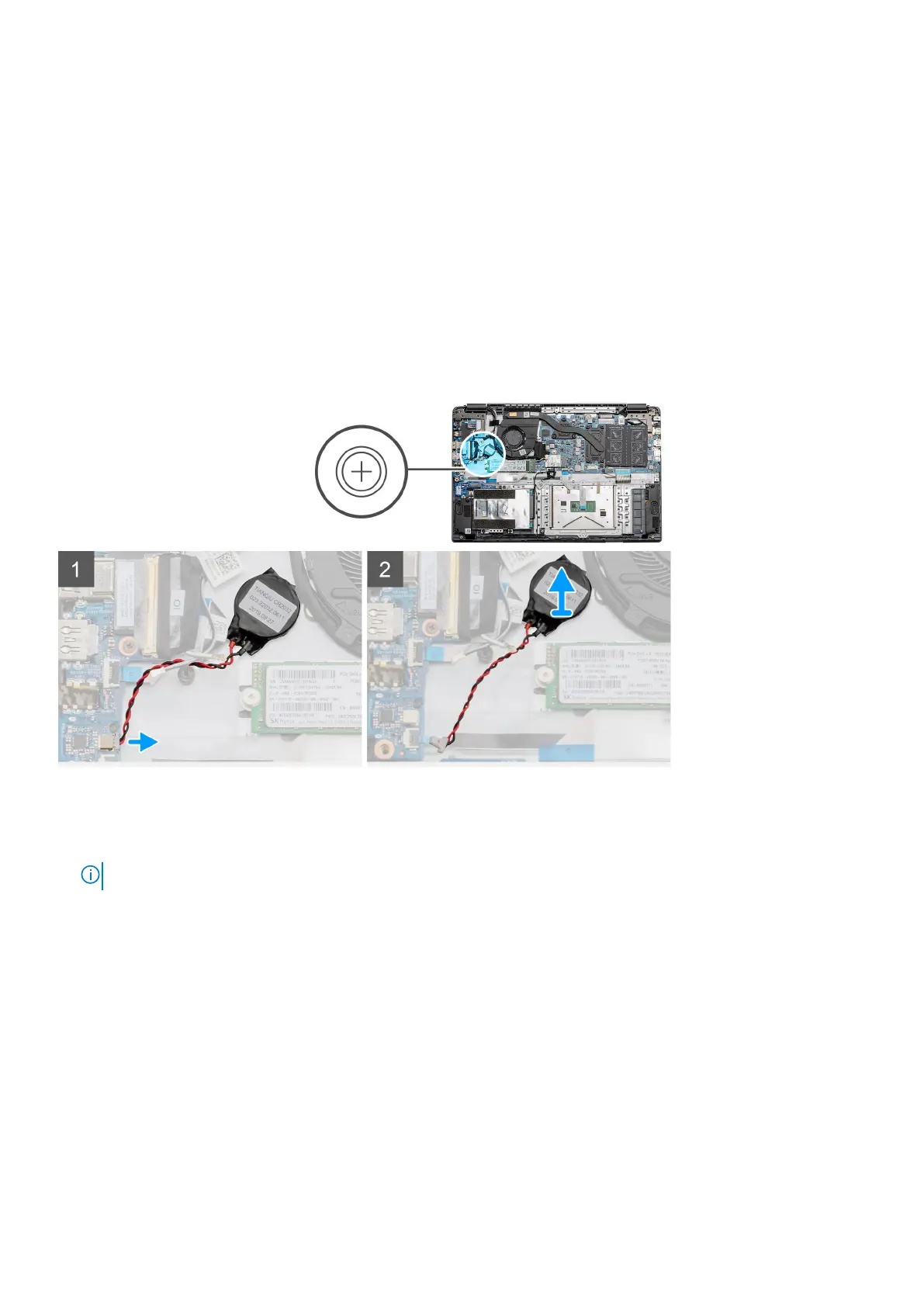
The figure indicates the location of the coin-cell battery and provides a visual representation of the removal procedure.
Steps
1. Disconnect the coin-cell battery cable from the system board.
2. Peel the coin-cell battery off the palmrest assembly as the coin-cell is affixed to the board with an adhesive.
NOTE: CAUTION: The removal of the coin cell battery will result in an RTC error and will clear all CMOS settings.
Installing the coin-cell battery
Prerequisites
If you are replacing a component, remove the existing component before performing the installation procedure.
About this task
The figure indicates the location of the coin-cell and provides a visual representation of the installation procedure.
30
Disassembly and reassembly



 To Next Page