About this task
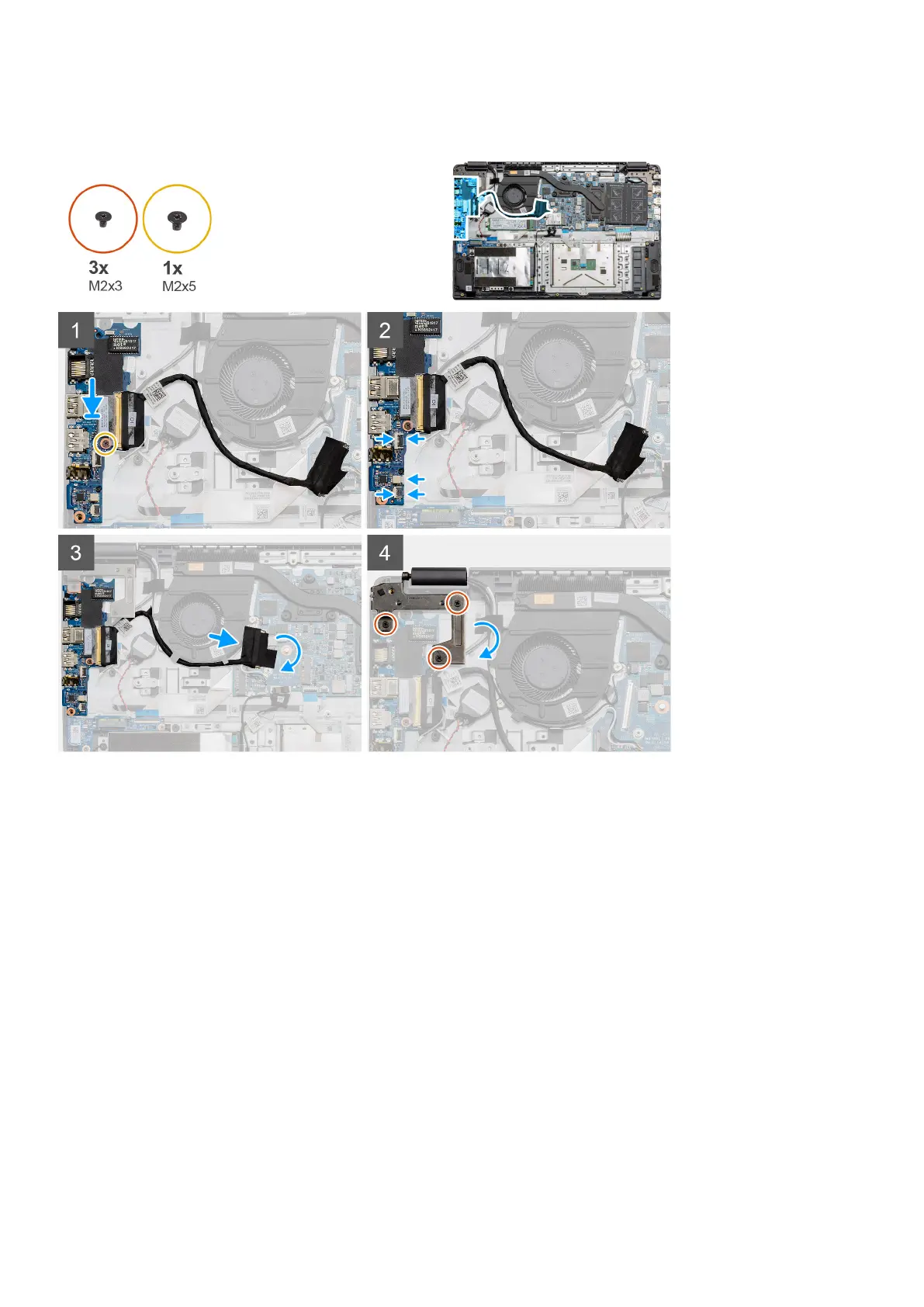
The figure indicates the location of the IO board and provides a visual representation of the installation procedure.
Steps
1. Place the IO board onto the mounting points on the palmrest and secure it using the single (M2x5) screw.
2. Connect the three cable connectors to the connectors on lower right side of the IO board. Using a single (M2x3) screw,
install the WWAN card and secure it in place.
3. Route the IO Board connector cable through the routing points under the fan assembly and connect the cable to the
connector on the system board. Fold the adhesive tape back onto the IO Board connector on the system board.
4. Using the three (M2x3) screws, close and secure the left hinge to the palmrest.
Next steps
1. Install the WLAN card.
2. Install the WWAN card.
3. Install the battery.
4. Install the base cover.
5. Install the SD Card.
6. Follow the procedure in After working inside your computer.
62
Disassembly and reassembly



 To Next Page