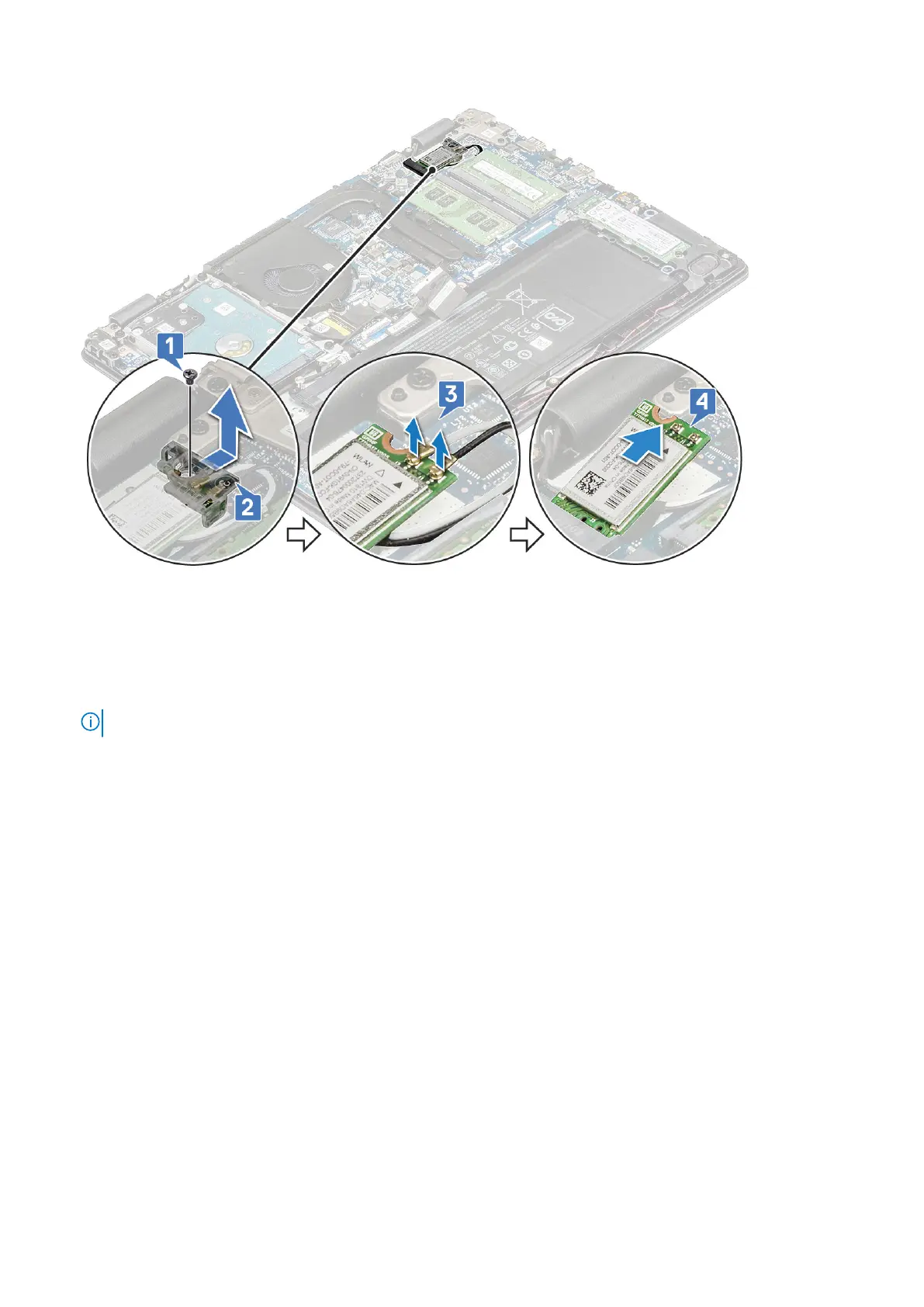
Installing the WLAN card
1. Insert the WLAN card into its connector on the system board.
2. Route the antenna cables on the wireless card slot and secure the antennas underneath the wireless card, and then connect
the two antenna cables to the connectors on the WLAN card.
NOTE: Connect the MAIN antenna (white) to the MAIN pin and AUX antenna (black) to the AUX pin, respectively.
3. Replace the WLAN bracket on the WLAN card.
4. Tighten the M2x3 screw to secure the WLAN card and card holder to the system board.
5. Install the:
a. base cover
b. SIM tray (WWAN models)
6. Follow the procedure in After working inside your computer
WWAN card – optional
Removing the WWAN daughterboard
1. Follow the procedure in Before working inside your computer.
2. Remove the:
a. Removing the SIM tray – WWAN models on page 12
b. base cover
3. To remove the WWAN card:
a. Remove the M2x3 screw that secures the WWAN metal bracket to the system [1] and then lift and remove the metal
bracket off the WWAN card [2].
b. Disconnect the two antenna cables from the WWAN card [3].
c. Pull out the WWAN card from its connector on the WWAN daughterboard [4].
Disassembly and reassembly
19





 To Next Page