Post-requisites
Replace the base cover.
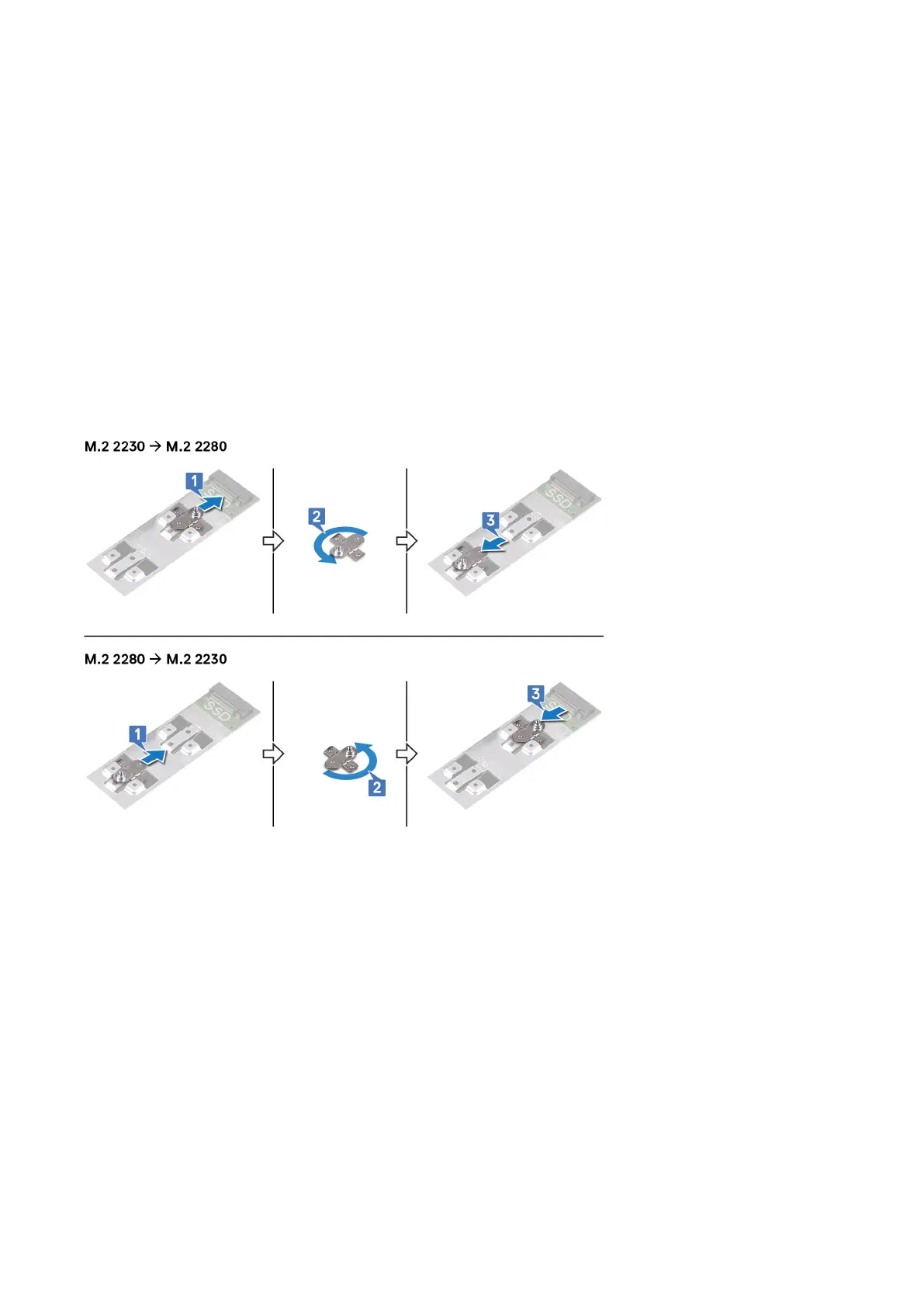
Procedure to move the screw mount
This computer supports two solid-state drive form factors:
• M.2 2230
• M.2 2280
If you are replacing the solid-state drive of a dier
ent form factor other than the one removed, see the following procedure to move the
location of the screw mount.
1 Remove the screw mount from the palm-rest and keyboard assembly.
2 Turn the screw mount to 180 degrees.
3 Insert the screw mount into the other screw mount slot on the palm-rest and keyboard assembly.
4 Align the notch on the solid-state drive/Intel Optane memory module with the tab on the solid-state drive slot.
5 Slide the solid-state drive/Intel Optane memory module rmly in
to the solid-state drive slot at an angle.
6 Press the other end of the solid-state drive/Intel Optane memory module and replace the screw (M2x3) that secures the solid-state
driv
e to the palm-rest assembly.
26 Replacing the solid-state drive/Intel Optane memory module



 To Next Page