2.3 Network Connection
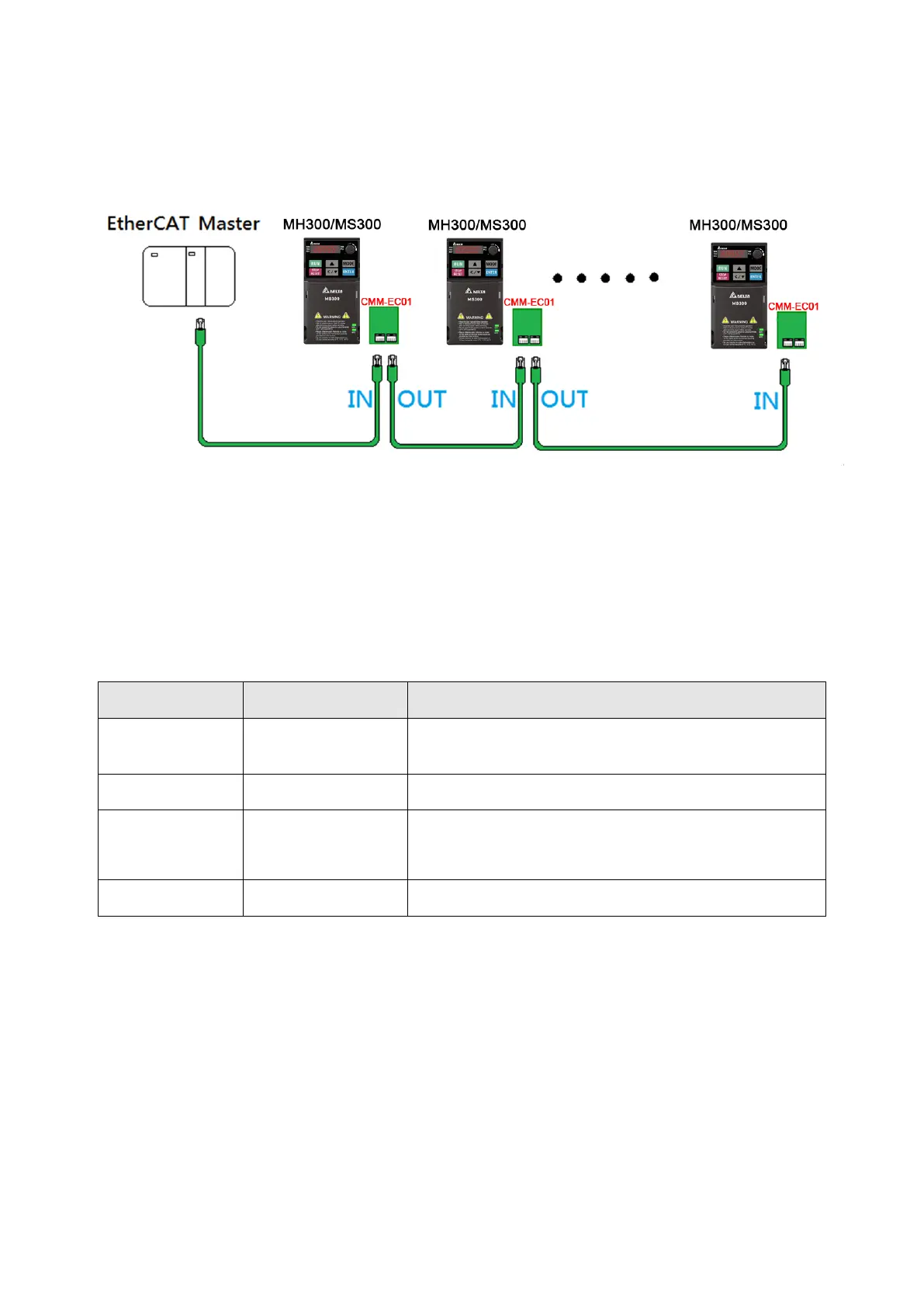
Pay attention to the connection method for EtherCAT because its packet delivery is directional. When
front-mounting the communication card, the delivery direction for CMM-EC02 is from left (IN) to right
(OUT). The diagram below shows the correct wiring for front-mounting CMM-EC02.
After finishing assembling the hardware, supply power to the drive. Then, Pr.09-60 on the drive
should display “EtherCAT”, with a current value of 6. If not, make sure your version of the drive is
correct and verify if the communication card is correctly connected.
2.4 MH300 / MS300 Drive Settings
When you operate MH300 / MS300 through CMM-EC02, you must set the communication card as the
source of controls and settings for MH300 / MS300. Use the keypad to configure the following parameter
addresses to the corresponding values:
2.5 ESI (EtherCAT Slave Information)
To make PLC or the host controller identify MH300 / MS300, you must load the product description file
(ESI file). Download the description files from Delta’s download center.
http://www.deltaww.com/iadownload_acmotordrive.
The file name for M300 series:
MS300: DELTA_IA-MDS_MS300_CMM-EC02_Vx-xx_EC_EP_yyyymmdd.xml
MH300: DELTA_IA-MDS_MH300_CMM-EC02_Vx-xx_EC_EP_yyyymmdd.xml
NOTE:
1. Vx-xx is the firmware version for EtherCAT communication card.
2. yyyymmdd is the release year/month/date.
Keypad Pr.
Settings /
Displayed Value
Function Description
Pr.00-20 8
Set communication card as the source of Frequency
command.
Pr.00-21 5 Set communication card as the control source.
Pr.09-60 6
Communication card identification:
When CMM-EC02 communication card is connected, this
parameter displays”6” (EtherCAT Slave).
Pr.09-30 1
Communication decoding method: EtherCAT only supports
decoding method 2 (60xx).
Send Quote Requests to info@automatedpt.com
Call +1(800)985-6929 To Order or Order Online At Deltaacdrives.com
Send Quote Requests to info@automatedpt.com
Call +1(800)985-6929 To Order or Order Online At Deltaacdrives.com



 To Next Page