2.2 Install and Remove Option Cards
2.2.1 Communication Cable and Grounding
Communication Cable
You have to order a communication card together with a communication cable, otherwise you won’t
be able to use the communication card. Verify the communication card model name and the mounting
position to mount that communication card, then select the right communication cable. There are two
kinds of communication cable, select the right cable in the table below according to the mounting
position.
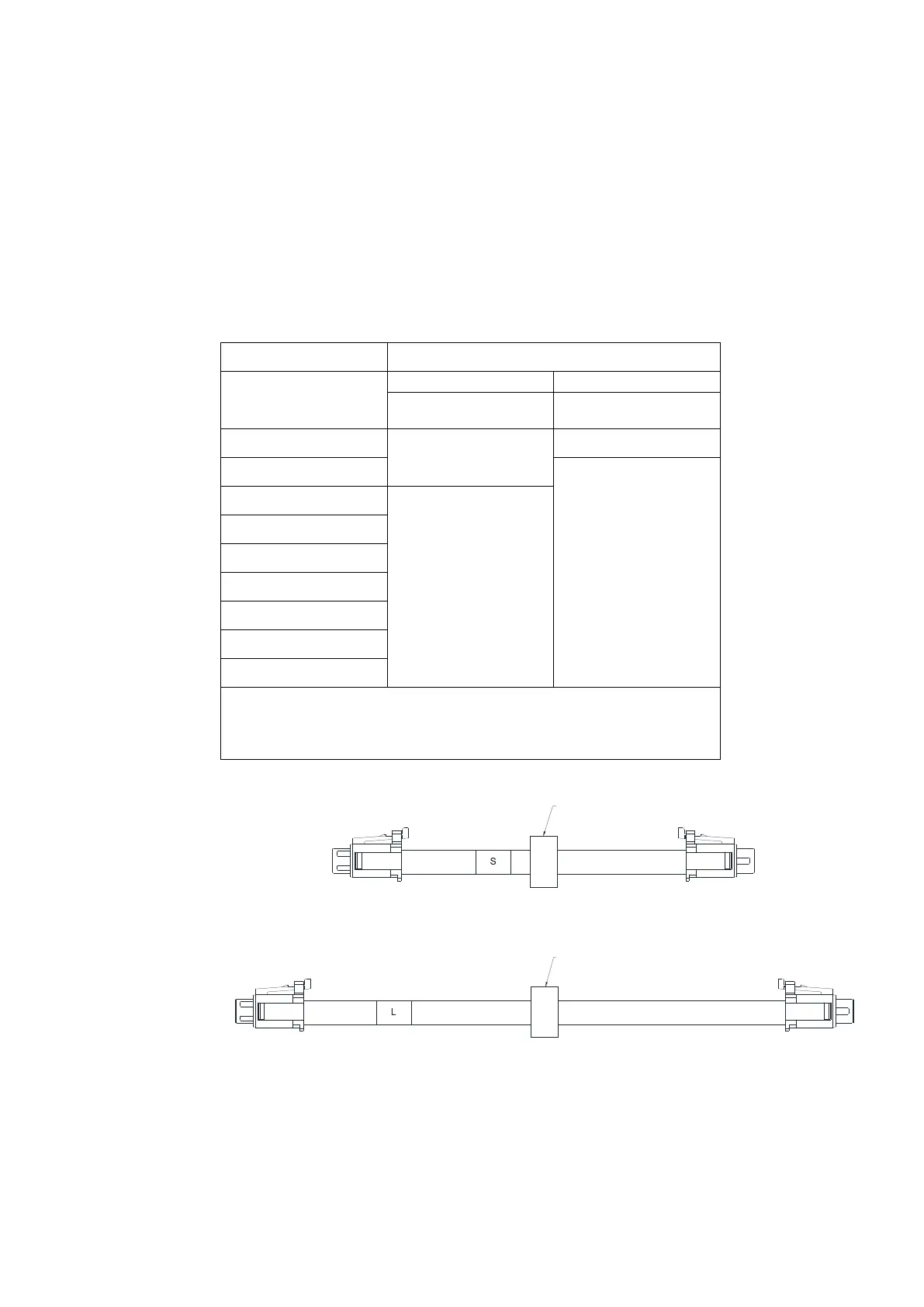
Communication card CMM-EC02 *
Frame
A
CBM-CL01A
CBM-CL01A
B
CBM-CL02A
C
CBM-CL02A
D
E
F
G
H
I
NOTE: CMM-EC02 communication card is shipped with a mounting
box. Order CBM-CL01A or CBM-CL02A together with CMM-EC02
according to the mounting position.
CBM-CL01A
Fig 2-5
CBM-CL02A
Fig 2-6
Send Quote Requests to info@automatedpt.com
Call +1(800)985-6929 To Order or Order Online At Deltaacdrives.com
Send Quote Requests to info@automatedpt.com
Call +1(800)985-6929 To Order or Order Online At Deltaacdrives.com



 To Next Page