EtherCAT Communication Card: CMM-EC02/ CMM-EC03
CMM-EC02/ CMM-EC03 Operation Manual
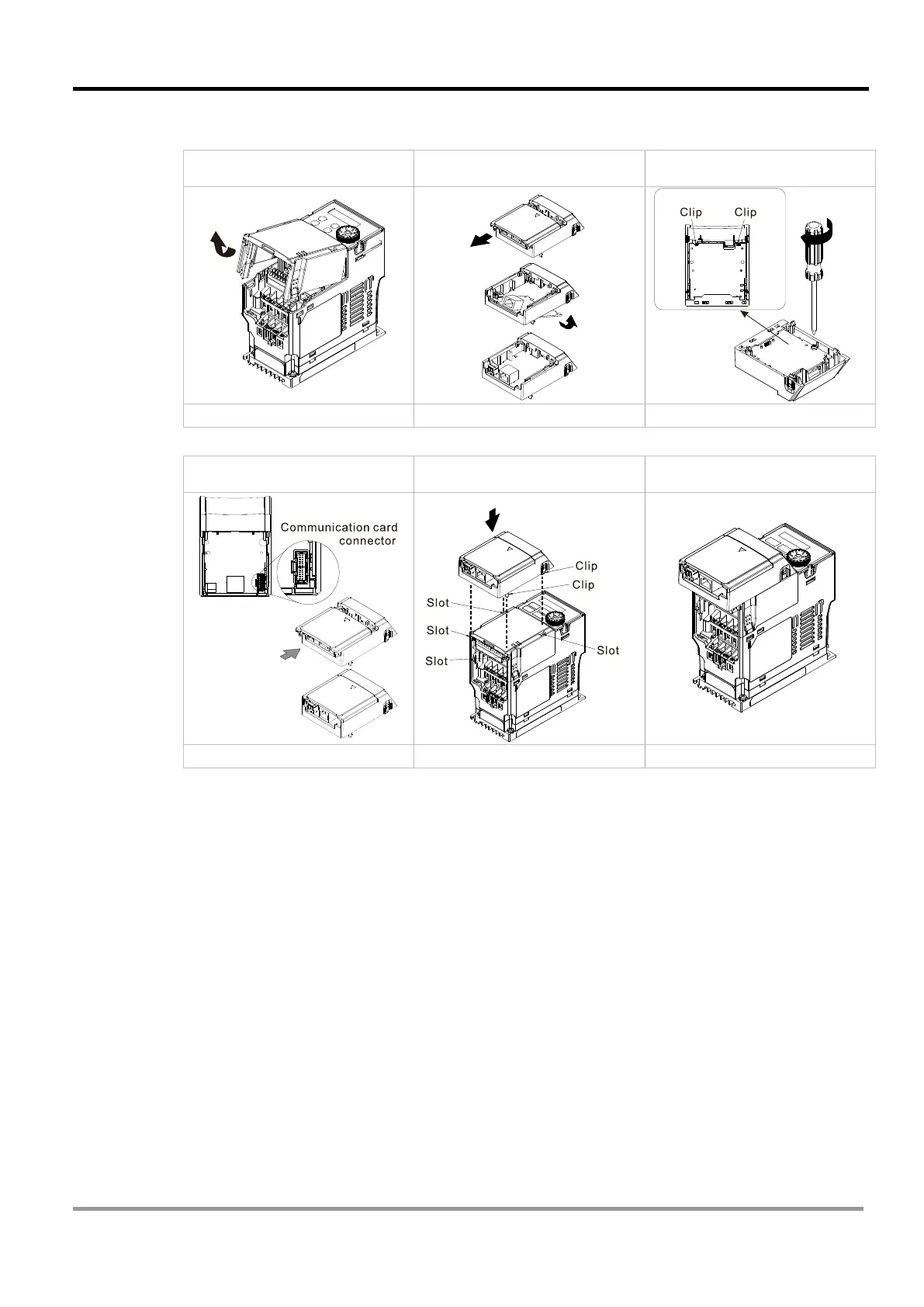
clips engage the slots, as shown in the Fig.2-33.
Assembly is completed, as shown in Fig.2-34.
Step1: Remove the
front cover
Step 2: Assemble the
communication card
Step 3: Tighten the
screws
Step 4: Attach the upper cover
to the mounting box
Step 5: Assemble the mounting
box for the option card
Step 6: Assembly completed
Fig 2-24 Fig 2-25
2.2.5 MH300 Mounting Position 2 (See Section 2.1 for Details on Mounting Position) -
Frame E and F
Installation method: Front-mount the communication card by connecting flat cables to the
control board.
Turn off the power of the motor drive, and then remove the front cover, as shown in Fig.2-35.
Assemble the connection cable: Connect the connector at one end of the connection cable to the
control board connector. Refer to Section 2.1.1 for more information on connection methods. Wire
the cables as Fig.2-36 shows and make sure the core is placed in the groove.
Assemble the communication card: Have the terminal block and connector of the communication
card face upward. Fix the front end of the communication card to the slots, and then rotate it, as
shown in the Fig.2-37.
Make sure that the clip properly engages the communication card, and then tighten the screws
(suggested torque value: 4–6 kg-cm [3.5–5.2 lb-in.] [0.39–0.59 Nm]), as shown in Fig.2-38.
Assemble the connection cable: Connect the connector at the other end of the connection cable to
the connector of the communication card, as shown in Fig.2-39.
Assembly is completed, as shown in Fig.2-40.



 To Next Page