19
SPECIAL MODE
1. Special mode setting
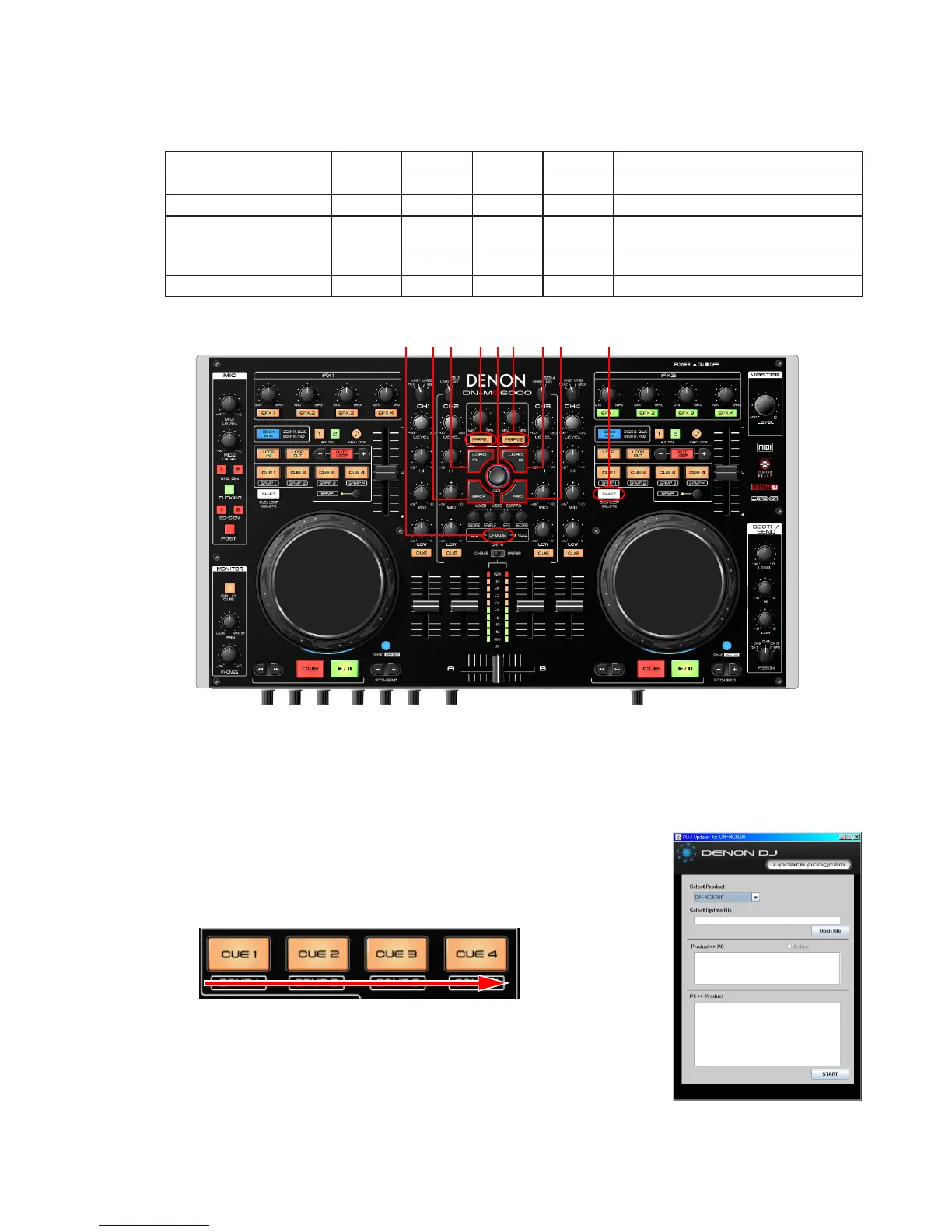
Turns on DN-MC6000 while pressing buttons A, B,C and D.
Mode A B C D Contents
Version Up Mode 1 7 8 - Firmware Upgrade
Version indicate mode 7 8 9 - Firmware version display.
Adjusting mode of the
touch sense sensitivity
2 6 9 - Adjust sensitivity of JOG wheel.
Stand-by checking mode. 3 4 5 9 check Stand-by mode.
Initialize mode 1 7 9 - Return to factory default setting
2. Version Up Mode
(1) Connect MC6000 to PC with USB cable.
(2) Pressing (BACK+FWD+SHIFT) at the same time, then turn on DN-MC6000.
(3) DN-MC6000 will enter versionup mode. CUE-1 will light.
(4) Start
【
DDJ Updater for DN-MC6000
】
on PC.
(5) Conrm that
【
Select Product
】
indicates to DN-MC6000.
(6) Click
【
Open File
】
, and then select update le.
(7) Click
【
START
】
to start updating.
DN-MC6000 indicates state of updating.
CUE-2: Update Data(0~49%), CUE-3: Update Data(50~99%),
CUE-4: Update Data(100%)
(8) Upon completion of the upgrade, it automatically restarts, start in Normal mode.
(9) Finish
【
DDJ Updater for DN-MC6000
】
.
NOTE
:
Please do not switch off the PC during update of Firmware. In addition, please
do not take off a USB cable.
When update is failed, PC indicates "Update Fail Error!!!".
In this case, retry update,please.
219 3 4 5 6 7 8



 To Next Page