20
3. Version Display
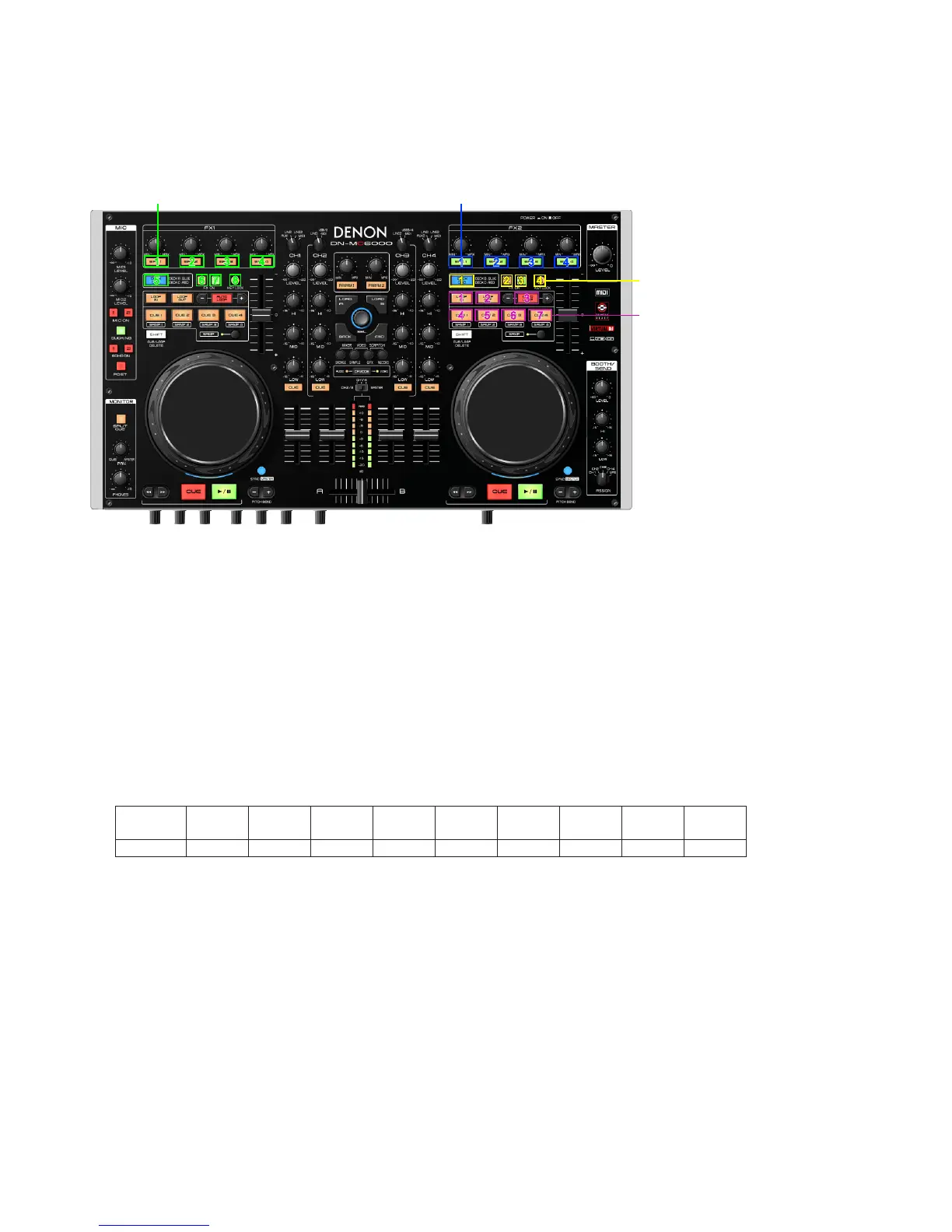
Pressing (FWD+SHIFT+CF MODE) at the same time, then turn on DN-MC6000.
How to read the version number
Firmware Version Leds (Ver A .XYZ)
※
They indicate System version when the CUE is pushed, and indicate DSP version when PLAY is pushed.
When the mode starts, they indicate System version.
Example
:
Ver1.132
DECK A side
:
EFX.1
DECK B side
:
EFX1, DECK CHG, FX1, FX2, LOOP IN, LOOP OUT
Seven places of LED turns on
4. Adjusting mode of the touch sense sensitivity
(1) Pressing (LOAD A+LOAD B+SHIFT) at the same time, then turn on DN-MC6000.
(2) Press CF MODE, and switch the jog wheel that you want to adjust.
※
When the mode starts, DECK A side is selected.
(3) Rotate the track selection knob, and adjust the sensitivity.
※
The button lights according to the set sensitivity.
Buttons CUE1 CUE2 CUE3 CUE4
DECK
CHG.
EFX.1 EFX.2 EFX.3 EFX.4
Sensitivity -4 -3 -2 -1 0 +1 +2 +3 +4
※
If the jog wheel detects a touch, the jog wheel changes from red to blue.
(4) Press the track selection knob(SEL.) to memorize adjustment data.
(5) Press SHIFT to nish.
Upon completion of the adjustment, it automatically restarts, start in Normal mode.
11 22
11
11 22 33 44
22 33
44
44 55 66 77
33
11 22
55 66
33
44
77 88
X: The second digit numeric display.A: The first digit numeric display.
Y: The third digit numeric display.
Z: The fourth digit numeric display.



 To Next Page