20
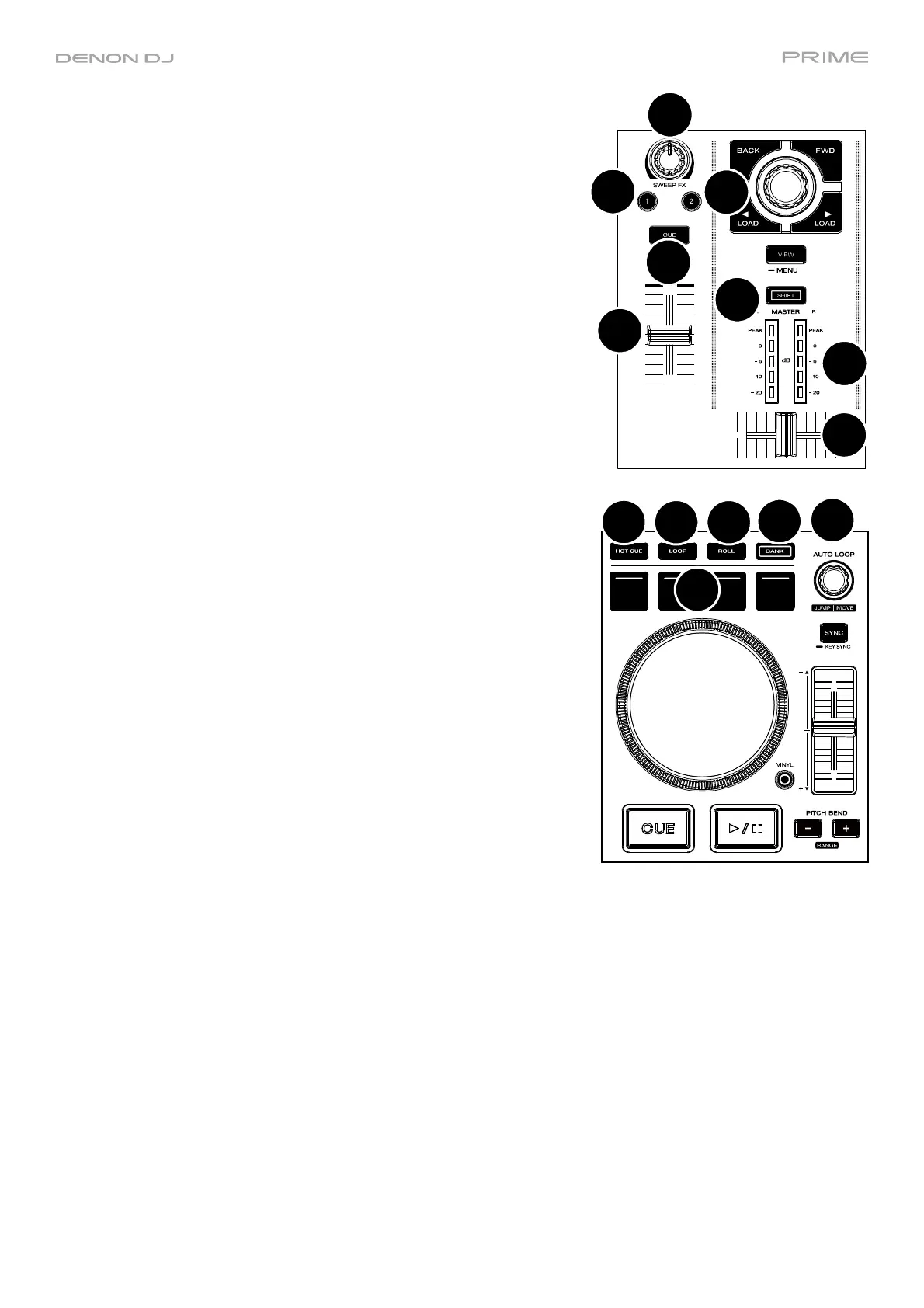
8. Shift: Press and hold this button to access secondary functions of
other controls.
9. Master Level Meters: These LEDs display the audio signal level of
the master mix (sent out of the Master Outputs).
10. Sweep FX: Turn this knob to control the active Sweep FX A or FX B.
Available selections are Filter and Wash Out.
11. Sweep FX A: Press this button to activate Sweep FX A (Filter). This
effect applies a filter to the channel. Starting from the center (12:00)
position, turn a Sweep FX knob counter-clockwise to apply a low-
pass filter, or turn it clockwise to apply a high-pass filter.
12. Sweep FX B: Press this button to activate Sweep FX B (Wash Out).
This creates a transition effect. Turn a Sweep FX knob to its most
counter-clockwise (minimum) position to apply a 1-beat echo that will
also mute the channel’s normal audio signal, or turn it to its most
clockwise (maximum) position to apply a 1/2-beat echo.
13. Channel Cue: Press this button to send the channel’s pre-fader signal
to the headphones’ cue channel.
14. Channel Fader: Use this fader to adjust the channel’s volume level.
15. Crossfader: Use the crossfader to mix between Deck 1 and Deck 2.
16. Hot Cue: Press this button to enter Hot Cue Mode.
17. Loop: Press this button once to enter Manual Loop Mode and press it
again to enter Auto Loop Mode.
18. Roll: Press this button to enter Roll Mode.
19. Bank: This button is used to change the value of the 4 performance
pads. The button will blink while accessing pads 5-8.
20. Performance Pads: These pads have different functions on each
deck depending on the current pad mode. See Pad Modes for more
information.
21. Auto Loop: Turn this knob to set the size of an automatic loop. The
value will be shown in the touchscreen.
Press this knob to activate or deactivate an automatic loop at the
current location of the track.
Jump/Move: Press and hold Shift and turn this knob to shift the
active loop to the left or right (Loop Move). When the loop is inactive,
press and hold Shift and turn this knob to jump forward or backward
in the track by a pre-determined quantized value (Beat Jump).
8
9
10
11
12
13
14
15
16
17 18
19
20
21













 To Next Page