23
Front Panel
1
2
3
4
5
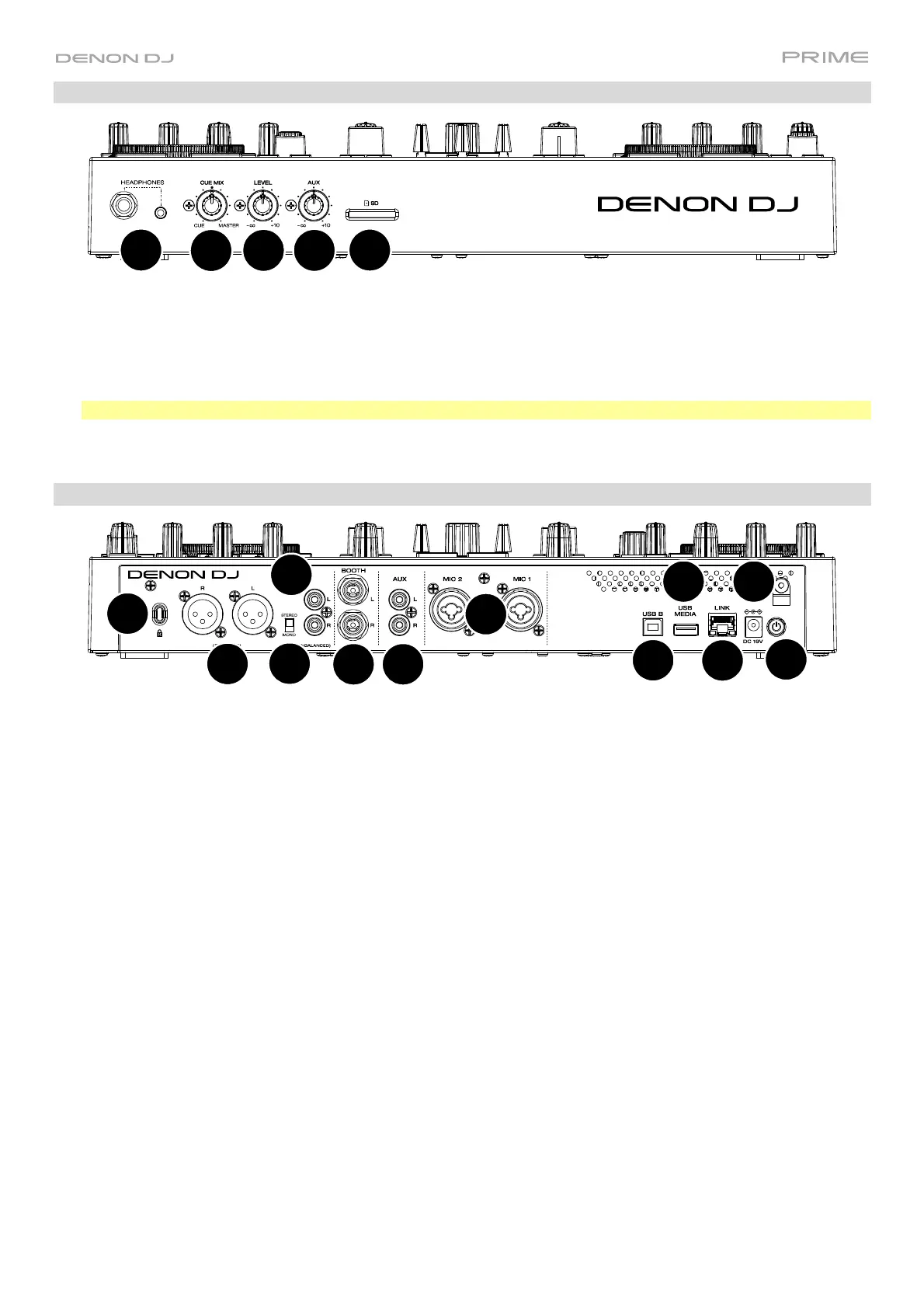
1. Headphones (1/4”, 1/8”) (6.35 mm, 3.5 mm): Connect your 1/4” or 1/8” (6.35 mm or 3.5 mm) headphones to
this output for cueing and mix monitoring. The headphone volume is controlled using the Phones Level knob.
2. Cue Mix: Turn this knob to adjust the blend of the pre-fader and master channels together in the headphones.
3. Phones Level: Turn this knob to adjust the volume level in your headphones.
4. Aux Level: Turn this knob to adjust the volume level of the Auxiliary input.
Note: The Auxiliary input signal is only sent to the Master Outputs.
5. SD Card Slot: Insert a standard SD card to this slot. You can use the touchscreen to select and load tracks from
your SD card.
Rear Panel
1
2
3
4
5
6
7
8
9
10
11
12
1. Power Input: Use the included power adapter to power the unit or charge the internal lithium-ion battery.
2. Power Button: Press this button to power PRIME GO on. Power on PRIME GO only after you have connected
all your input devices and before you power on your amplifiers and loudspeakers.
To power off PRIME GO, press this button and follow the prompts on the touchscreen. Power off your amplifiers
and loudspeakers before powering off PRIME GO.
3. Rear USB Port: Connect a standard USB drive to this USB port. When you select a USB drive as a source, you
can use the touchscreen to select and load tracks from your USB drive.
4. USB B: Use a standard USB cable (included) to connect this USB port to an available USB port on your computer.
5. Link Port: Use a standard Ethernet cable to connect this port to a computer. PRIME GO will send time, BPM,
and other track data to the compatible StagelinQ lighting and video software over this connection.
6. Booth Outputs (1/4” / 6.35 mm): Use standard 1/4” (6.35 mm) cables to connect these outputs to booth
monitors or a booth amplifier system. Use the Booth Level knob on the top panel to control the volume level.
7. Master Outputs (XLR, balanced): Use standard XLR cables to connect these outputs to loudspeakers or an
amplifier system. Use the Master Level knob on the top panel to control the volume level.
8. Master Outputs (RCA, unbalanced): Use standard RCA cables to connect these outputs to loudspeakers or an
amplifier system. Use the Master Level knob on the top panel to control the volume level.
9. Stereo/Mono: Use this switch to set the channel configuration of the Master Outputs: Stereo (binaural audio
using separate left and right channels) or Mono (summed monaural audio through both left and right channels).
10. Aux Inputs (RCA, unbalanced
): Use standard RCA cables to connect these line-level inputs to an external audio
source. Use the Aux Level knob on the top panel to control the volume level.
11. Mic Inputs (XLR or 1/4” / 6.35 mm): Use standard XLR or 1/4” (6.35 mm) cables (not included) to connect
standard dynamic microphones to these inputs. Use the Mic 1 and Mic 2 Level knobs on the top panel to
control the volume level.
12. Kensington
®
Lock Slot: Use this slot to secure PRIME GO to a table or other surface.













 To Next Page