24
Operation
Touchscreen Overview
Performance View
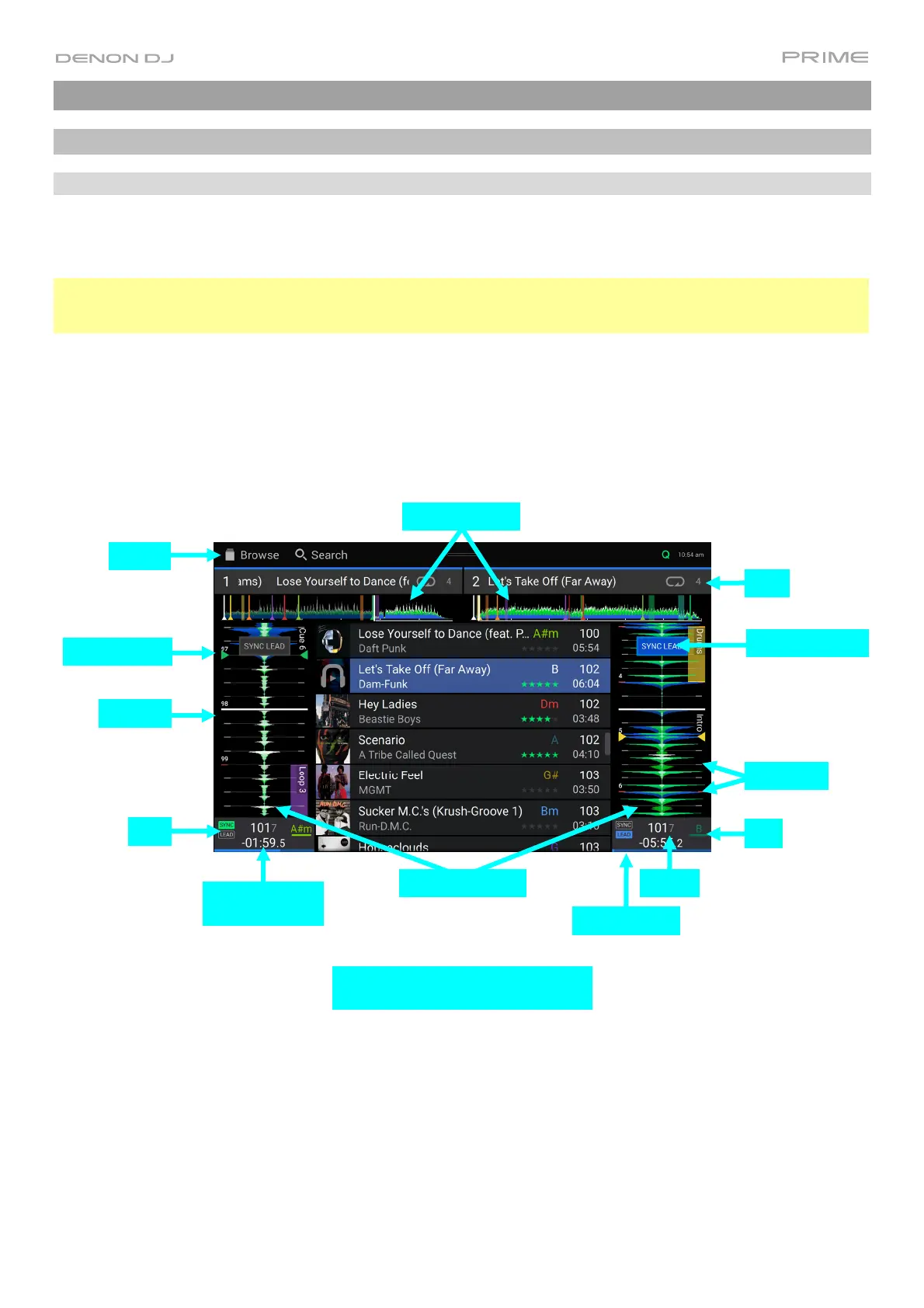
Track Overview & Waveform
Swipe left or right on the track overview to scan through the track while the track is paused.
Note: You can use this feature this during playback if Needle Lock is off. If Needle Lock is on, stopping the platter
with your hand or palm will allow you to swipe through the track overview. See User Profile to learn about Needle
Lock.
Spread or pinch your fingers on a waveform to zoom in or out of it, respectively.
Tap the time to switch between the elapsed time and remaining time.
Tap the key when Key Lock is on to change the key.
Hold Shift and press View to toggle between vertical and horizontal waveforms. For PRIME 4, you can also toggle
between two-deck and four-deck waveform views.
PRIME 4
Playhead
Loop
Track Overviews
Track Waveforms
Key
Sync
Track Progress
Time Remaining/
Elapsed
Beat Points
Tempo
Toolbar
Hot Cue Point
Sync Lead Status
Two Deck Vertical Waveform View
with Librar













 To Next Page