7
Features
PRIME 4
Top Panel
2
1
4
56
7
3
10
8
9
12
11
13
14
15
11
11
10
8
9
12
11
13
14
15
11
11
10
8
9
12
11
13
14
15
11
11
8
14
15
10
9
12
11
13
11
11
16
17
18
19
20
21
22
24
23
25
26
27
28
29
30
31
32
33
34
36
35
38
37
39
40 41 42 43
22
24
23
25
26
27
28
29
30
31
32
33
34
36
35
38
37
39
40 41 42 43
45
44
46
47
45
46
44
48
55
56
57
57
57
58
58
59
60
61
62
63
64
65
64
66
66
67
68
69
49
50
51
52
53
54
55
56
57
57
47
48
49
50
51
52
53
54
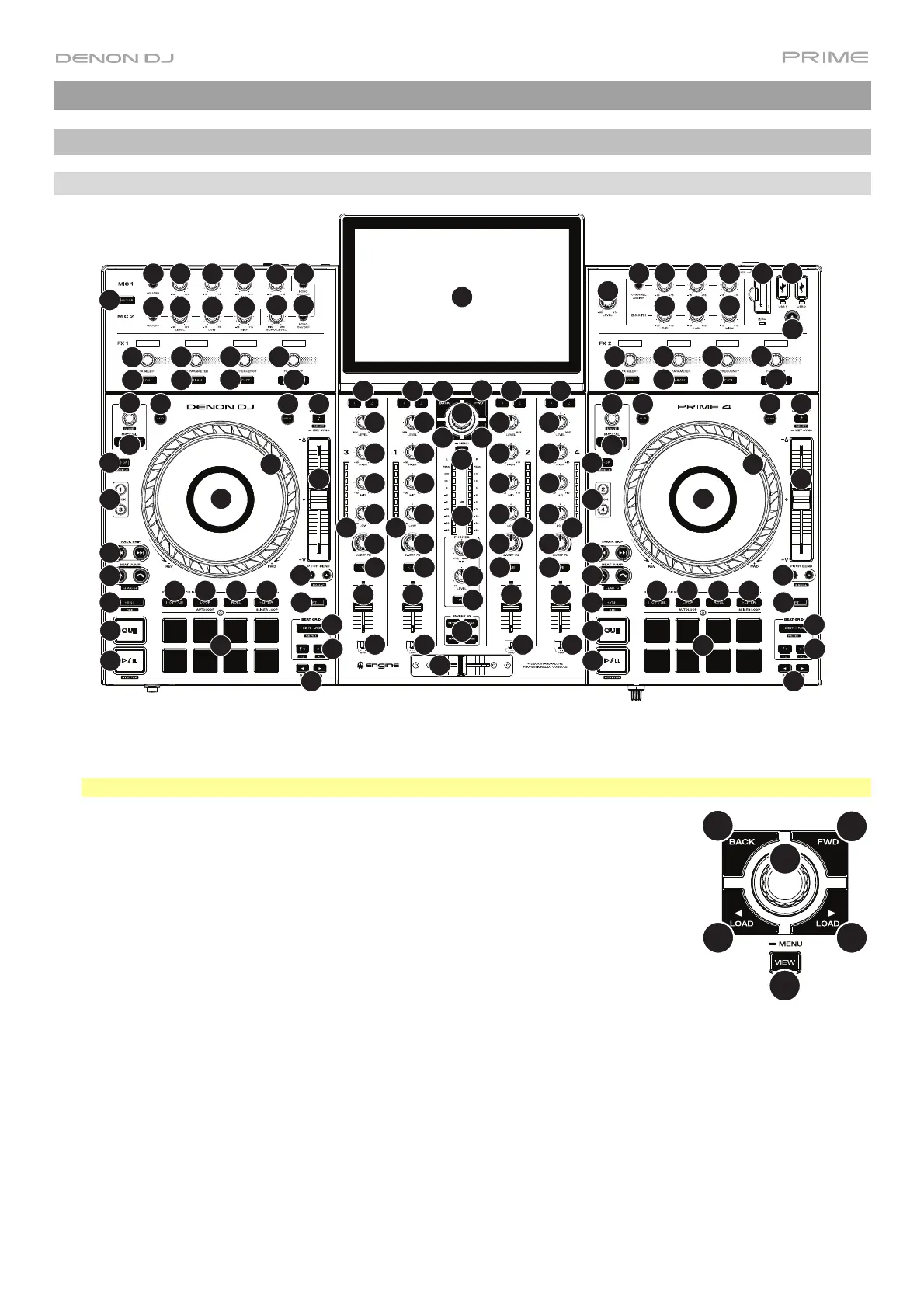
1. Touchscreen: This full-color multi-touch display shows information relevant to PRIME 4's current operation.
Touch the touchscreen (and use the hardware controls) to control the PRIME 4 interface. See Touchscreen
Overview for more information.
Tip: If you adjust the angle of the touchscreen, use the stand on its back panel to secure it in place.
2. Browse Knob: Turn this knob to navigate through lists. Press the knob to move
forward in the touchscreen or select an item.
Press and hold Shift and then press this knob to send the selected track to the
Prepare list.
3. Back: While in Library View, press this button to move to the previous window. While in
Performance View, press this button to enter Library View.
4. Forward (FWD): While in Library View, press this button to move to the next window.
While in Performance View, press this button to enter Library View.
Press and hold Shift and then press this button to turn Quantize on or off.
5. Load : Press this button to load the selected track to Deck 1 or Deck 3.
Quickly double-press this button to instant double the track currently playing on the focused right deck (2/4) to
the focused left deck (1/3).
6. Load : Press this button to load the selected track to Deck 2 or Deck 4.
Quickly double-press this button to instant double the track currently playing on the focused left deck (1/3) to the
focused right deck (2/4).
7. View: Press this button to cycle between Library View and Performance View. Double-press this button to enter
the Engine Lighting view.
Press and hold this button to show the Control Center, which includes quick links to other menus such as Source,
Wi-Fi, Record, User Profile and Settings. See Control Center for more information.
Press and hold Shift and then press this button to toggle between vertical and horizontal waveforms in
Performance View.
2
4
56
7
3













 To Next Page