35
Playlist Deck
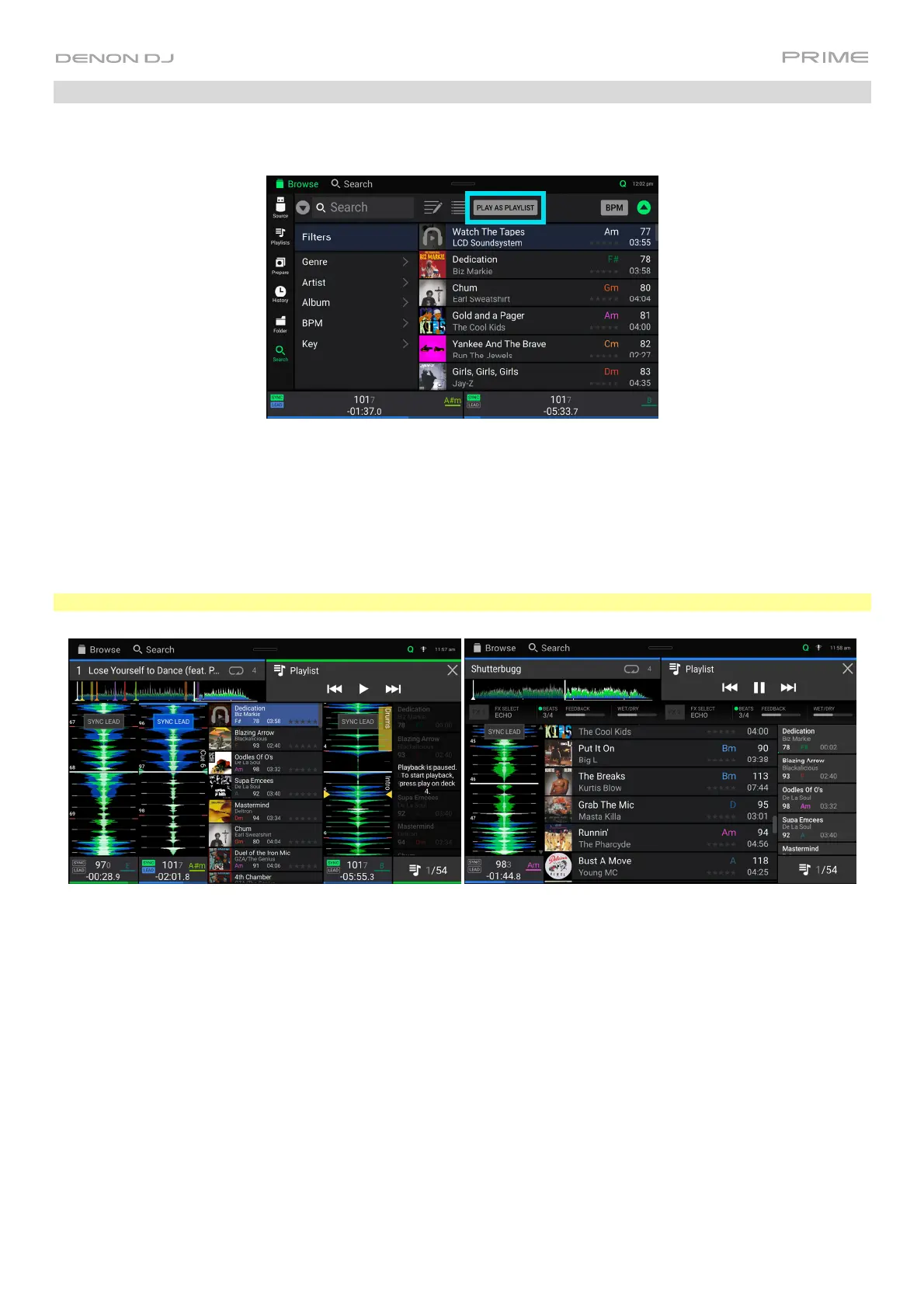
While in Library View, you can send the currently viewed file list to its own deck to play as a playlist.
To enable Playlist Deck, tap Play As Playlist in Library view. When enabled, the playlist on deck will play through
the selected track list and automatically crossfade between each track according to the Playlist Deck Crossfade
Time parameter in the Settings menu.
When using PRIME 4, the playlist deck will always be on Deck 4, and enabling the Zone Out while active will isolate
the Playlist Deck to these outputs. If you have an LC6000 PRIME unit connected to PRIME 4’s Rear USB Port 4,
this unit will be used to control the playlist deck. When using PRIME 2 or PRIME GO, you can select which deck is
used for the playlist.
Note: In Performance view, playlist decks are only available in vertical view.
To enable playlist deck playback, press Play on the selected deck.
To change tracks within the playlist, use the track backward and track forward buttons in the track overview area,
or using the Track Skip buttons on the hardware.
To remove the playlist from the deck, tap the X in the track overview area.













 To Next Page