3
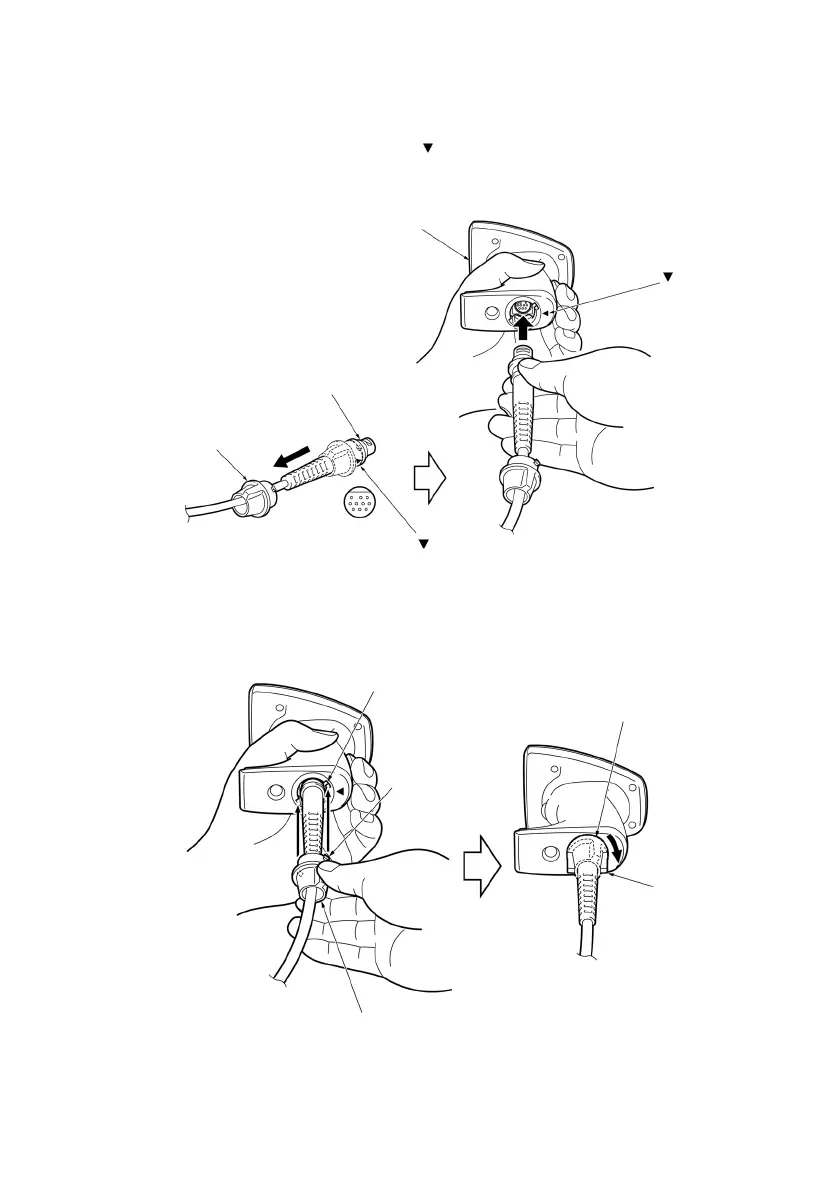
2.2 Connecting the Interface Cable to the Scanner
(1) Pull the connector cover of the interface cable off its connector as shown below.
(2) Plug the interface cable connector into the connector located in the bottom of the scanner.
Note: As shown below, hold the scanner body, align the
mark on the cable connector with that on the scanner, and
fully insert the interface cable connector.
(3) Align the two bosses on the connector cover with cutouts in the scanner body, fit the connector cover into the scanner,
and turn it clockwise to lock it.
Connector cove
Boss
Connector cove
Cutout
Turn the cover until
the bosses come to be
horizontal.
Scanne
Connector cove
Interface cable connecto
mark
mark



 To Next Page