21
Chapter 4 Reading Bar Codes
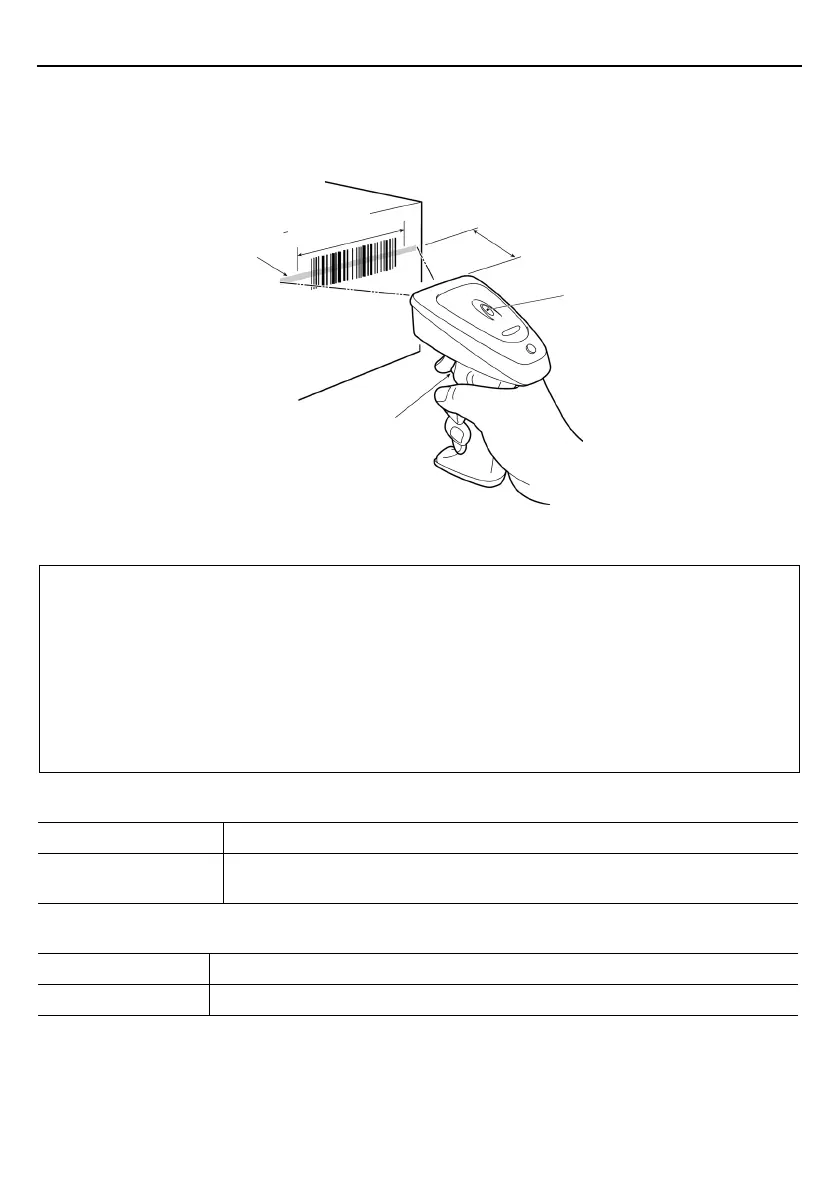
(1) Press the trigger switch to turn on the beam and prepare the scanner for reading.
Note: This step is not required for the continuous reading and auto sensing modes (see Section 6.3).
(2) Align the scanner over the center of the target bar code so that the beam longitudinally scans the center of the bar
code.
(3) Wait for the indicator LED to turn blue and the beeper to sound, indicating a successful read.
Note: The effective scan range is less than the full beam sweep.
The effective scan range depends on the model and the distance from the scanner to the target.
GT10B-SU/GT11B-SU: approximately 10 cm (3.94") for a scan distance of 7 cm (2.76")
GT10B-LU: approximately 17 cm (6.69") for a scan distance of 18 cm (7.09")
Note: Having more than one bar code within the field of view either causes the read to fail or produces multiple input.
Note: Bar code orientation (right side up or upside down) does not matter as long as the margins are well within the
field of view.
Note: It is sometimes necessary to vary the scanning angle to eliminate reflections of the beam and ambient light off
highly reflective labels.
Scanning modes
Regular read mode Successful completion of read-in produces data transfer.
Data verification mode The scanner transfers only data that matches a predefined list of acceptable bar codes.
(Refer to Chapter 8 for details.)
Speed-/depth-priority scanning
Speed-priority The scanner gives priority to reducing the time spent decoding bar code data.
Depth-priority The scanner gives priority to expanding the scan range.
For details, refer to Appendix 1.
Illumination
Trigger switch
Indicator LED
Scan distance
GT10B-SU/GT11B-SU: 7 cm (2.76")
GT10B-LU: 18 cm (7.09")
Effective
scan range



 To Next Page