20
Connecting the Adapter to the
Meter
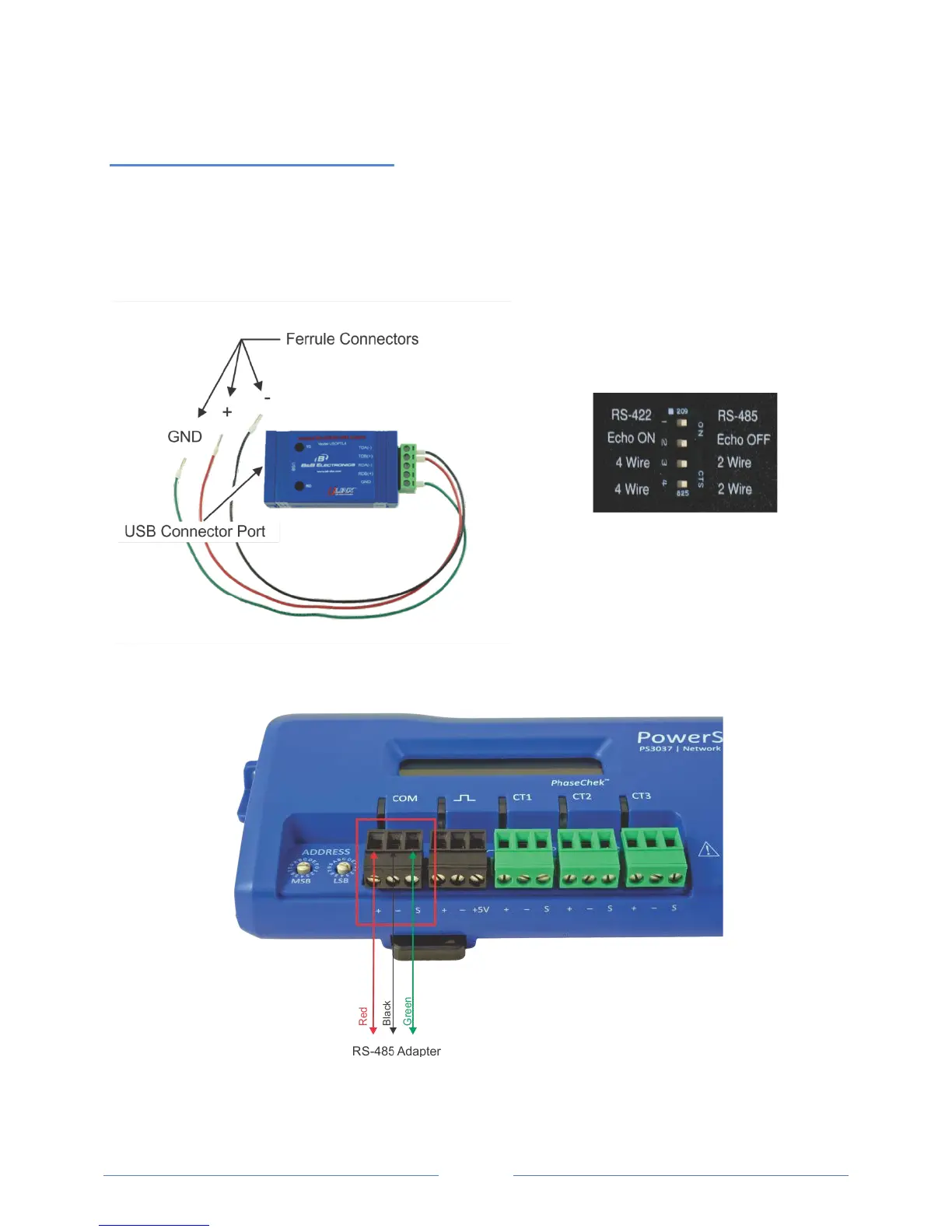
The three wires coming from the RS-485 adapter are plugged into the COM connector. Insert each white
ferrule into the appropriate slots on the connector. The red wire inserts in the left slot (+), the black wire
in the middle slot (-), and the green wire in the right slot (Shield), Figure II-1 and Figure II-3. Verify that
the dip switches on the back of the RS-485 adapter are set to RS-485, Echo Off, 2 Wire, 2 Wire as shown
in Figure II-2 before plugging the adapter into the PowerScout 3037.
Fi
gure II-1: RS-485 Adapter
Figure II-2: Dip switches on back of RS-485
Adapter
Figure II-3: RS-485 Connector on PS3037
www.GlobalTestSupply.com
Find Quality Products Online at: sales@GlobalTestSupply.com



 To Next Page