EasyManua.ls Logo

Depaepe Telecom SecurAccess Compact - 10.1. Line connection and installation

Depaepe Telecom SecurAccess Compact
Print Icon
To Next Page IconTo Next Page
To Previous Page IconTo Previous Page
Loading...
SecurAccess Compact – User Guide 26
!
!
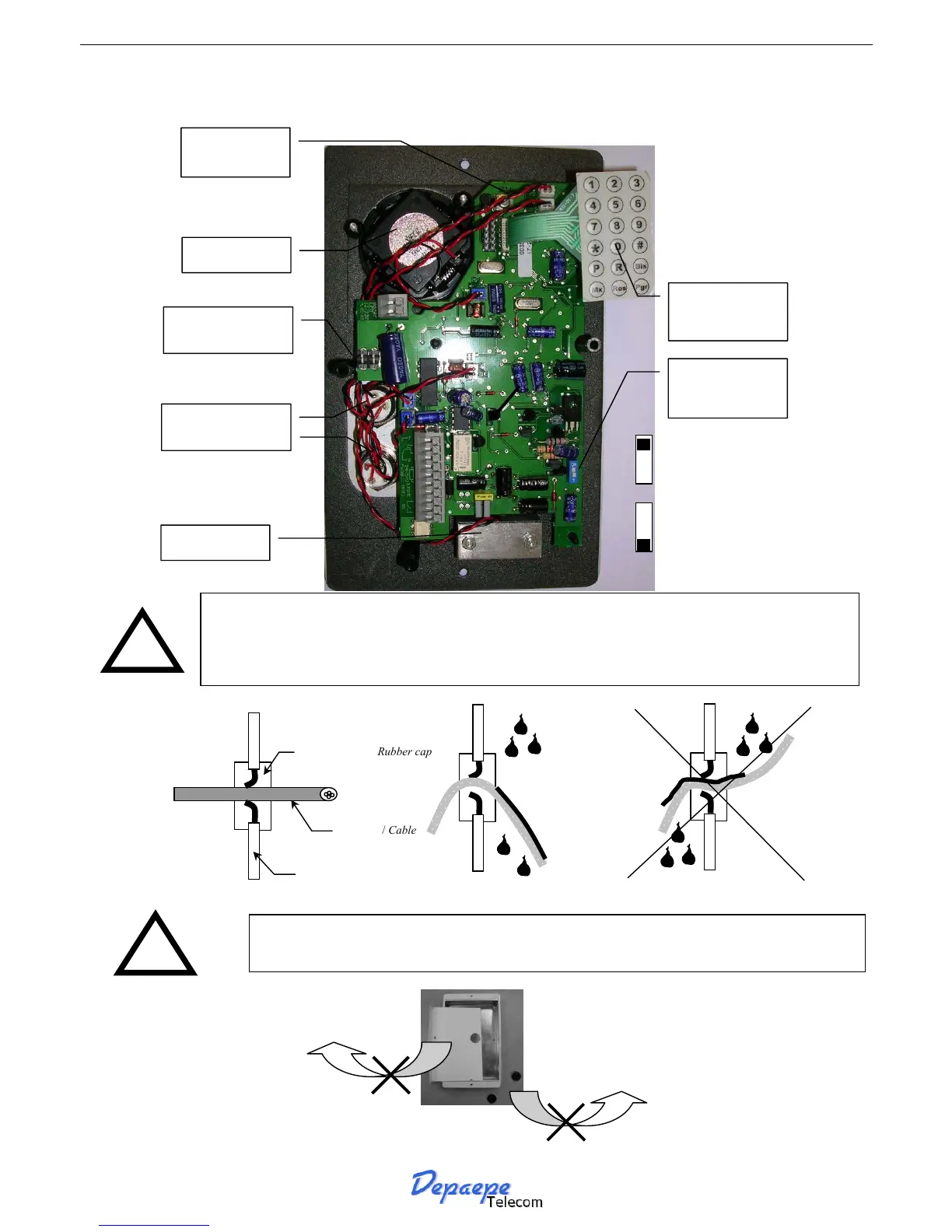
10.1. Line connection and installation
Passe-câble / Rubber cap
Paroi de l’appareil
Housing surface
Câble / Cable
Intérieur/Inside
Extérieur/Outside
Bon/Good
Intérieur/Inside
Extérieur/Outside
Mauvais/Bad
In order to improve the protection against humidity and bad weather:
Drill the cable(s) holes with a slightly thinner dimension than the diameter of the
cable itself,
bend the cable downwards to let the water and humidit
y
run outside of the case.
To prevent from electric shocks, do not remove rubber line cord entries and
the plastic protection inside the case.
Loudspeaker
Microphone
Memory/Off-hook
buttons M1, M2
RAZ (Reset)
Programming
Keypad
Line current
regulation
shunt
ON
OFF
Without line
current regulation
ON
OFF
With line current
regulation
Switch
Leds/Boost

Table of Contents

Related product manuals