6
Control panel operations
6-4 ineo 160
General guide
56 84271 3
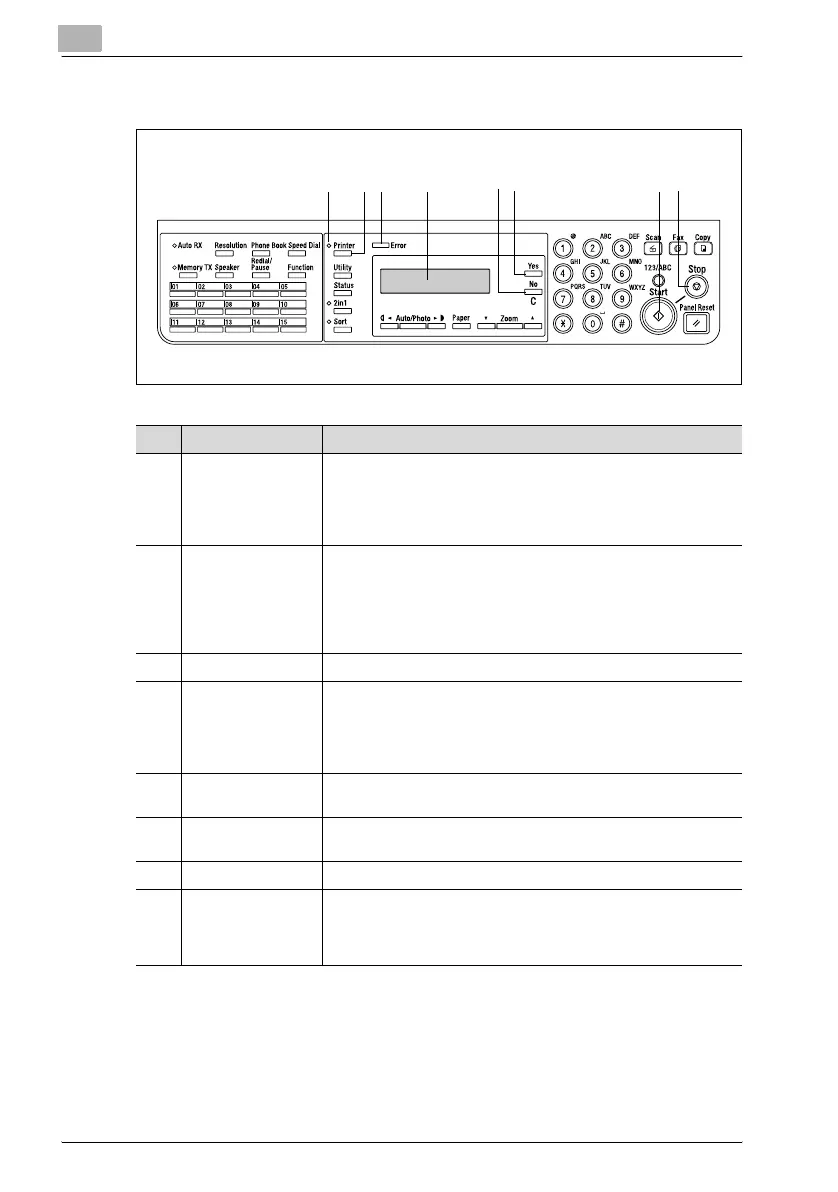
No. Name Description
1 [Printer] indicator • Blinks while the machine is receiving print data.
• Lights while there is print data in machine memory and while
the machine is performing a print operation.
• Goes out when there is no print data.
• See “[Printer] indicator” on page 6-5.
2 [Printer] key • Press while the machine is receiving print data (indicated by
the [Printer] indicator blinking) to enter the PC print mode.
• Press while the machine is in the PC print mode to exit the PC
print mode.
• The PC print mode will not be entered if there is no print data
in machine memory when the [Printer] key is pressed.
3 [Error] indicator • Lights up in orange if an error or malfunction occurs.
4 Display • While print data is being received, “PC:PRN” appears in the
display.
• If the [Printer] key is press while the machine is receiving print
data (the [Printer] indicator is lit), the paper source and paper
size for the print job are indicated in the display.
5 [No/C] key • Press to reply “No” to the confirmation message that appears
when a print job is canceled.
6 [Yes] key • Press to reply “Yes” to the confirmation message that appears
when a print job is canceled.
7 [Start] indicator • Lights up in orange when the machine is receiving print data.
8 [Stop] key • To cancel the current print job while print data is being re-
ceived, press the [Printer] key, and then press this key when
the PC print mode screen appears. See “Canceling a print job”
on page 6-6.



 To Next Page