6
Control panel operations
6-8 ineo 160
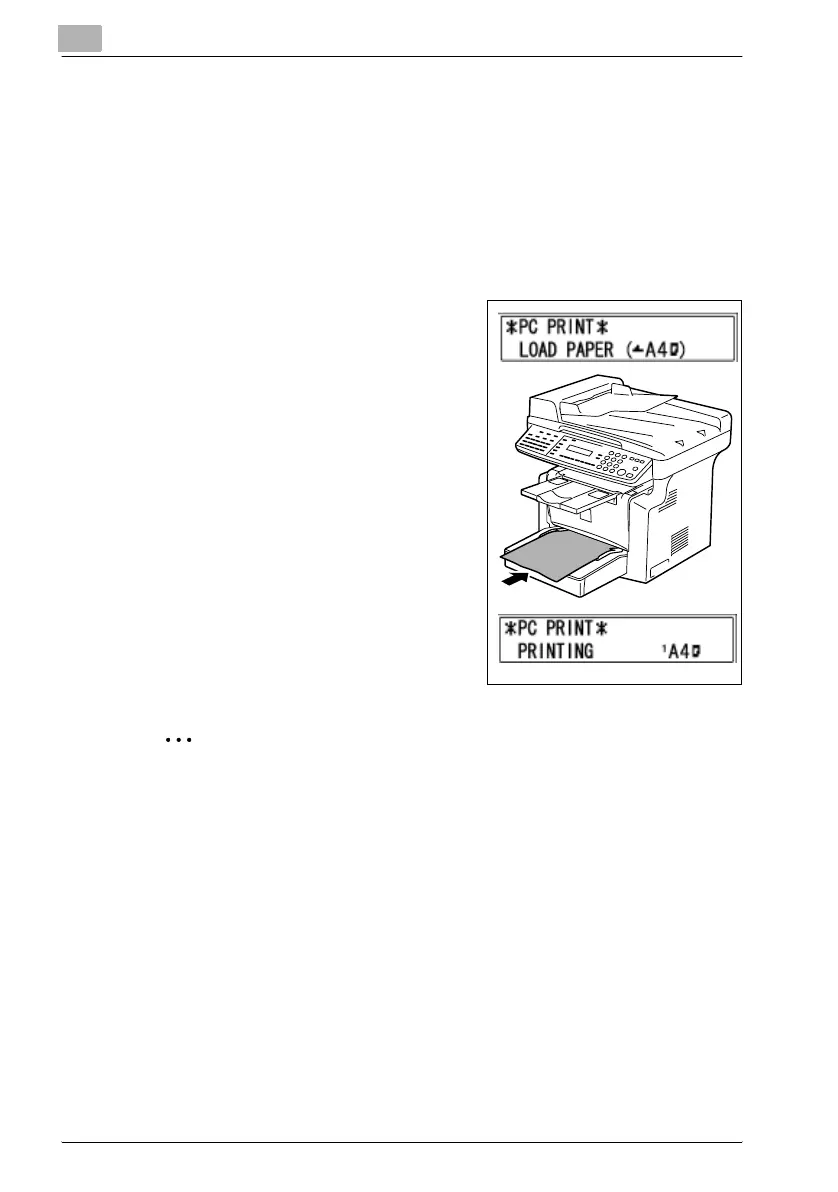
Using the bypass tray
Use the procedure described below to print onto paper that is fed automat-
ically from the bypass tray.
1 On your computer, display the “Setup” tab of the printer driver, and
then specify “Bypass” for the Paper Source setting (page 5-13).
2 Execute the print operation from your computer.
3 When the message LOAD PAPER
appears on the machine’s display,
load paper onto the bypass tray.
– This causes the print operation to
be performed using the paper
from the bypass tray.
4 Repeat step 3 as many times as nec-
essary until printing of the document
is complete.
2
Note
Be sure to execute the print operation from the computer first, and then
place the paper onto the bypass tray. If there is already paper on the by-
pass tray when you execute the print operation, remove it, and then place
it again onto the bypass tray.
The bypass tray can be loaded with a maximum of 1 envelope, OHP
transparencies, cards, or 10 sheets of plain paper.
Energy Save Mode
If print data is received while the machine is in energy save mode, energy
save mode is canceled.
When print data is received, the data is printed after the machine has finished
warming up.



 To Next Page