7
Troubleshooting
7-4 ineo 160
7.2 Main error messages
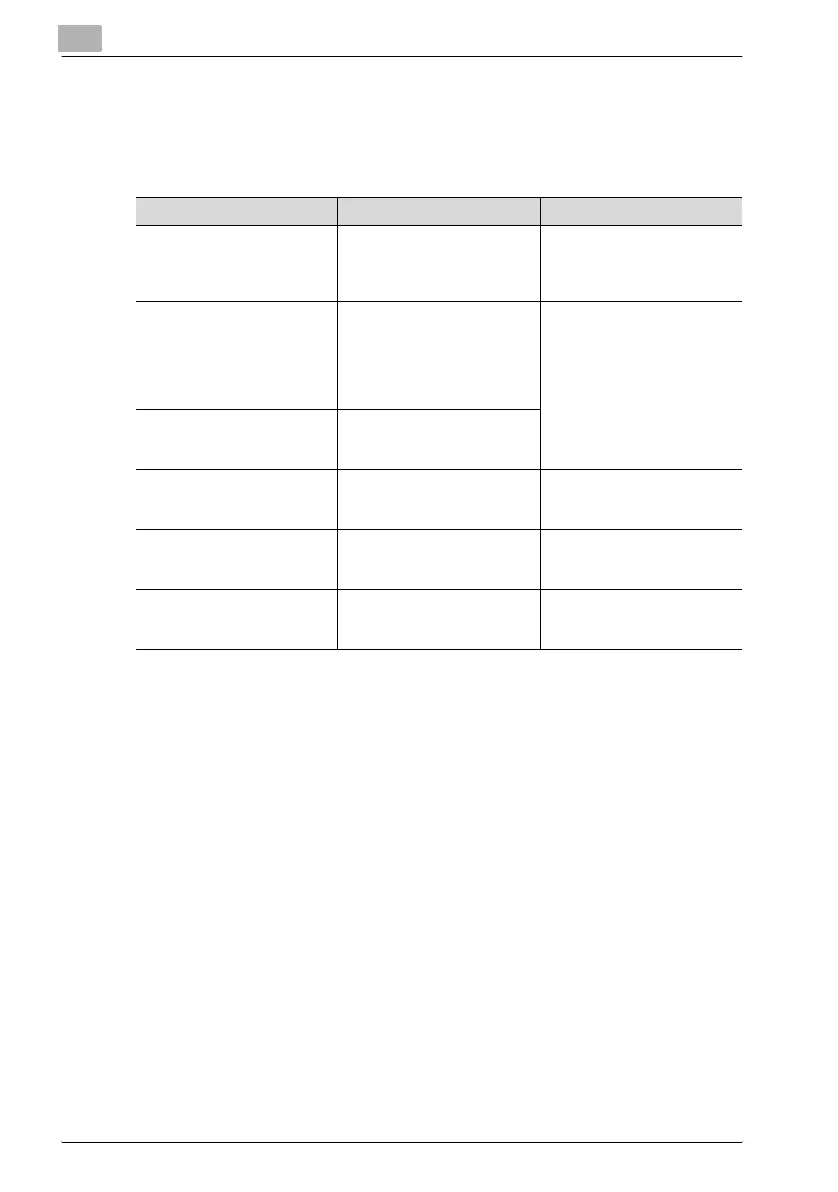
The table below describes the main error messages that may appear during
PC print mode operations.
Error message Cause Action
PAPER SIZE ERROR The paper size specified with
the printer driver differs from
the size of paper that is load-
ed.
Load paper of the correct size
into the tray.
NO SUITABLE PAPER “Auto” is selected for Paper
Source with the printer driver
properties, but none of the
machine’s trays contain paper
of the size specified for print-
ing.
Tray1:
Load the correct paper into
the tray, and change the pa-
per size in the Utility mode.
Tray2 (option):
Use a paper feed unit loaded
with paper of the correspond-
ing size.
INCORRECT PAPER SIZE Paper size specified by the
printer driver is not loaded in
the specified paper tray.
PAPER EMPTY There is no paper in the spec-
ified tray or the specified tray
is not loaded in the machine.
Load paper into the tray or
load Tray2 (option) into the
paper feed unit.
MEDIA TYPE ERROR Media type specified by the
printer driver is not loaded in
the specified paper tray.
Change the media type in the
Utility mode, and load the cor-
rect paper into the tray.
MEMORY FULL The memory is full of stored
data.
Press any key, and then turn
the machine off, then on
again.



 To Next Page