ineo+ 224/284/364/454/554 7-21
7
[Prefix/Suffix Setting]
To display: [Utility] - [Administrator Settings] - [Network Settings] - [Detail Settings] - [Prefix/Suffix Setting]
Register a prefix and suffix of an E-mail address. Also, configure the setting for recalling the registered prefix
and suffix when entering an E-mail address.
[Fax Settings]
To display: [Utility] - [Administrator Settings] - [Fax Settings]
Configure the operating environment of the fax or network fax function.
[Prefix/Suffix Setting] Register a prefix and suffix of an E-mail address. Also, configure the setting
for recalling the registered prefix and suffix when entering an E-mail ad-
dress.
For details, refer to page 7-21.
[Error Code Display Set-
ting]
Select whether to display network error code on the Touch Panel.
For details, refer to [User's Guide: Web Management Tool].
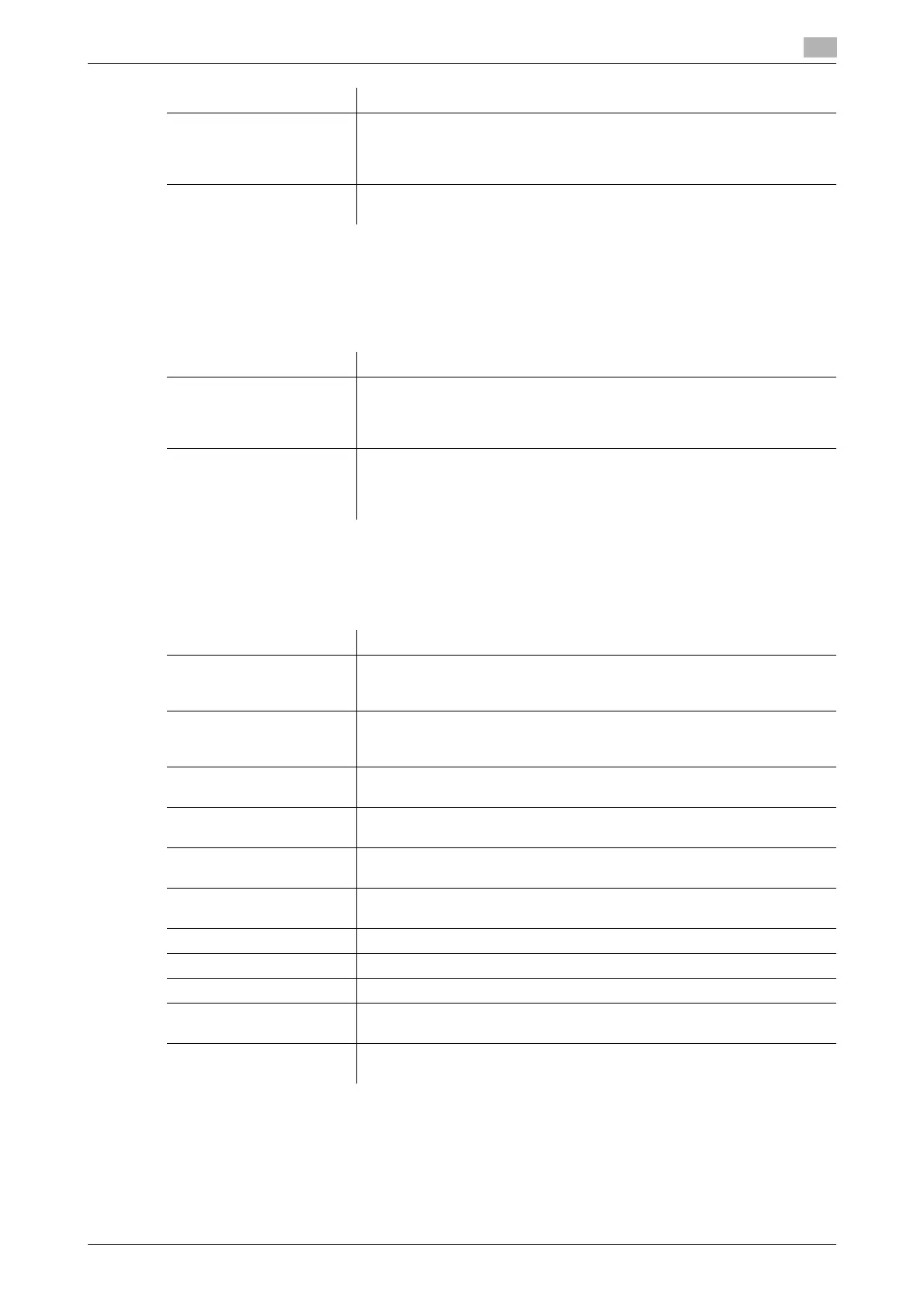
Settings Description
Settings Description
[ON/OFF Setting] Select whether to use Prefix/Suffix Setting.
If you select [ON], you can recall the registered prefix and suffix which are
registered in [Prefix/Suffix Setting] when entering an E-mail address.
[OFF] is selected by default.
[Prefix/Suffix Setting] Register a prefix and suffix to complement E-mail address entry. You can
register up to 8 prefixes and suffixes.
• [Prefix]: Enter a prefix (using up to 20 characters).
• [Suffix]: Enter a suffix (using up to 64 characters).
Settings Description
[Header Information] Register the machine name, your company name (sender name), and the
fax number that are to be printed as Header Position when faxes are trans-
mitted.
[Header/Footer Position] Specify the format of Header Position to be printed on a fax. Select wheth-
er to print Footer Position (date, time, and reception number) on faxes re-
ceived by this machine.
[Line Parameter Setting] Configure the environment to use fax functions on this machine, such as
the types of telephone lines (dialing method) and fax receive mode.
[TX/RX Settings] Specify how to print faxes received and how to handle files in a polling
transmission.
[Function Settings] Configure the settings for using various fax transmission and reception
functions.
[PBX Connection Setting] Configure the settings for using this machine in a Private Branch Exchange
(PBX) environment.
[Report Settings] Specify the conditions for printing fax-related reports.
[Job Settings List] Print the list of settings associated with faxes.
[Multi Line Settings] Set how you want to use a second line, if any.
[Network Fax Settings] Change default settings on Internet Fax or IP Address Fax environment and
compression type of send data.
[Fax Print Quality Settings] When printing a received fax, select whether to give priority to the image
quality or to the printing speed, to fit the resolution of the received fax.



 To Next Page