Specifying a destination
1
1-14 ineo+ 224/284/364/454/554
1.3
1.3 Specifying a destination
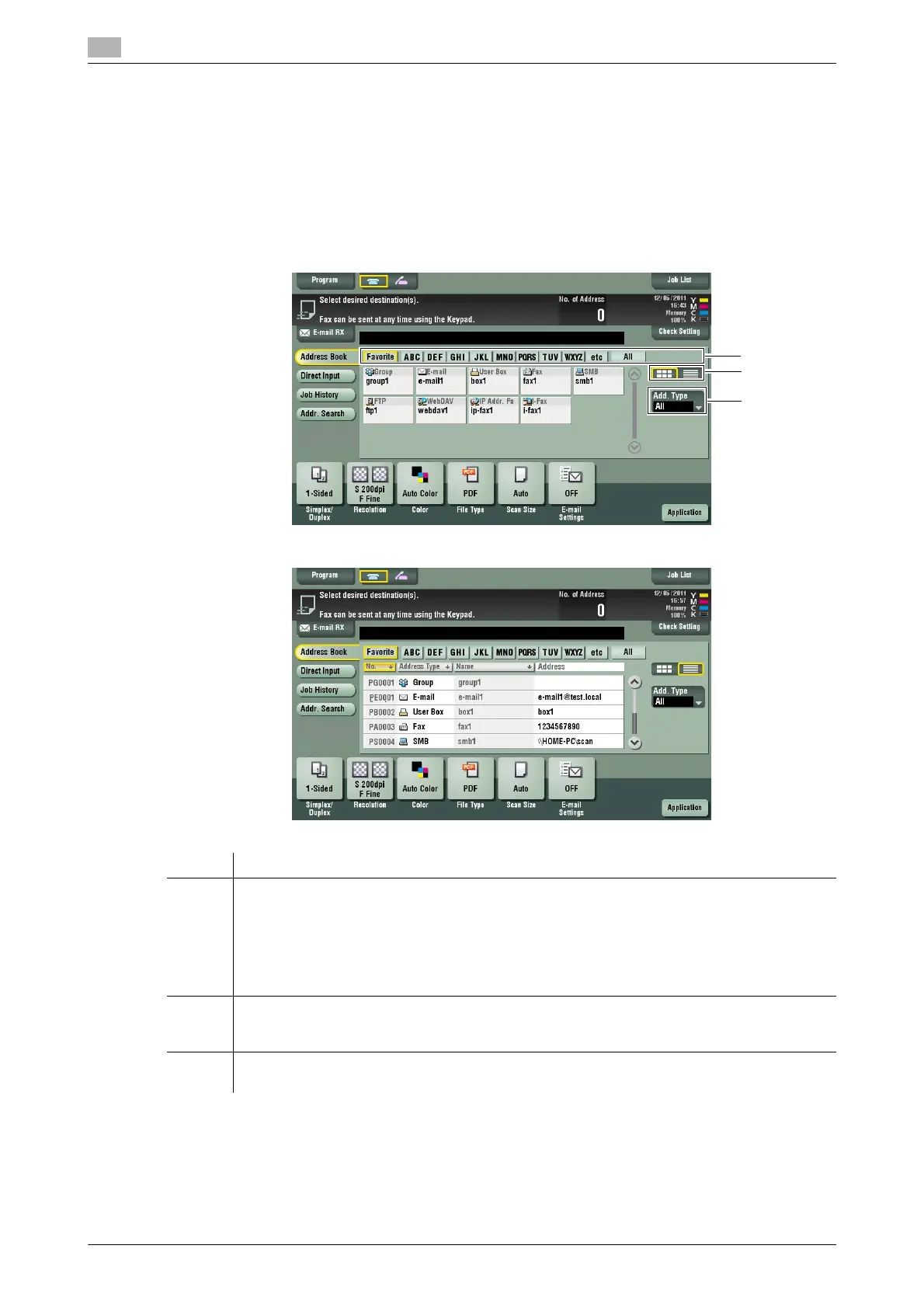
Selecting from address book
In [Address Book], select the destination registered on this machine.
You can send data by broadcast transmission if you select multiple destinations. You can also use broadcast
transmission by combining different sending modes such as network fax and SMB Send.
For details on how to register a destination, refer to page 4-3.
No. Description
1 Narrow down destinations with the index specified for the registered destination. Also using
[Address Type] further narrows down destinations.
The following keys can be used to narrow down destinations:
• [All]: All address book entries registered on this machine are displayed.
• [Favorite]: The destinations specified with [Favorites] as search text are displayed.
• [etc]: Displays destinations for which a character other than an alphabet character is spec-
ified as the initial character of a registered name and no index is specified.
2 Switches the display of the registered destinations to the button or list view mode.
If the list view mode is selected, you can sort destinations by registration number, destination
type, or registered name.
3 Narrow down destinations by the type of the registered destination. Using also search text fur-
ther narrows down destinations.



 To Next Page