EN - 8
SYMPTOM POSSIBLE CAUSE REMEDY
B. Unit operates. Red Service Required light is
illuminated. Audible alert may be sounding.
1. Air lter is blocked. 1. Check the air lter. If the lter is dirty, wash it following the cleaning
instructions on page 7.
2. Exhaust is blocked. 2. Check the exhaust area and make sure there is nothing restricting the
unit exhaust.
3. Blocked or defective cannula, face
mask, or oxygen tubing.
3. Detach cannula or face mask. If proper ow is restored, clean or replace
if necessary. Disconnect the oxygen tubing at the oxygen outlet. If
proper ow is restored, check oxygen tubing for obstructions or kinks.
Replace if necessary.
4. Blocked or defective humidier
bottle.
4. Detach the humidier from the oxygen outlet. If proper ow is obtained,
clean or replace humidier.
5. Flow meter set too low. 5. Set ow meter to prescribed ow rate.
If the above remedies do not work, contact your DeVilbiss provider.
C. Unit operates. Audible low-frequency vibration
sound is detected.
1. Electronic Assembly Malfunction. 1. Turn your unit “Off.” Switch to your reserve oxygen system and contact
your DeVilbiss provider immediately.
D. Yellow Low Oxygen light is on. 1. Unit in “start up” mode. 1. Allow unit up to 15 minutes to complete start up period.
E. The yellow Low Oxygen light is on and the
intermittent audible signal is sounding.
1. Flow meter is not properly set. 1. Ensure the ow meter is properly set to the prescribed number. (The
maximum ow meter setting is 6 LPM when an oxygen bottle is being
lled with oxygen from the auxiliary port.)
2. Air lter is blocked. 2. Check the air lter. If the lter is dirty, wash it following the cleaning
instructions on page 7.
3. Exhaust is blocked. 3. Check the exhaust area and make sure there is nothing restricting the
unit exhaust.
If the above remedies do not work, contact your DeVilbiss provider.
F Red Service Required light is on and an
intermittent audible signal is sounding.
1. Flow meter is not properly set. 1. Ensure the ow meter is properly set to the prescribed number. (The
maximum ow meter setting is 6 LPM when an oxygen bottle is being
lled with oxygen from the auxiliary port.)
2. Air lter is blocked. 2. Check the air lter. If the lter is dirty, wash it following the cleaning
instructions on page 7.
3. Exhaust is blocked. 3. Check the exhaust area and make sure there is nothing restricting the
unit exhaust.
If the above remedies do not work, contact your DeVilbiss provider.
4. Electronic Assembly Malfunction. 4. Contact your DeVilbiss provider.
G. If any other problems occur with your oxygen
concentrator.
1. Turn your unit “Off.” Switch to your reserve oxygen system and contact
your DeVilbiss provider immediately.
OVERVIEW OF ALARMS
This device contains an alarm system which monitors the state of the device and alerts of abnormal operation, loss of essential performance or failures. Alarm conditions are
shown on the LED display. The alarm system functions are tested at power up by lighting all visual alarm indicators and sounding the audible alarm (beep).
All alarms are Low Priority Technical Alarms.
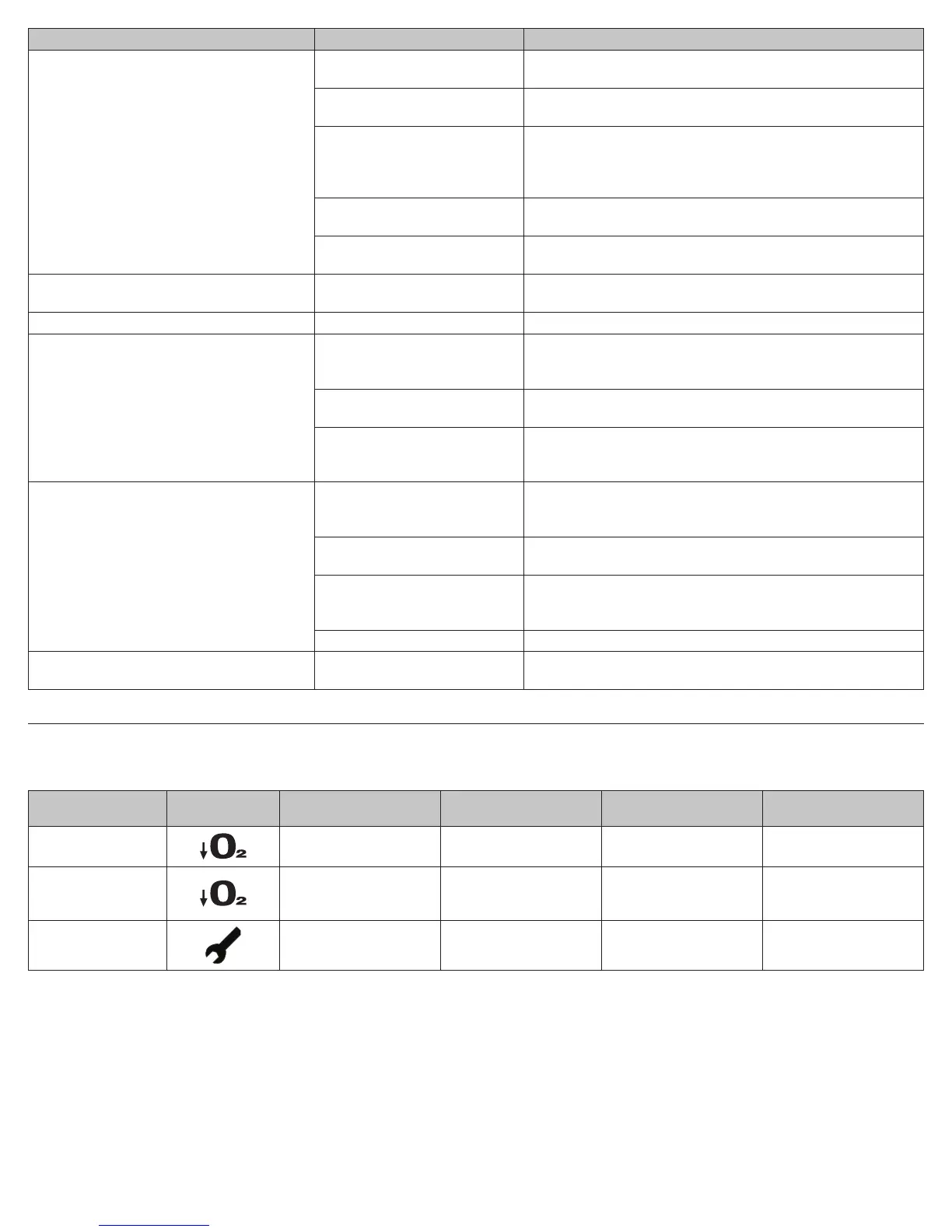
Alarm Condition LED Indicator
Visual Alarm Signal
Meaning
Audible Alarm Signal
Visual Alarm Signal
Cleared by
Action to take
Start-up Period
YELLOW
Low O
2
LED ON
No
After startup period, O
2
reaches at least 87%
Wait for unit to nish startup
period, up to 15 minutes
Low Oxygen
Concentration
YELLOW
Low O
2
LED ON when O
2
is
<87%
Yes
Before O
2
drops below 82%
Turn unit off See Troubleshooting table
Malfunction
RED
Service Required LED ON
Yes Turn unit off
Return unit to provider for
service
A-1025








 To Next Page