22
LT-2 027
I. KEYPAD & LCD DISPLAY REMOVAL AND REPLACEMENT
CAUTION– Failure to wear anti-static equipment during service may damage
this device.
1. See instructions above to remove cover and control PC board.
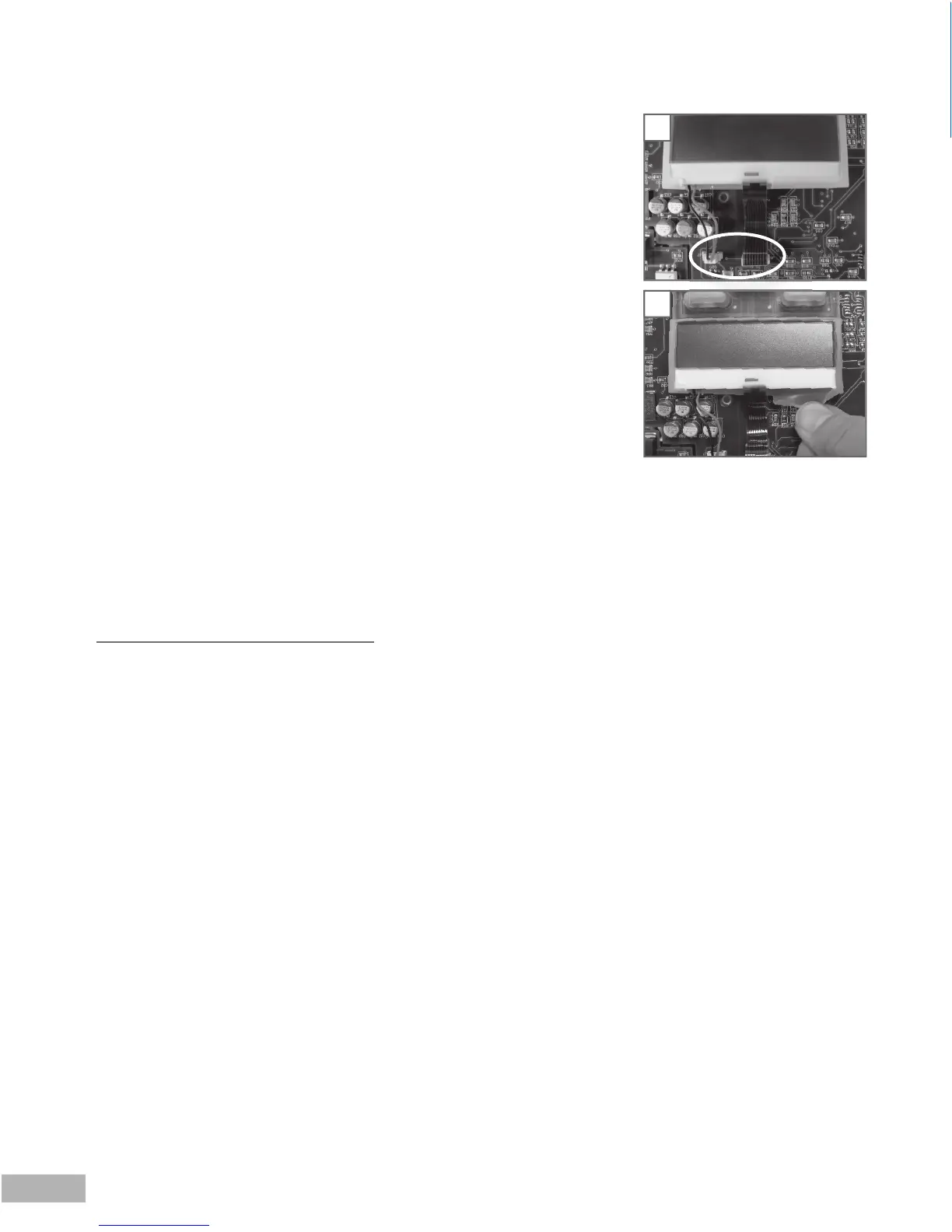
2. Wearing an anti-static device, disconnect the two LCD display wire harnesses.
(Fig. 9)
NOTE– Do not touch the exposed contact area on the end of the ribbon cable. Dirt and
oils may damage it.
3. Gently roll the silicone frame away from the edges of the LCD display screen (Fig.
10), lift the display off the key pad and place it on a clean, fl at, anti-static surface, if
returning to the unit.
4. Lift the key pad off the board, gently pulling three silicone rattails through the
board.
NOTE– Do not touch the key pad contacts on the PC board. Dirt and oils may damage
them.
5. Replace the key pad by inserting the silicone rattails on the replacement key pad
through appropriate holes on the control board and gently pulling the rattails
through the holes.
6. Insert the LCD display into the silicone frame on the key pad and connect the
wire harnesses to the appropriate connectors on the board.
7. See instructions above to replace the control PC board and the cover.
J. FIRMWARE INSTALLATION
Go to http://www.devilbisshealthcare.com/Products to download the latest fi rmware up-
date. Download and installation instructions are provided on the web site, if needed.
9.
10
9











 To Next Page