27
LT-2027
EN
HEATER
Symptom Action
The PAP does not recognize the
heater. (With the PAP blower ON,
the PAP display does not indicate
Heat:xxx on the bottom line.)
Connect the heater to a known good PAP device, if one is available. If PAP display still does
not recognize the heater, replace the heater.
If a known good PAP device is not available, remove the PAP from the heater and check the
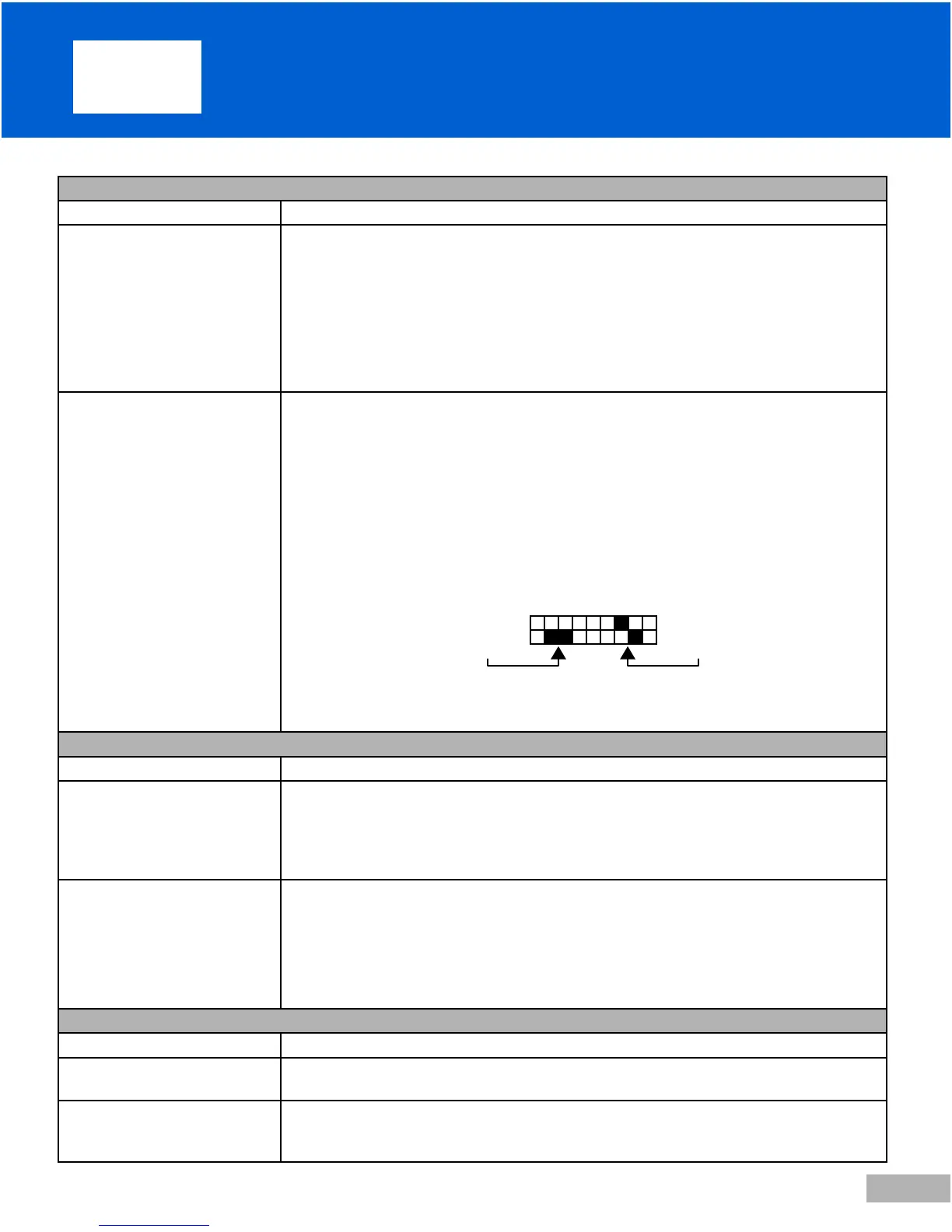
thermistor for resistance. The thermistor pins are located in the connector and are the ones
closest to each other. See image below. The resistance should be 10 K ohms +/- 1% at 25° C
(77°F). If open or shorted, replace the heater. See Service instructions. Alternatively: Replace
the heater plate assembly, DV5H-607. If the resistance is in the correct range, the issue is in
the PAP device. Troubleshoot as indicated below.
Heater plate does not respond to
the PAP heat setting.
(With the PAP blower ON and
the heat setting at 1 or above, the
heater plate does not get warm.)
Connect the heater to a known good PAP device, if one is available. If the heater still does not
respond to the heat setting, replace the heater.
If a known good PAP device is not available, connect the PAP, using the serial interface cable
DV51D-615, to a PC using a terminal program (such as Windows HyperTerminal, or equivalent)
with Com settings 9600 baud, no parity, 8 data stop bits, 1 stop bit, Flow Control set to none.
Turn the PAP blower ON and increase the heat setting to 10 using the PAP keypad (UP key). In
the terminal program, connect to the PAP device by typing ‘rh’ followed by ENTER; then type
‘Ht’ followed by ENTER. Repeat the ‘Ht’ – ENTER sequence every 2-3 minutes and verify that
the returned value increases. If the value increases, the system is operating normally. If the value
does not increase, remove the PAP device from heater and measure the heater resistance. The
heater terminals are the ones diagonal to each other on the connector.
heater terminals
hermistor terminals
The resistance should be between 180 to 220 ohms; if not replace the heater. See Service in-
structions. Alternatively: Replace the heater plate assembly, DV5H-607. If the resistance is in the
correct range, the issue is in the PAP device. Troubleshoot as indicated below.
PAP
Symptom Action
The PAP does not recognize a
known good DV5HH heater.
(With the PAP blower ON, the
PAP display does not indicate
Heat:xxx on the bottom line.)
Check the wire harness on the PAP / heater connector; repair or replace, if needed. If the wire
harness and connections are correct, replace the control PC board. See Service Instructions.
Heater plate on a known good
DV5HH heater does not respond
to the PAP heat setting.
(With the PAP blower ON and
the heat setting at 1 or above, the
heater plate does not get warm.)
Check the wire harness on the PAP / heater connector; repair or replace, if needed. If the wire
harness and connections are correct, replace the control PC board. See Service Instructions.
MANIFOLD and O-RING
Symptom Action
Excessive air leak Remove the humidifi er chamber. Inspect the manifold in the heater base and replace, if torn or
worn. Inspect the O-Ring in the humidifi er chamber and replace, if worn or missing.
Water leak from the humidifi er
chamber.
Remove the humidifi er chamber. Inspect the chamber for cracks in the plastic or water leak-
ing from the heat transfer plate. If cracks or transfer plate leaks are found, replace the water
chamber. Inspect the O-Ring in the humidifi er chamber and replace, if worn or missing.
14. Troubleshooting DV5HH











 To Next Page