13
LT-2 027
EN
6. A ler ts and Device Fau lts
A. ALERTS VISIBLE TO PATIENTS
Alert Description
Delay running
XX minutes left
Comfort Delay is active
Mask leak = XX%. Check
fit.
High airfl ow for at least 10%
of previous use time (Poor
mask fi t) (actual percentage
is listed)
Mask off. Please check
mask fit.
High airfl ow during use
(Poor mask fi t or mask
removed)
Device Fault E0X. Call
provider.
Device error (See next
table.)
B. DEVICE FAULTS VISIBLE TO PATIENTS
Only device faults classifi ed as critical are visible to the patient
on the LCD display. These faults can be corrected by a service
technician.
Device
Fault
Description
E01
Read Setting Error. Stored prescription
settings are corrupted. Unit is in fail-safe state
(blower off) when this error displays. See
Troubleshooting and Service Instructions to
correct fault, or return unit for repair.
E03
Motor Error. Unit attempts to drive the
motor, but the blower is not spinning (zero
motor speed). See Troubleshooting and Service
Instructions to correct fault, or return unit for
repair.
E04
Locked Rotor Error. Average motor speed is
low, while the motor current is high, for several
seconds. See Troubleshooting and Service
Instructions to correct fault, or return unit for
repair.
E06
Motor Runaway Error. Motor speed is high
and the pressure and total fl ow are low (close
to zero) for a fi xed period of time. See Trouble-
shooting and Service Instructions to correct
fault, or return unit for repair.
E07
Motor Fault Error. The motor control chip
fault output goes active low for a fi xed pe-
riod of time. See Troubleshooting and Service
Instructions to correct fault, or return unit for
repair.
C. READING AND CLEARING THE LAST
DEVICE FAULT CODE
NOTE– The last device fault code is stored in EEPROM to
assist in fi eld service of the unit.
Additional equipment: IBM or Compatible PC with a free se-
rial port, PAP to PC cable (DV51D-615), a terminal program
(Microsoft Windows HyperTerminal or equivalent).
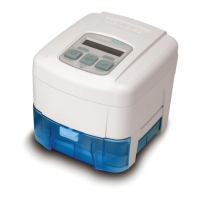
1. Connect the DV54 PAP to the PC serial port with
PAP to PC cable.
2. Apply AC power to the unit. If the blower is running,
press the ON/OFF key on the keypad so that the
blower stops and the LCD displays ‘OFF’.
3. Use a terminal program (such as Windows HyperTer-
minal, or equivalent) with COM settings 9600 baud,
no parity, 8 data bits, 1 stop bit, and Flow Control set
to none.
4. When connection is established with the PAP, the
terminal program will show: ‘RH;’ every 0.5 seconds.
This display indicates that the PAP is waiting for a
handshake.
5. Type ‘rh’ (all commands are case sensitive) and press
Enter. The PAP should respond with the fi rmware
version in the form “V0.XX mm/dd/yyyy.”
Repeat this step if necessary to complete the hand-
shake.
6. Request the last alert code and date by typing ‘El’
and pressing Enter. The return value will be in the
form ‘Exx dd/mm/yyyy’. Exx is the alert code and
dd/mm/yyyy is the date the error occurred.
7. Clear the last alert code by typing ‘Ec’ and pressing
Enter. The PAP will respond with ‘OK’.











 To Next Page