2928
Menu Item Icon Options
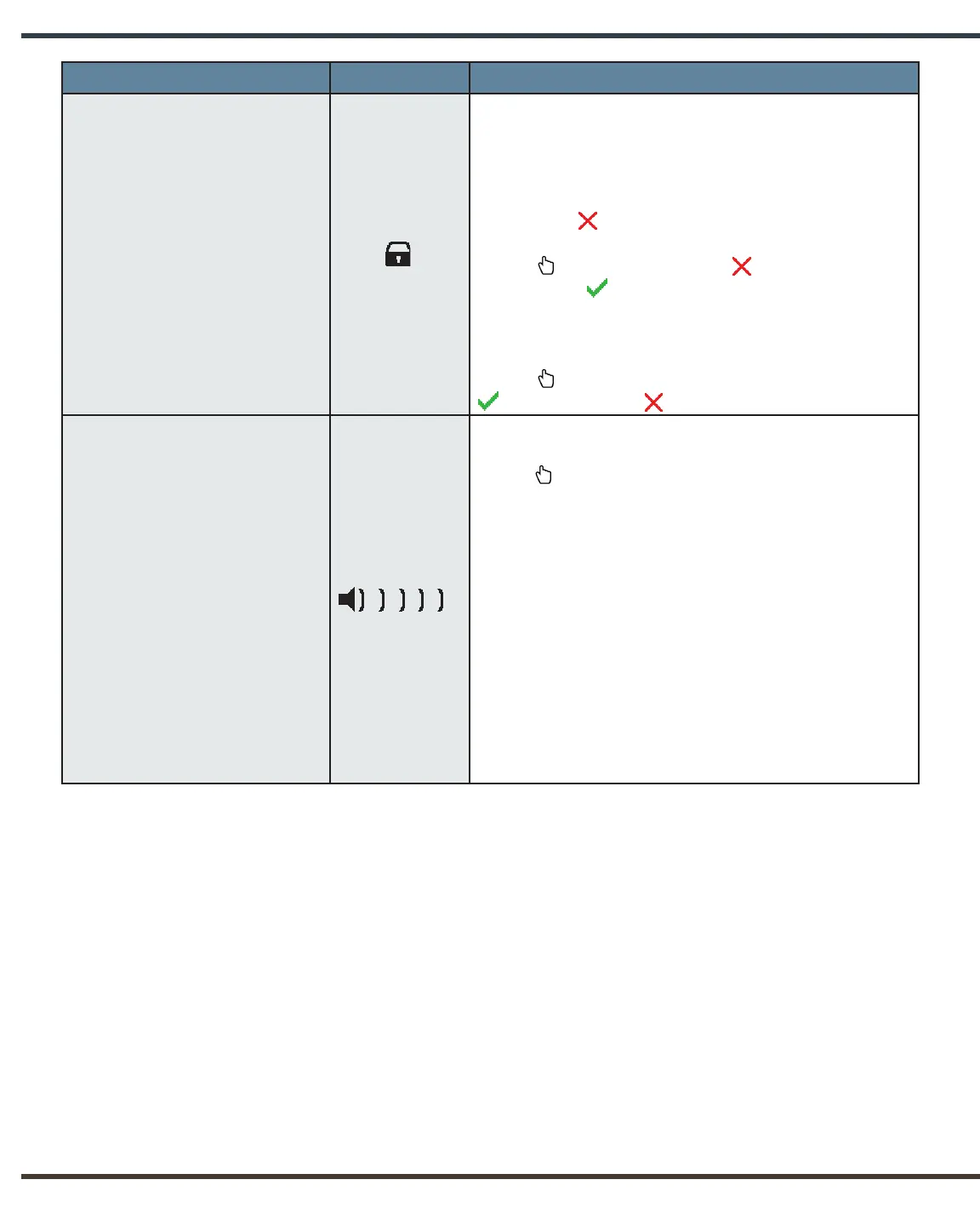
Lock/Unlock X-rays
Can be activated to prevent unauthorised use
when the NOMAD Pro 2 is idle or stored. This
functionality may also be used for training
purposes.
The red “x” indicates that the X-ray is unlocked.
In order to lock the X-ray, the operator presses the
Select button. The red “x” will change to a
green check , indicating that the X-ray is now
locked.
The X-ray can be unlocked by pressing the
Select button again, replacing the green check
with the red “x” .
Audible Sound
Allows the operator to adjust the volume. The range
is from one (softest), up to five (loudest). The
Select button is used to cycle through the
different volume options. The system emits a tone
as each volume is selected so the operator can
determine the choice.
Once the desired option is displayed, the operator
may scroll either up or down to change other
settings; the selected volume will remain. The
operator may return to the audible sound menu
item to make further adjustments during the
current Settings Menu session. However, once
the operator exits the Settings Menu, the volume
choice will be saved and can only be changed by
re-entering the Settings Menu.


 To Next Page