22
Example: If program A has valve 1 set at a run time of 0:01 and program B has
valve 1 set at a run time of 0:00, then setting a SimpleSmart
™
program for valve
1 will not include program B’s valve 1 because it is off. If program B’s valve 1
was intended to be included in the program calculation, then program B’s valve
1 needs to be set to a nonzero run time before setting the SimpleSmart
™
option.
Changing a run time of the valve while a SimpleSmart
™
program is active will
turn off the SimpleSmart
™
program and it will have to be reactivated each time
a run time is manually adjusted.
NOTE: If using one of the SimpleSmart
™
presets we recommend evaluating the
plants’ health for the first month and making adjustments to the system as needed.
If an adjustment or fine tuning of the SimpleSmart
™
programming is required, this
adjustment can be made for each month in the Seasonal Adjustment (%) Setting
(see section 9.7).
Example: The user entered watering run time will be adjusted monthly based
upon the forecast ET pattern for the selected region.
By selecting SP02, the controller may adjust the programmed run time of valve 1
from 10 minutes per program, to 3 minutes or less per program. This reduces the
irrigation run time by 7 minutes, providing a water savings of 70% for the month of
January.
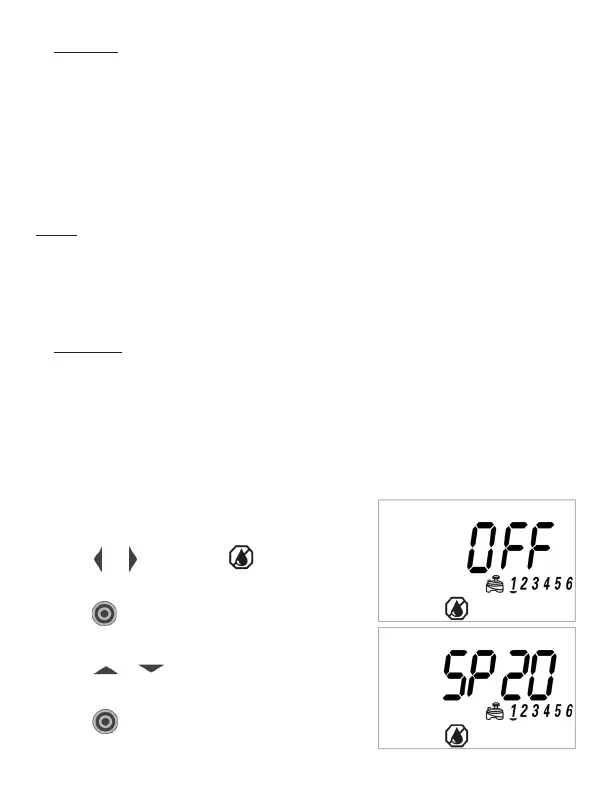
9.6.2 TO ACTIVATE THE SIMPLESMART
™
ET
FEATURE:
1. Press or until you see on the bottom
of the display.
2. Press
and OFF will begin flashing for
valve 1.
3. Press or to select one of the twenty
preset programs (see Chart A on page 21).
4. Press
to confirm your settings.



 To Next Page