DS-685L/F Series Service Manual
z DS-685L
Zero internal count should be 4,800 +/- 300, if you can not get 4,800 +/- 300 count, do span
adjustment again.
z DS-685F
Zero internal count should be 9,600 +/- 300, if you can not get 9,600 +/- 300 count, do span
adjustment again.
d) Depress “ T “ key to exit “INTERNAL COUNT AND A/D COUNT” mode.
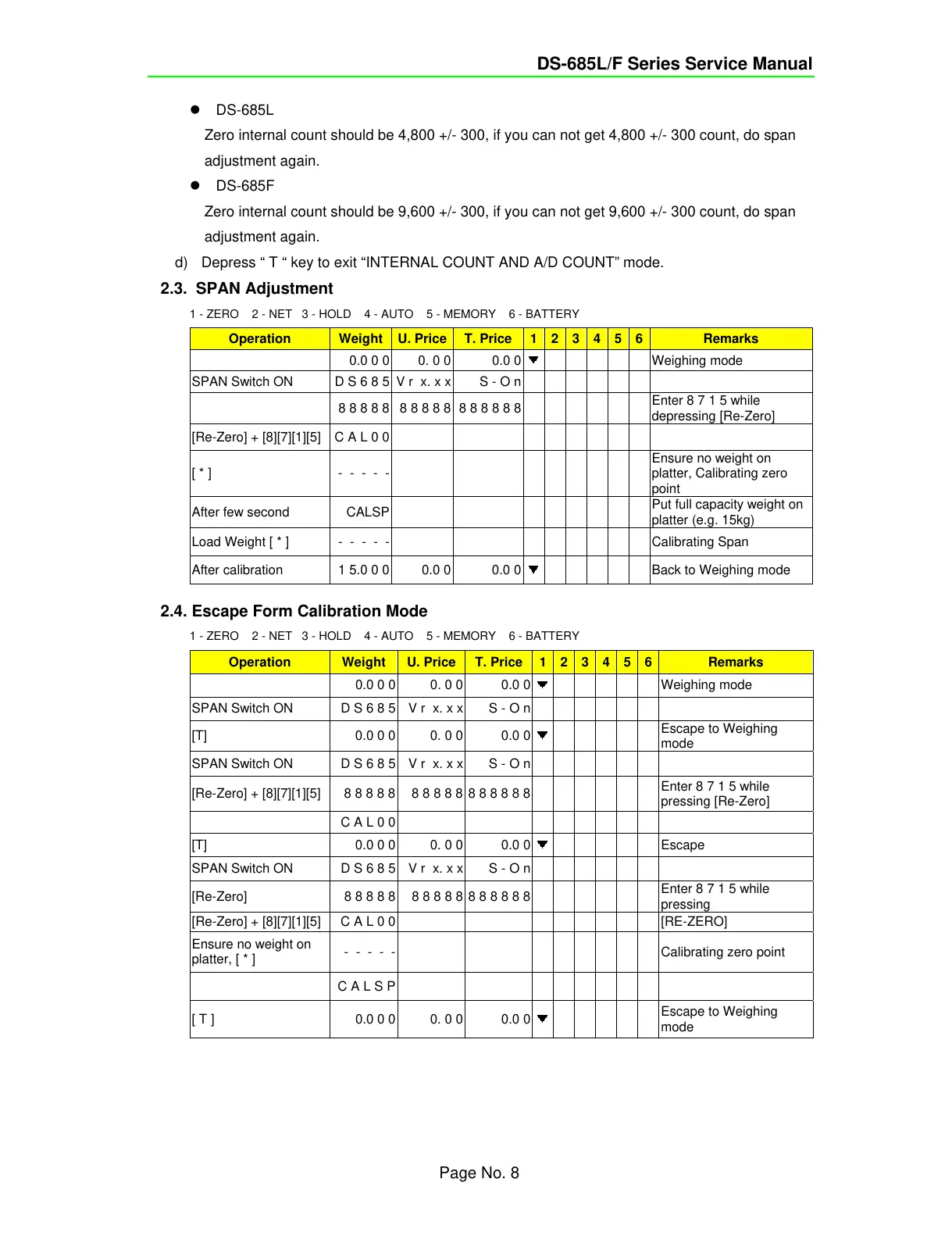
2.3.
SPAN Adjustment
1 - ZERO 2 - NET 3 - HOLD 4 - AUTO 5 - MEMORY 6 - BATTERY
Operation Weight U. Price T. Price 1 2 3 4 5 6 Remarks
0.0 0 0 0. 0 0 0.0 0
Weighing mode
SPAN Switch ON D S 6 8 5 V r x. x x S - O n
8 8 8 8 8 8 8 8 8 8 8 8 8 8 8 8
Enter 8 7 1 5 while
depressing [Re-Zero]
[Re-Zero] + [8][7][1][5] C A L 0 0
[ * ] - - - - -
Ensure no weight on
platter, Calibrating zero
point
After few second CALSP
Put full capacity weight on
platter (e.g. 15kg)
Load Weight [ * ] - - - - -
Calibrating Span
After calibration 1 5.0 0 0 0.0 0 0.0 0
Back to Weighing mode
2.4. Escape Form Calibration Mode
1 - ZERO 2 - NET 3 - HOLD 4 - AUTO 5 - MEMORY 6 - BATTERY
Operation Weight U. Price T. Price 1 2 3 4 5 6 Remarks
0.0 0 0 0. 0 0 0.0 0
Weighing mode
SPAN Switch ON D S 6 8 5 V r x. x x S - O n
[T] 0.0 0 0 0. 0 0 0.0 0
Escape to Weighing
mode
SPAN Switch ON D S 6 8 5 V r x. x x S - O n
[Re-Zero] + [8][7][1][5] 8 8 8 8 8 8 8 8 8 8 8 8 8 8 8 8
Enter 8 7 1 5 while
pressing [Re-Zero]
C A L 0 0
[T] 0.0 0 0 0. 0 0 0.0 0
Escape
SPAN Switch ON D S 6 8 5 V r x. x x S - O n
[Re-Zero] 8 8 8 8 8 8 8 8 8 8 8 8 8 8 8 8
Enter 8 7 1 5 while
pressing
[Re-Zero] + [8][7][1][5] C A L 0 0
[RE-ZERO]
Ensure no weight on
platter, [ * ]
- - - - -
Calibrating zero point
C A L S P
[ T ] 0.0 0 0 0. 0 0 0.0 0
Escape to Weighing
mode
Page No. 8



 To Next Page
 Loading...








