DG-BG1000 User Manual
24
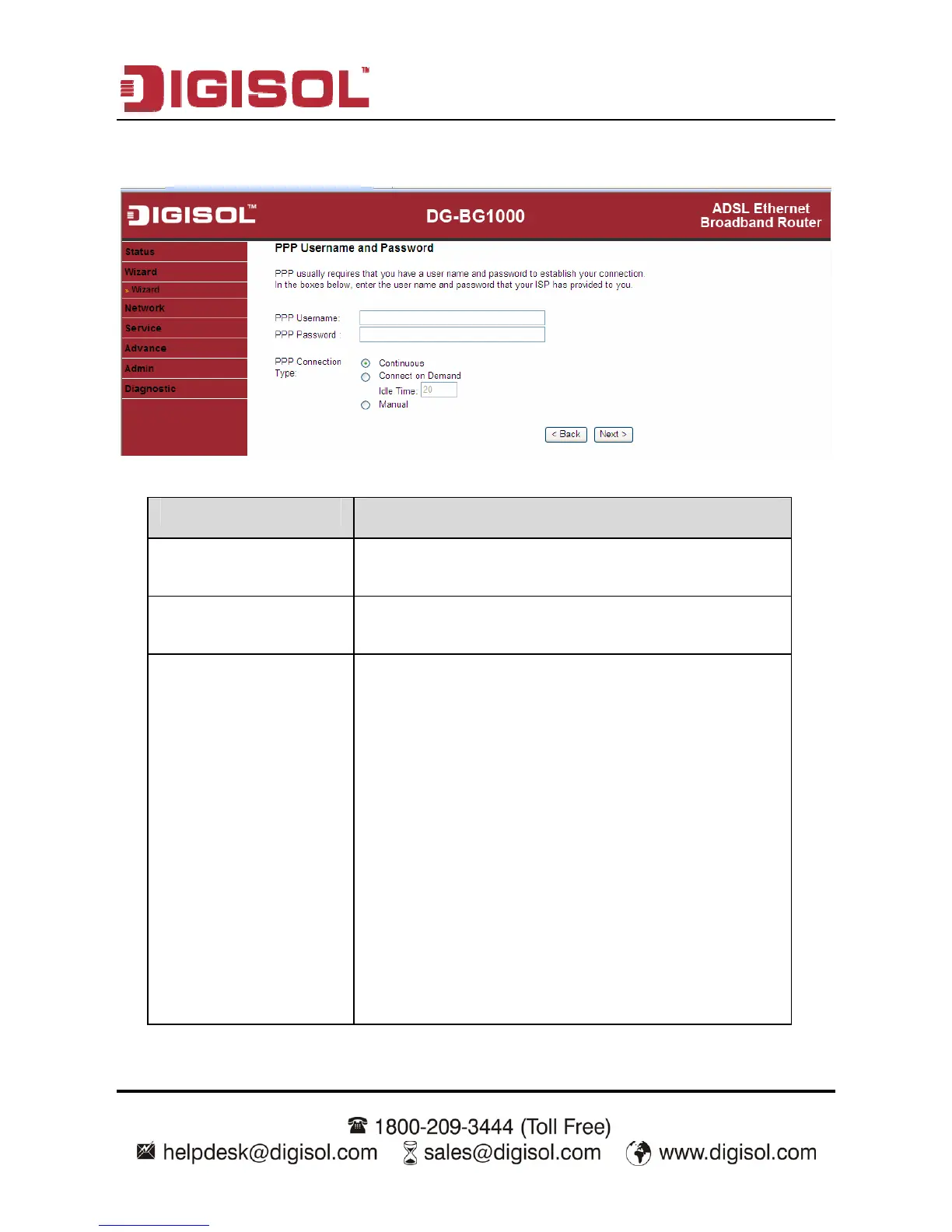
After setting, click Next, the page as shown in the following figure appears.
The following table describes the parameters in this page:
Parameter Description
PPP Username
Enter the username for PPPoE dial-up, which is
provided by your ISP.
PPP Password
Enter the password for PPPoE dial-up, which is provided
by your ISP.
PPP Connection Type
You can select Continuous, Connect on Demand, or
Manual.
Continuous: After dial-up is successful, PPPoE
connection is always on-line, no matter whether
the data is being transmitted or not.
It is recommended to select it.
Connect on Demand: After dial-up is successful,
within the preset idle time, no data is being
transmitted; the router automatically disconnects
the PPPoE connection.
In this case, you need to enter the idle time.
Manual: Select it, you need to dial up and
disconnect the connection mannually.


 To Next Page
 Loading...


