DG-HR3400 User Manual
WPA-PSK [AES] + WPA2-PSK [AES] - Allow clients
using either WPA-PSK [AES] or WPA2-PSK [AES]
To achieve the best performance with 11N wireless adapters
under robust security network, we recommends that you
change your network`s security option to WPA2-PSK.
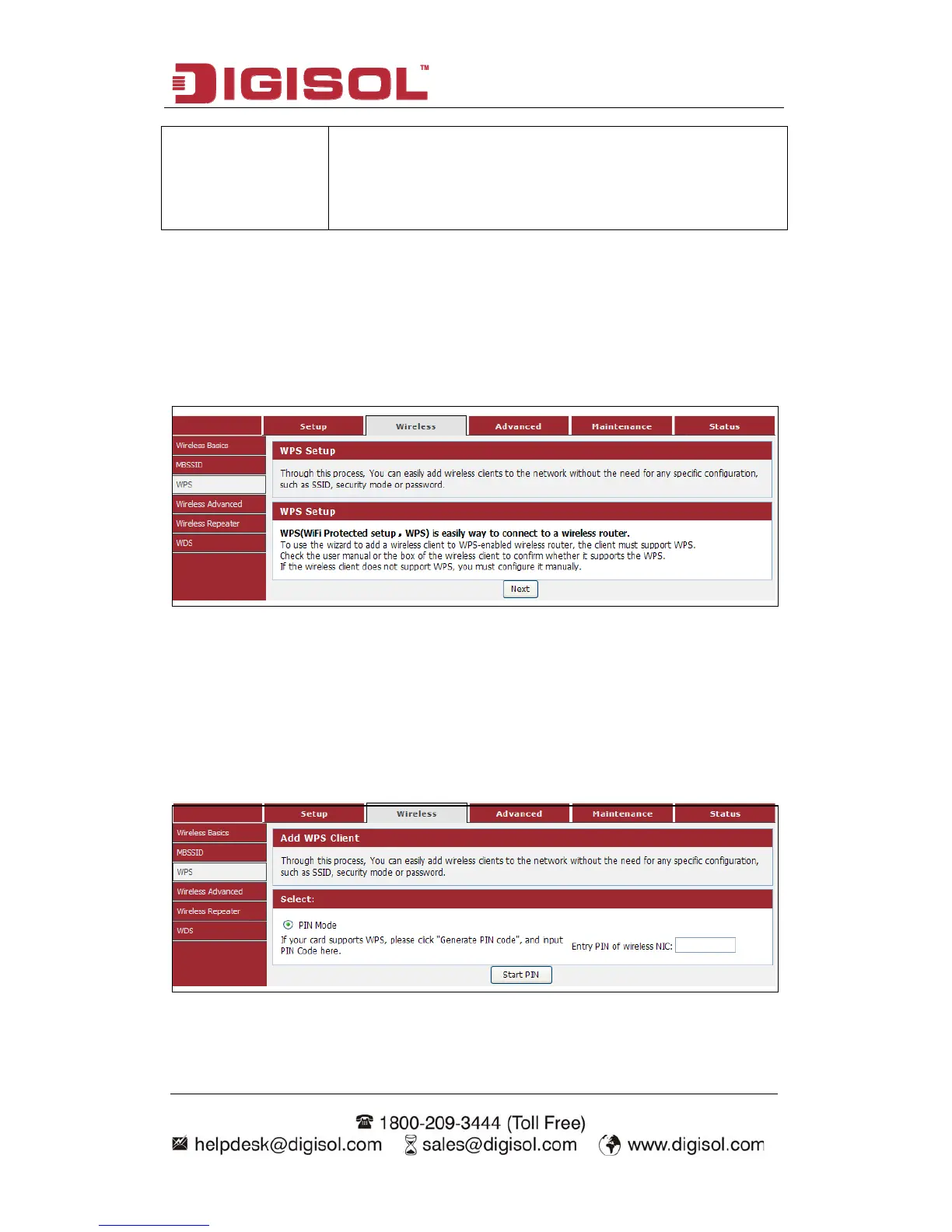
4-2-3 WPS
Through this process,
pecific c
nu “Wirele
you can easily add wireless clients to the network without the
onfiguration, such as SSID, secuneed for any s
Choose me
rity mode or password.
ss→WPS”, below given screen will be displayed.
etup) is easy way to connectWPS (WiFi Protected S to a wireless router.
d to a
ort WPS.
Check the user manual hether it supports
lient do
Click the “Next” butto
To use the wizar
must supp
dd a wireless client to WPS-enabled wireless router, the client
or the box of the wireless client to confirm w
the WPS.
If the wireless c es not support WPS, you must configure it manually.
n to continue.
You can add wireless client by PIN mode. If you use PIN mode, you should input
client PIN code. WPS process. You can find client Meanwhile you should start client
52



 To Next Page