NCH02 User’s ManualDigital Dream Motion Controller Page -22
4.4 Test and Diagnosis Page
The test and diagnosis page can be entered by pressing under the parameter configuration page.
The page mainly displays the basic function of test information of the system, including key monitoring, input
and output monitoring, spindle monitoring and so on.
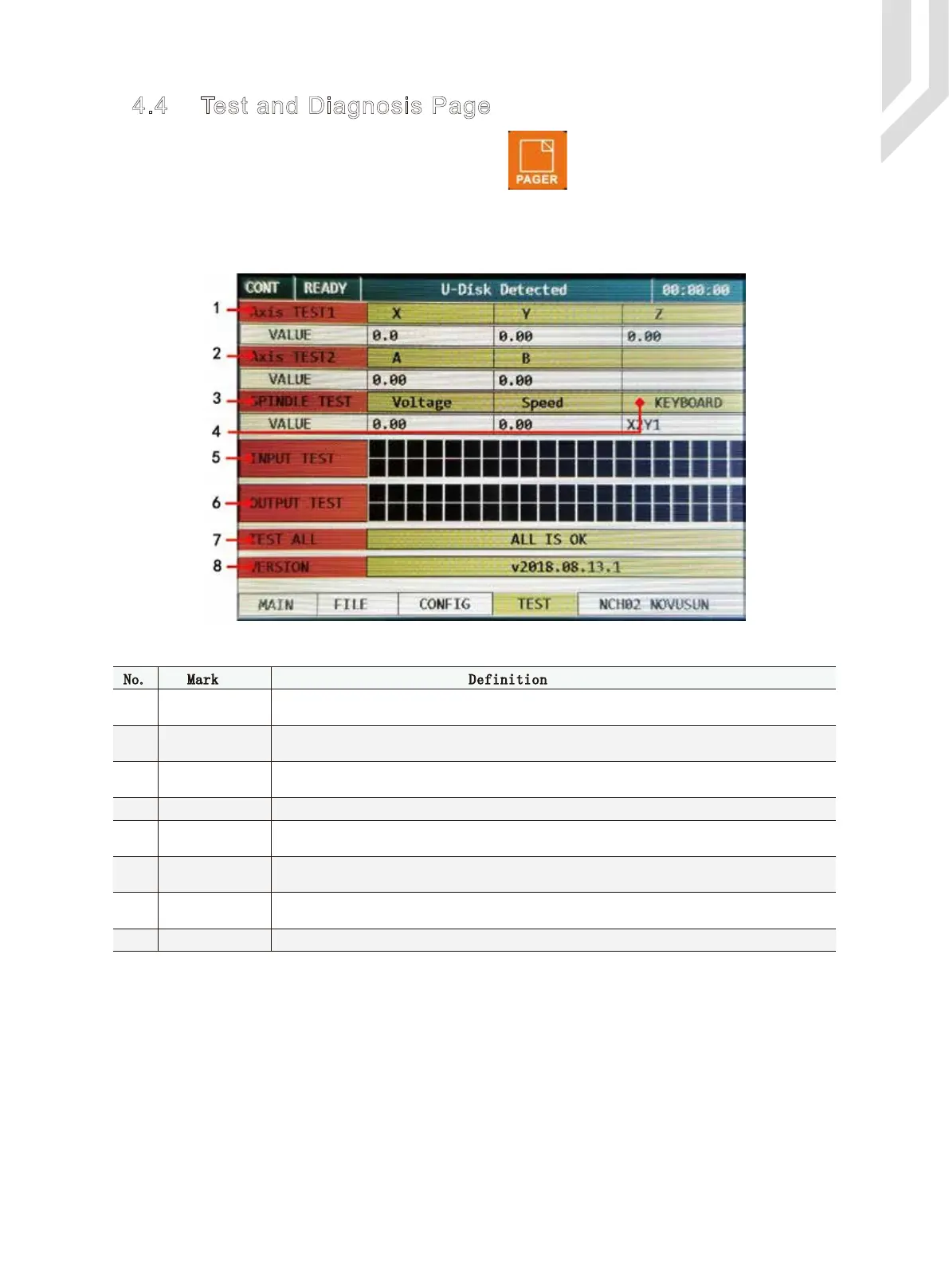
The Test and Diagnosis Page pls note the following Picture 4-8.
Picture 4-8 Test and Diagnosis Page
1
3
4
2
No. Mark Definition
Axis TEST1
Axis TEST2
SPINDLE TEST
5 INPUT TEST
6 OUTPUT TEST
7 TEST ALL
8 VERSION
KEYBOARD
X/Y/Z 3 axis testing.Turnning the Rotary/Push Button,and select it and push the button to confirm.
Then the XYZ axis running at the certain path which already designed..
A/B 2 axis testing.Turnning the Rotary/Push Button,and select it and push the button to confirm.
Then the AB axis running at the certain path which already designed..
The input IO value is displayed in real time. One IO port corresponds to a color block, if the IO port
is valid the color block turns red,and if the port is invaid the color block is black.
The input IO value is displayed in real time. One IO port corresponds to a color block, if the IO port
is valid the color block turns red,and if the port is invaid the color block is black.
The function can be select by turnning the rotary&push button.Select it and push the button the
testing start.All modules are running.
This column display the produts version information.
Spindle testing.Turnning the Rotary/Push Button,and select it and push the button to confirm.The
spindle output is changed according to the designed voltage,voltage and speed showed in the column.
Button monitoring can monitor the pressing position of the button in real time.



 To Next Page