DFW series indicators DFW_03_12.07_EN_U
45
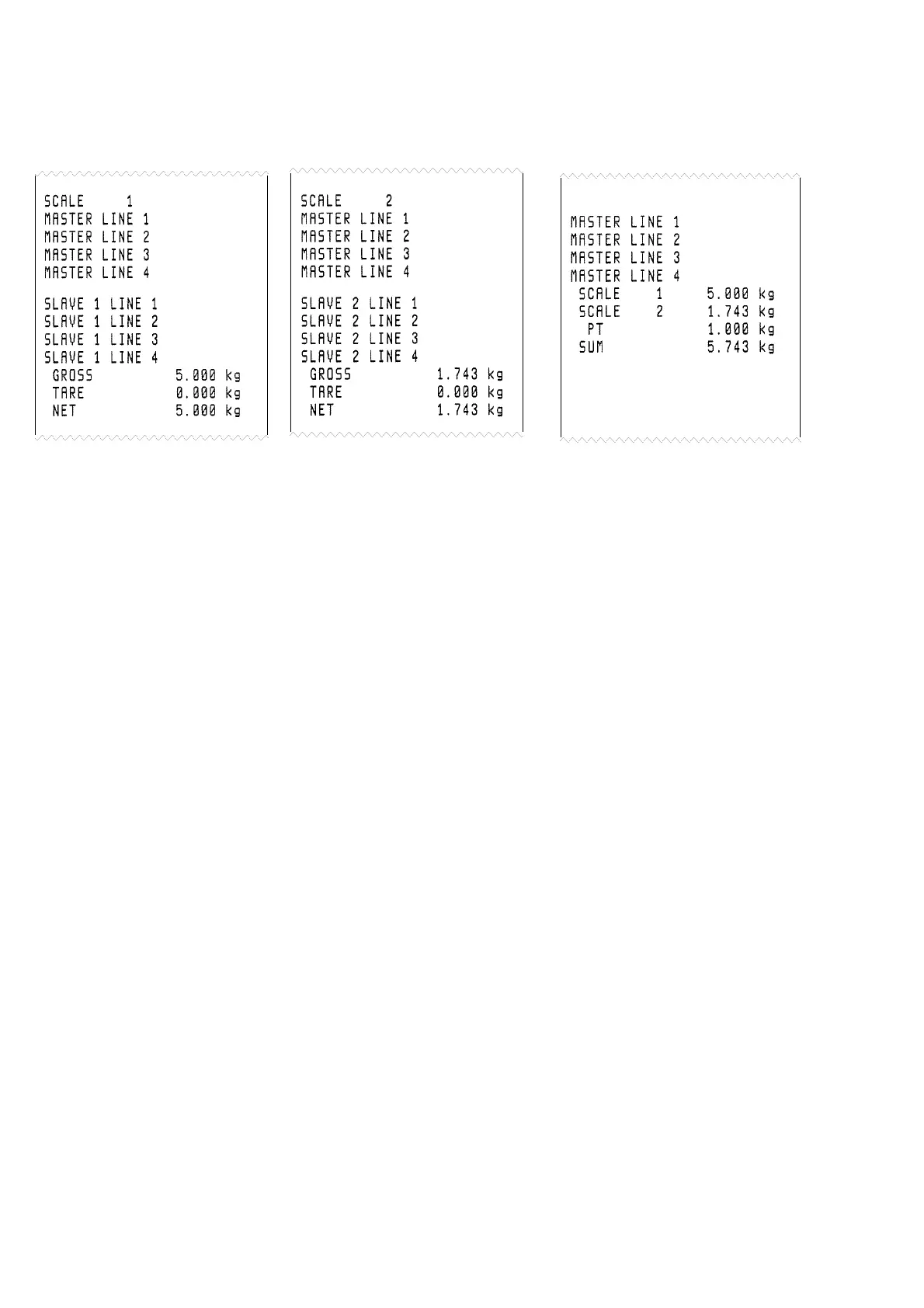
Examples of printout:
2 slaves connected to the master (TPR printer)
Slave 1 Slave 2 Master
NOTES:
If the printer has been selected in the MASTER but not in the SLAVE, it is not possible to print.
If more than one SLAVE is present, the number of the SLAVE from which the weight comes from will be added on each
printout on the MASTER.
If enabled the master inserts the header
If enabled the master adds at the end of the format the ticket number and date & time.
On the MASTER it is also possible to display and print the sum of the weights of a number of SLAVES lower than the value
programmed in the FunCt >> MAStr >> nuMSL step, by turning off the SLAVES that are not used.
11.6.5 LIST OF WEIGHS (DFWPM10USB MODEL)
It is possible to store a list that can contain up to 487 values of weight.
If the “MAStr” functioning mode and the “EXtEnd” protocol have been selected, in the FunCt >> MAStr >> nuMSL >>
ProtoC >> t.KEyb >> WGh.LSt step one can enable or disable the list of weighs:
no list disabled
yES list enabled, with access to the management menu of the list
yES.dir list enabled, with direct access to the PC connection; in this case, the serial port selected for the
communication with the PC (“PC.SEL” step, TECH.MAN.REF.) is exchanged with the other available serial
port, for the downloading of the list on PC
If the list of weighs is enabled, in the FunCt >> MAStr >> nuMSL >> CLoS.LS step one can enable or disable the closure
of the list:
no closure of the list disabled
yES closure of the list enabled
Initialization of the memory:
For the functioning of the list of weighs with a new memory, one has to execute the initialization of this device:
- if the “yES” parameter has been set in the WGh.LSt step, it is necessary to enter in the dEL.LSt step of the menu of the
list (the “ErASE?” message is displayed) and press ENTER/PRINT to confirm (the “dEL..” message is displayed).
- if the “yES.dir” parameter has been set in the WGh.LSt step, one has to connect the indicator to the PC and execute the
initialization through the “Delete List” function of the WeighConsole™ software (see the corresponding manual).
Notes:
- If the memory is not initialized and one presses ENTER/PRINT to store the weight, the message “Err.Chk” is displayed.
- Date and time have to be set in the F.ModE >> CLoCk step of the setup environment (see the section “DATE/TIME
ADJUSTMENT (OPTIONAL OR INCLUDED DEPENDING ON THE MODEL)”).







 To Next Page