DWG2000C-4/8G User Manual
22 / 51
Control IP to GSM side of call the gain. Default is +6 dB.
Control GSM to IP side of call the gain. Default is +6 dB.
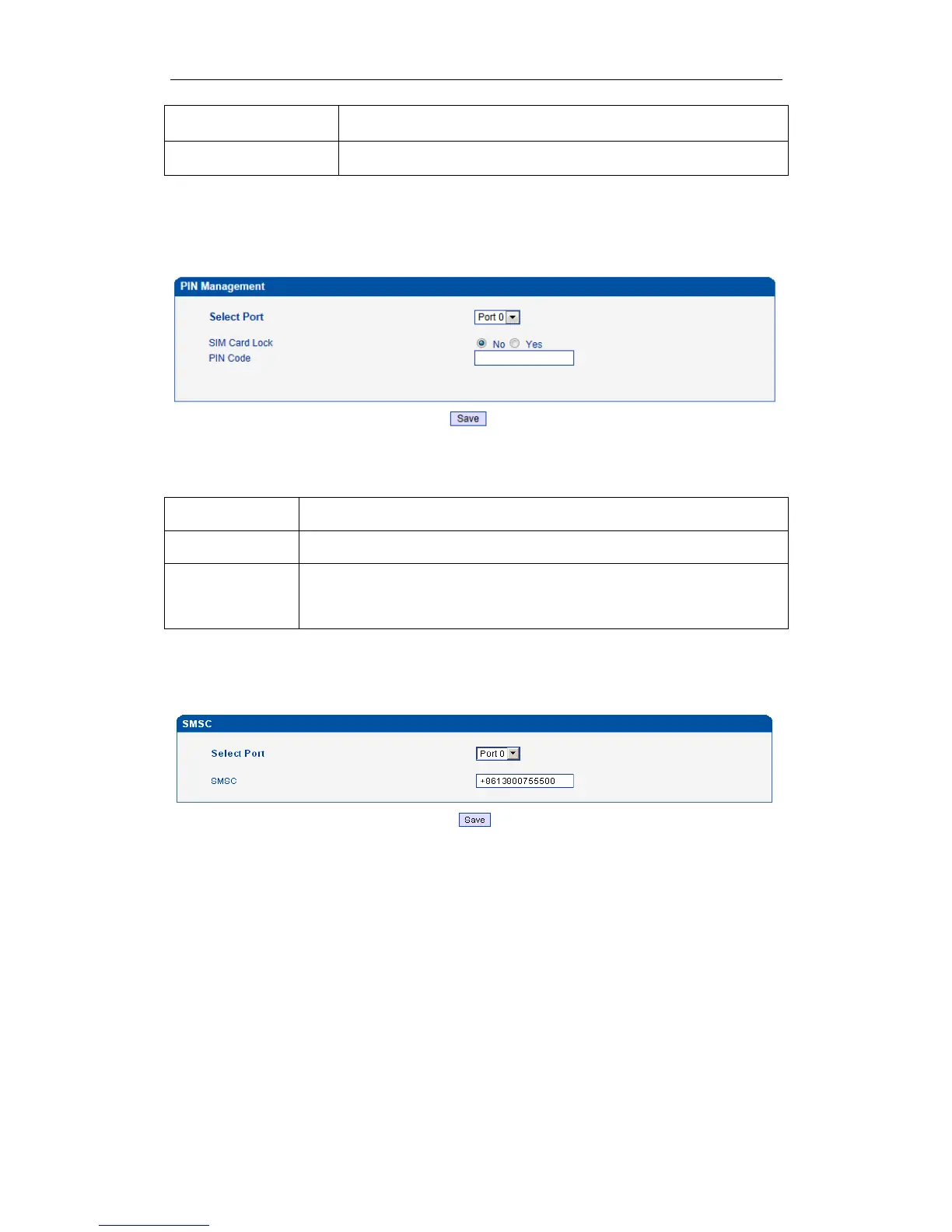
4.6.3 PIN Management
Figure 4-6-4 PIN Management
Detailed description as below:
Table 4-6-4 Description of PIN Management
Selects the GSM channel No.
Whether to allow lock the SIM card
Personal identification number of SIM card. In the status of SIM card locked, PIN
can be modified to prevent SIM card from being stolen.
4.6.5 SMSC
Figure 4-6-5 SMSC
SMS center of mobile, in most places, the celluar modular will automatically detect the SMSC number.
This configurable option is used in a situation that the SMSC number could not detected by celluar
modular. When such case happens, please contact with mobile service provider to identify the SMSC
number and then add SMSC number in SMSC configurable web interface.
4.6.6 SMS
Figure 4-6-6 SMS Message
www.InternetVoipPhone.co.uk | sales@internetvoipphone.co.uk | 0800 088 4846














 To Next Page