OPERATION
74
FRICTION CLUTCH (OPTIONAL)
As an option, a friction clutch can replace the shear bolt overload protection (on demand and for specific cases, contact
your dealer).
NOTE: When a friction clutch is used, power is still transmitted to the cutter head during slippage, but may burn quickly
if not stopped during an overload situation.
When slippage occurs, and the feed rolls are in FORWARD motion, the harvester controller will initiate an emergency stop
(models equipped with FerroDtec).
An intermittent failure alarm (4/5s ON – 1/5s OFF) is activated and the transmission shifts back to NEUTRAL to avoid a
feed roll or header blockage.
1. Stop the PTO, shut the tractor off and wait for all rotating parts to come to a complete stop.
2. With the harvester in NEUTRAL, turn the feed rolls manually to clear the header and inlet.
3. Clear the feed rolls or header if any crop remains.
4. Start the tractor, engage the PTO at low speed with the harvester in NEUTRAL, and accelerate the engine speed
quickly to clear the harvester.
NOTE: Clean the processor rolls if needed (see on page 74).
CLEANING THE PROCESSOR ROLLS
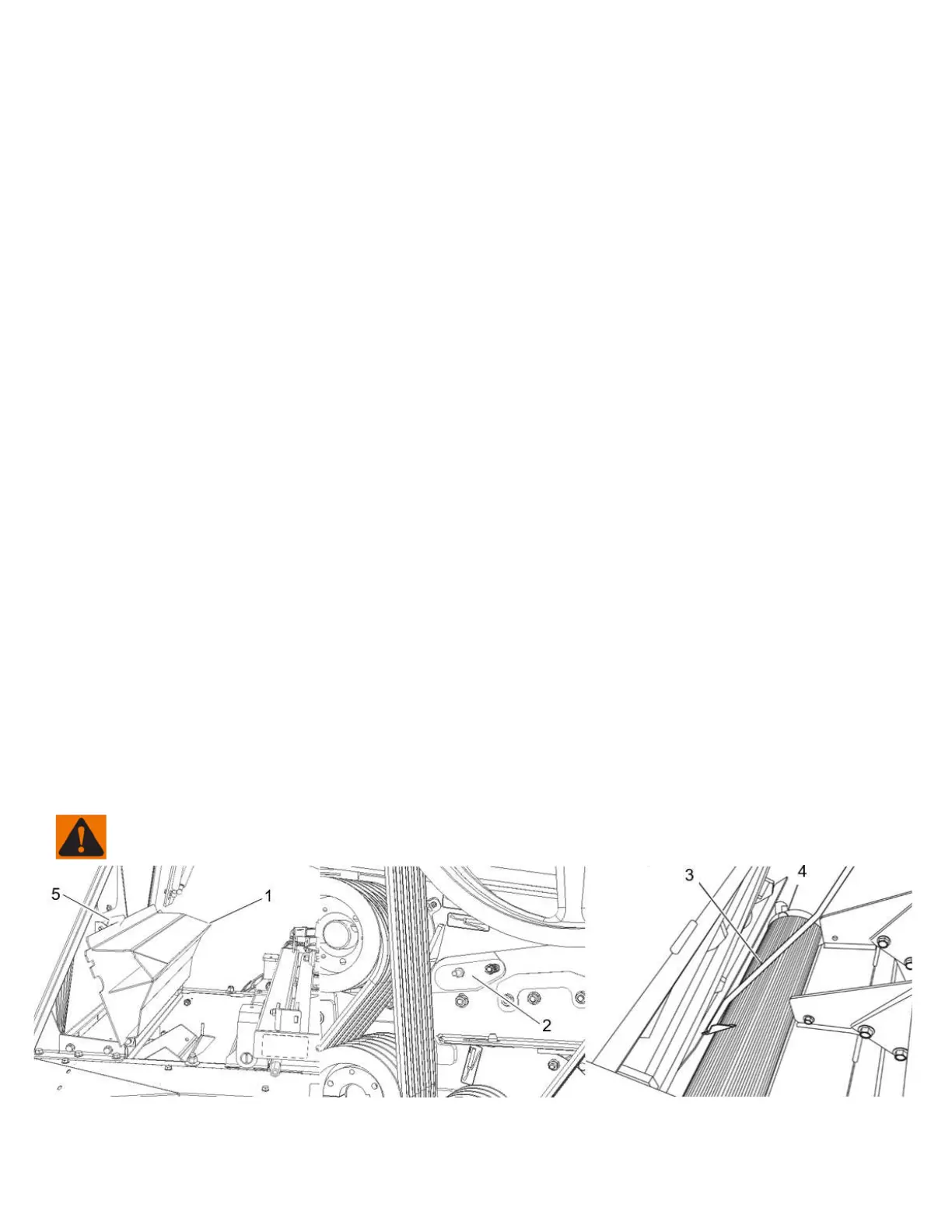
FIGURE 88
If a safety shear bolt is broken or the PTO has been accidentally stopped while operating, material accumulated between
the processor rolls and the cutter head must be removed. Follow this cleaning procedure:
1. Stop the PTO, shut the tractor off and wait for all rotating parts to come to a complete stop.
2. Open the top cover (item 1) and secure it opened with the safety latch (item 5).
3. Open the cleaning doors (item 2).
4. Use the scraper (item 3) down between the cutter head and the upper roll, first with the narrow side.
5. Scrape material out through the cleaning slotted holes (item 2 or 4).
6. When the cleaning is done, close the top cover and the small cleaning doors. Engage PTO to completely clean the
area between the rolls and the cutter head. Then, completely stop everything as stated in Step 1 and check if the
cleaning is adequate. If not, carry out the procedure once more.
IMPORTANT: Clean the belt area from any debris to avoid damaging them.
WARNING: Be careful when working inside the cutting chamber. A piece of wood should block the cutting head
in order to prevent any sudden rotation of the knives.
Figure 88 Cleaning the processor rolls


 To Next Page