MAINTENANCE & AJUSTEMENTS
98
PROCESSOR LINER ADJUSTMENT
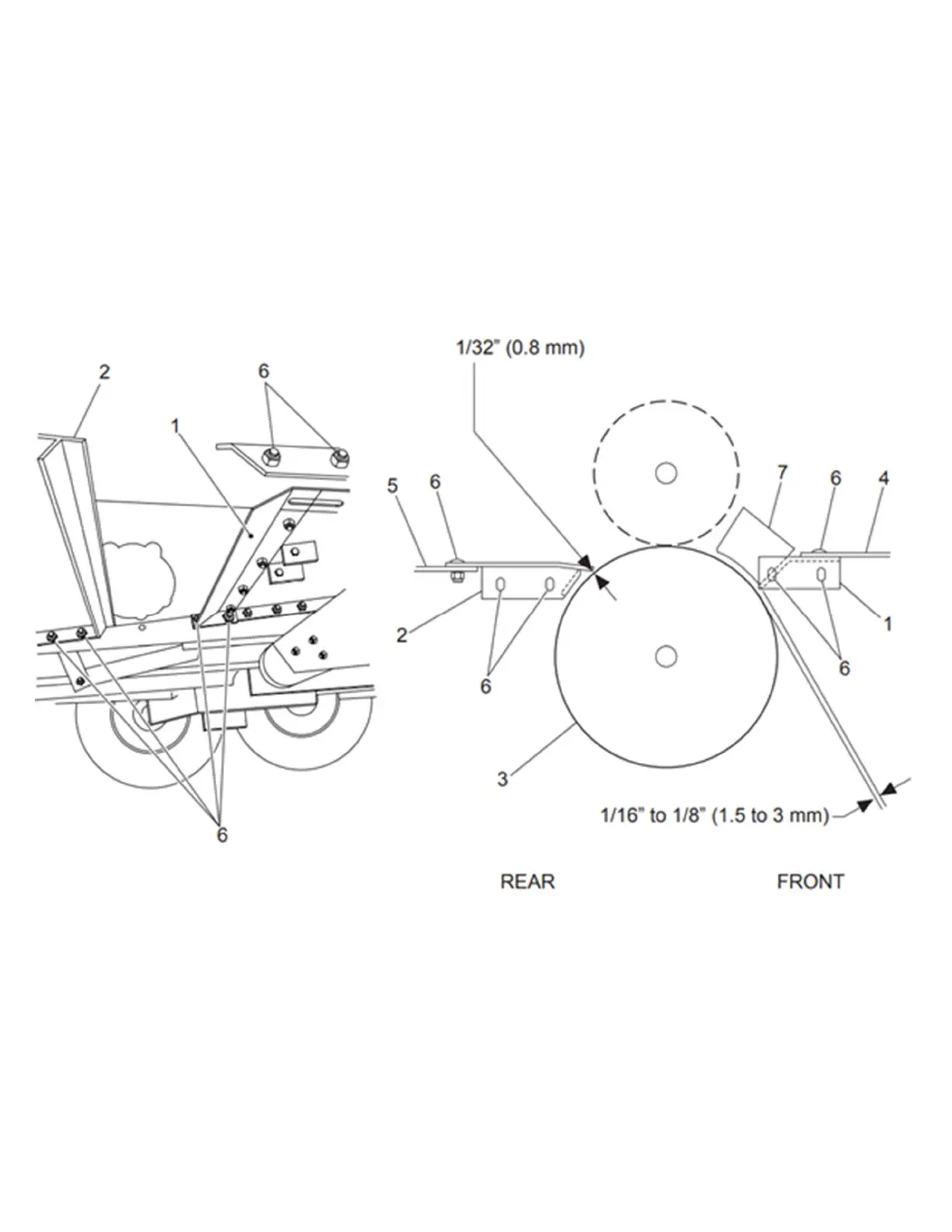
FIGURE 117
Adjust the front half bottom plate (item 1): Loosen all 8 bolts (item 6) and leave a lengthwise clearance of 1/16” to 1/8”
(1.5 to 3) between the front half bottom plate and the lower roll (item 3) as shown below.
NOTE: The front half bottom plate (item 1) must always be bolted under the cutter head bottom plate (item 4). Tighten
all 8 bolts securely while retaining the even, lateral spacing between the lower roll and the bottom plate.
NOTE: Check deflector wear (item 7) and replace them if necessary. Worn deflectors will let corn leak between the end
of the processor roll and the machine frame.
NOTE: A tall reflector is used on the left-hand side and a short one on the right-hand side (item 7).
Figure 117 Processor plates adjustment
Adjust the rear half bottom plate (item 2): After installing the rear bottom plate and the adjustment bolt support bracket,
adjust the distance between lower roll and the rear half bottom plate.
NOTE: The rear halfback (item 2) must always be bolted above the bottom of the accelerator (item 5). Tighten all the
bolts.
NOTE: The lower Corn Processor roll must NEVER touch the rear half bottom plate. Use gauges with recommended
thickness, as shown here.


 To Next Page