To Next Page

R
Robert FreySep 16, 2025
What to do if Directed Door locks CAN bus incorrectly detected?
- SSarah HerreraSep 16, 2025
Verify the CAN1 and CAN2 connections.

What to do if Directed Door locks CAN bus incorrectly detected?
Verify the CAN1 and CAN2 connections.
What to do if Directed Automobile Accessories module has no power?
First, check that the D2D harness is connected and that there is 12 Volts present between the red and black wires. If 12 Volts is present, it's possible the Directed module is defective.
What to do if Directed Automobile Accessories CAN1 is not detected?
Check the CAN1 Tan and Tan/Black wire connections. Wake up the data bus by turning the ignition on and try again. If your installation does not require this connection, skip this step by pressing the programming button 5 times.
What to do if Directed Automobile Accessories bypass data not detected?
Check the bypass line connection. If you are using more than one wire, make sure they are not inverted. Also, ensure the vehicle still operates correctly using the factory key.
What to do if Directed Automobile Accessories CAN2 is not detected?
Check the CAN2 Orange/Green and Orange/Brown wire connections. Wake up the data bus by turning the ignition on and try again. If your installation does not require this connection, skip this step by pressing the programming button 5 times.
What to do if Directed Automobile Accessories J1850 is not detected?
Check the J1850 wire connection. Wake up the data bus by turning the ignition on and try again.
What does it mean if Directed Automobile Accessories are waiting to begin the programming sequence?
It means that you should ensure the correct programming procedure is being followed.
What to do if Directed Automobile Accessories bypass processing error occurred?
The bypass calculation failed. Reset the module and try again. If the condition persists, no answer.
What to do if Directed Automobile Accessories ISO 1 is not detected?
The Yellow/Black wire did not detect the expected signal. Refer to “Installation (wiring diagrams & vehicle wiring reference charts)” to check the connections.
What to do if Directed Automobile Accessories CAN bus incorrectly detected?
Verify the CAN1 and CAN2 connections. Refer to 'Installation (wiring diagrams & vehicle wiring reference charts)' to check the connections.
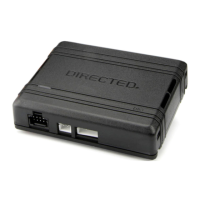
Describes the DB3 as a universal, flashable data-bus interface module.
Highlights the DB3's capability to cover over 90% of vehicles on the road today.
Lists features like RSR/RXT compatibility, programmable functions via Directechs, and RF loop support.
Details compatibility with RSR, RXT, SmartStart, and 3X Lock Start systems.
Mentions the ability to configure the module using a flash module.
Explains the warranty for Directed interfaces ensuring high-speed digital connectivity and error-free data exchange.
Warns users to check for hood detection switches before servicing to prevent unexpected restarts.
 General
| Brand | Directed |
|---|---|
| Model | DB3 |
| Category | Automobile Accessories |
| Language | English |