EasyManua.ls Logo

Directed DS4+ - User Manual

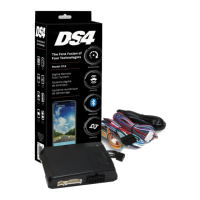
Directed DS4+
62 pages
Print Icon
To Next Page IconTo Next Page
Loading...
FORD6
INSTALLATION GUIDE
This product is intended for installation by a professional installer only! Attempts to install this
product by a person other than a trained professional may result in severe damage to a vehicle’s
electrical system and components.
2017-12-13
© 2017 Directed, Vista CA
DS4+
Designed by Installers for Installers

Questions and Answers

  • T
    timothy07Sep 12, 2025
    What to do if my Directed Remote Starter shows a bypass processing error?
    • D
      Deanna TaylorSep 12, 2025
      If your Directed Remote Starter encounters a bypass processing error, reset the module and try again. If the problem persists, further assistance may be needed.
  • M
    Ms. Jean Clarke DVMSep 12, 2025
    What to do if my Directed Remote Starter is waiting to begin the programming sequence?
    • B
      Brian Best DDSSep 12, 2025
      If your Directed Remote Starter is stuck waiting to begin the programming sequence, ensure that you are following the correct programming procedure.
  • M
    Mitchell MedinaSep 12, 2025
    Why was Runsafe not disabled on my Directed Remote Starter?
    • A
      Angela NelsonSep 12, 2025
      If the Runsafe feature wasn't disabled on your Directed Remote Starter, it's likely because no UNLOCK command was received before opening the door, or the 45-second timer expired in takeover mode.
  • E
    Edward AshleySep 12, 2025
    What to do if transponder functions were skipped on my Directed Remote Starter?
    • T
      Tara BradfordSep 12, 2025
      If transponder functions were skipped on your Directed Remote Starter, and if compatible, when the RXT mode is not desired or convenience features are needed, reset and reprogram the module.
  • R
    rowensSep 12, 2025
    What to do if my Directed Remote Starter shows that ISO 2 is not detected?
    • M
      Mr. Robert WilliamsSep 13, 2025
      The Orange/Black wire didn't detect the expected signal. Check the connections.
  • K
    Kelly BowmanSep 12, 2025
    What does PTS shutdown error mean on my Directed Remote Starter?
    • M
      Mr. Daniel WeaverSep 12, 2025
      A PTS shutdown error on your Directed Remote Starter means the PTS output from the module was not activated due to safety protection.
  • D
    Daniel ForbesSep 12, 2025
    What to do if my Directed Remote Starter says CAN bus incorrectly detected?
    • K
      Karen CookSep 12, 2025
      If the CAN bus is incorrectly detected by your Directed Remote Starter, verify the CAN1 and CAN2 connections.
  • S
    swalterSep 13, 2025
    What to do if my Directed Remote Starter shows that MUX is not detected?
    • V
      Veronica HahnSep 13, 2025
      The Violet/Green or Violet/Brown wire didn't detect the expected voltage value. Check the connections.
  • L
    lopezjacobSep 13, 2025
    Why does my Directed Remote Starter say that the brake was not detected?
    • T
      Tara WellsSep 13, 2025
      The brakes were not detected, which prevents the Directed Remote Starter system from shutting down the vehicle.
  • D
    Daniel HorneSep 13, 2025
    Why does my Directed Remote Starter say that the smart key was not detected?
    • V
      vsalinasSep 13, 2025
      The smart key was not detected, which prevents the Directed Remote Starter system from shutting down the vehicle.

Summary

Warning! Safety first

Wiring connections

Installation Diagrams and Types

Type 1 with T-Harness (THFON1)

Installation diagram and details for Type 1 with T-Harness.

Type 2 with T-Harness (THFON1)

Installation diagram and details for Type 2 with T-Harness.

Type 3

Installation diagram and details for Type 3.

Type 5 with T-Harness (THFON1)

Installation diagram and details for Type 5 with T-Harness.

Type 8

Installation diagram and details for Type 8.

Vehicle wiring reference chart

Configuring the System

Module Programming - Using 2 Keys

Module Programming - 1-Key with Key2 GO

LED Diagnostics and Troubleshooting

Module Programming Indicators

LED indicators for module programming states and errors.

Analog Error Code Indicators

Troubleshooting analog feature configuration errors via LED.

Module Reset Procedures

Soft Reset Procedure

Resets programming steps without affecting firmware.

Hard Reset Procedure

Reverts firmware to default settings, requiring reconfiguration.

Tachometer Setup

Initializing Virtual Tach

Programming Virtual Tach for starter motor control during remote start.

SmartStart System Compatibility

Directed DS4+ Specifications

General IconGeneral
BrandDirected
ModelDS4+
CategoryAutomobile Accessories
LanguageEnglish

Related product manuals