EasyManua.ls Logo

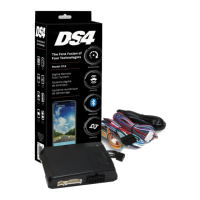
Directed DS4+ - User Manual

Directed DS4+
62 pages
Print Icon
To Next Page IconTo Next Page
Loading...
FORD6
INSTALLATION GUIDE
This product is intended for installation by a professional installer only! Attempts to install this
product by a person other than a trained professional may result in severe damage to a vehicle’s
electrical system and components.
2017-12-13
© 2017 Directed, Vista CA
DS4+
Designed by Installers for Installers

Questions and Answers

  • H
    Heather SullivanSep 10, 2025
    What to do if ISO 2 is not detected in Directed DS4+?
    • C
      carol93Sep 10, 2025
      If the ISO 2 is not detected in your Directed Automobile Accessories because the Orange/Black wire did not detect the expected signal, check the connections using the 'Installation (wiring diagrams & vehicle wiring reference charts)'.
  • E
    Erin WhiteheadSep 10, 2025
    What to do if MUX is not detected in Directed Automobile Accessories?
    • L
      Lorraine PerrySep 10, 2025
      If the MUX is not detected in your Directed Automobile Accessories because the Violet/Green or Violet/Brown wire did not detect the expected voltage value, check the connections using the 'Installation (wiring diagrams & vehicle wiring reference charts)'.
  • S
    Sean GriffinSep 10, 2025
    How to fix CAN bus if it's incorrectly detected in Directed DS4+ Automobile Accessories?
    • P
      Peter YatesSep 12, 2025
      If the CAN bus is incorrectly detected in your Directed Automobile Accessories, verify the CAN1 and CAN2 connections. Check the connections using the 'Installation (wiring diagrams & vehicle wiring reference charts)'.
  • K
    kararhodesSep 12, 2025
    How to troubleshoot a Directed Remote Starter module with no power?
    • T
      Tiffany MitchellSep 12, 2025
      If your Directed Remote Starter module isn't getting power, first ensure the D2D harness is properly connected. Then, check if there's 12 Volts present between the red and black wires. If the voltage is correct, the module itself might be defective.
  • L
    laurenalexanderSep 12, 2025
    What to do if my Directed Remote Starter shows CAN1 not detected?
    • R
      Ronald RichmondSep 12, 2025
      If your Directed Remote Starter shows a 'CAN1 not detected' error, check the connections of the CAN1 Tan and Tan/Black wires. Try waking up the data bus by turning the ignition on and attempting the process again. If the installation doesn't need this connection, you can skip the step by pressing the programming button 5 times.
  • A
    Amanda MoranSep 12, 2025
    What to do if my Directed Remote Starter shows CAN2 not detected?
    • S
      samuel13Sep 12, 2025
      If your Directed Remote Starter displays a 'CAN2 not detected' message, check the connections of the CAN2 Orange/Green and Orange/Brown wires. Wake up the data bus by turning the ignition on and try again. If the installation doesn't require this connection, skip this step by pressing the programming button 5 times.
  • R
    rodriguezgabrielaSep 12, 2025
    What to do if my Directed Remote Starter says bypass data not detected?
    • R
      Regina HaynesSep 12, 2025
      If your Directed Remote Starter indicates that bypass data is not detected, check the bypass line connection. If you're using multiple wires, make sure they aren't inverted. Also, ensure that the vehicle still operates correctly using the factory key.
  • M
    millerrossSep 12, 2025
    What to do if my Directed Remote Starter is not detecting J1850?
    • C
      Crystal JacobsSep 12, 2025
      If your Directed Remote Starter isn't detecting J1850, check the J1850 wire connection. Then, wake up the data bus by turning the ignition on and trying again.
  • S
    snydermatthewSep 12, 2025
    What to do if my Directed Remote Starter shows that ISO 1 is not detected?
    • J
      John AriasSep 12, 2025
      The Yellow/Black wire didn't detect the expected signal. Check the connections.
  • S
    Sierra HughesSep 12, 2025
    What to do if my Directed Remote Starter initialization failed?
    • J
      john19Sep 12, 2025
      If the initialization process fails on your Directed Remote Starter, reset the module and try the programming sequence again. If the issue continues, further assistance may be needed.

Summary

Warning! Safety first

Wiring connections

Installation Diagrams and Types

Type 1 with T-Harness (THFON1)

Installation diagram and details for Type 1 with T-Harness.

Type 2 with T-Harness (THFON1)

Installation diagram and details for Type 2 with T-Harness.

Type 3

Installation diagram and details for Type 3.

Type 5 with T-Harness (THFON1)

Installation diagram and details for Type 5 with T-Harness.

Type 8

Installation diagram and details for Type 8.

Vehicle wiring reference chart

Configuring the System

Module Programming - Using 2 Keys

Module Programming - 1-Key with Key2 GO

LED Diagnostics and Troubleshooting

Module Programming Indicators

LED indicators for module programming states and errors.

Analog Error Code Indicators

Troubleshooting analog feature configuration errors via LED.

Module Reset Procedures

Soft Reset Procedure

Resets programming steps without affecting firmware.

Hard Reset Procedure

Reverts firmware to default settings, requiring reconfiguration.

Tachometer Setup

Initializing Virtual Tach

Programming Virtual Tach for starter motor control during remote start.

SmartStart System Compatibility

Directed DS4+ Specifications

General IconGeneral
BrandDirected
ModelDS4+
CategoryAutomobile Accessories
LanguageEnglish

Related product manuals