14
usB host Mode setup guIde
(Zoom, Red Panda, SouRce audio)
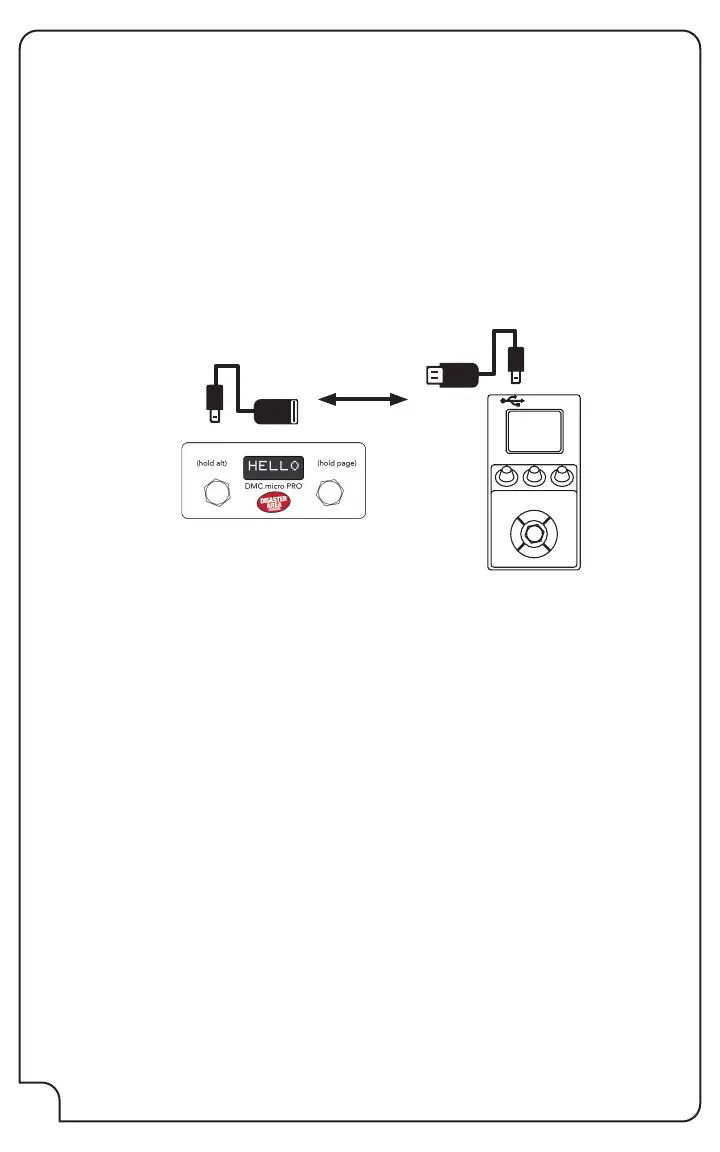
DMC.micro supports controlling one USB MIDI device on MIDI channel 1. To connect a USB MIDI
pedal to DMC.micro, you’ll need a USB cable that matches the type on your pedal and a Disaster
Area gHOST Adapter Cable.
Enter Setup on the DMC.micro and congure USB as HOST.
Then set up the A device as a supported device type.
At this time, DMC.micro supports Zoom MultiStomp pedals (MS-50G, MS-60B, MS-70 CDR) as
ZOOM, Source Audio C4, Spectrum, Ultrawave as C4, Red Panda Tensor as TENS, or Red Panda
Particle v2 as PRT2.
Example: If you want to connect an MS-70CDR, set DevA = ZOOM and USB = HOST.
Save the conguration and exit.
Power o the DMC.micro and your USB MIDI device.
Plug the gHOST Adapter Cable into the USB port of the DMC.micro.
Plug the USB cable into the USB port of your MIDI device.
Connect the gHOST Adapter Cable to the USB cable.
Congure your USB MIDI device to use MIDI channel 1. The Zoom MS series are automatically
congured. Source Audio C4, Spectrum, Ultrawave devices should also set Skip USB Power
Check to ON in the Neuro App / Desktop editor.
Power on both devices. The Preset Mode and A device modes should both control your USB
MIDI device.
USB HOST MODE TIPS:
DMC.micro can only control ONE USB MIDI device, USB hubs aren’t supported.
Only Device A can use USB MIDI! If you need additional USB MIDI devices, check out the
micro.ghost USB MIDI adapter.
USB MIDI devices may be more susceptible to noise pickup than 5-pin or 1/4” devices. We
generally recommend either of those connection methods if at all possible.
Alexander Neo Series and Super Series pedals are NOT supported using USB. Please use the 1/4”
jacks to control them instead.
If you have to use USB MIDI and are experiencing unwanted noise from your device, make sure
that both the DMC.micro and your device are on separate power outputs or supplies.


 To Next Page